

Guardian Eye WebCamera
ANDREI POSOKHOV Utilities iPhoneiPadiPod touch
Guardian Eye WebCamera is a free Utilities app for iPhone and iPad by ANDREI POSOKHOV. Requires iOS 15.0. Updated October 7, 2026.
- Price
- Free
- on the App Store
- Size
- 25 MB
- Age 4+
- Updated
- Oct 7
- 2026 · v3.0.2
Screenshots
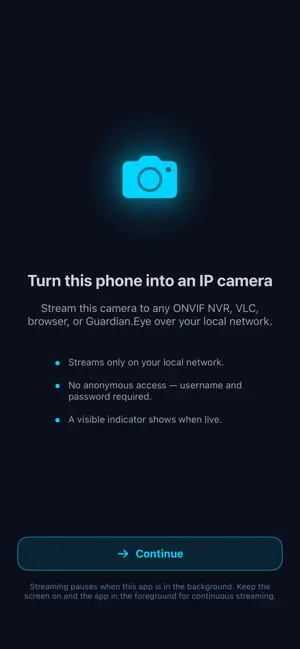
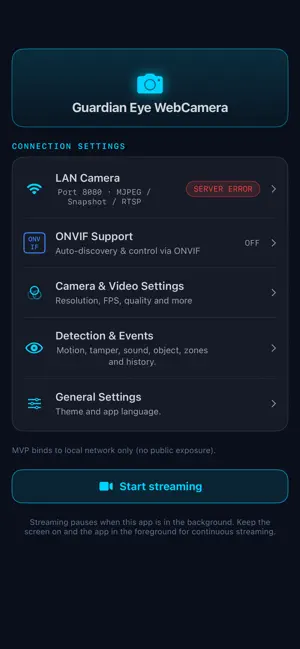
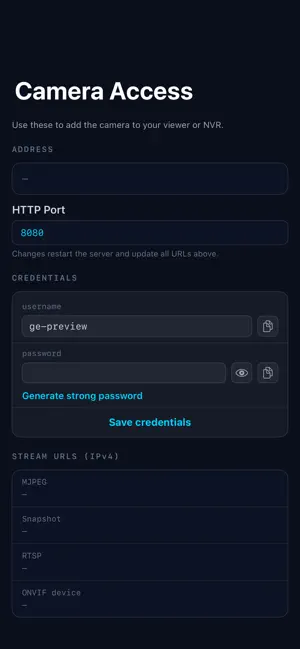

About Guardian Eye WebCamera
Guardian Eye WebCamera turns an old iPhone into a standalone network IP camera — no cloud, no account, no subscription. Use it directly or connect it to Guardian Eye and other compatible ONVIF recorders over your local network. WORKS WITH • Guardian Eye — native integration for live viewing and local recording • Compatible ONVIF clients and network video recorders • VLC and modern web browsers LIVE VIEWING & PROTOCOLS • Secure direct viewing in a web browser using WebRTC — no cloud relay or browser plug-in • JPEG snapshots, MJPEG, and RTSP • H.264 and H.265/HEVC video with optional AAC microphone audio • ONVIF-compatible server with automatic WS-Discovery • Digital zoom, image settings, events, and object metadata over ONVIF • Efficient 640x360 preview sub-stream for recorder grids (Pro) • Core live viewing through ONVIF, RTSP, HTTP/MJPEG, and WebRTC is available without Pro LOCAL ARCHIVE & SYNCHRONIZATION • Keep recordings directly on the iPhone, including audio and event information • Record continuously or only around detected events • Choose one synchronization mode: no synchronization, ONVIF Profile G, or FTP/FTPS • Profile G allows a compatible recorder to search, replay, and retrieve recordings from the iPhone • FTP/FTPS sends completed recordings to your own server • FTPS supports certificate validation for protected transfers • Profile G and FTP/FTPS archive synchronization require Pro SMART ON-DEVICE DETECTION • People and pets recognised on the device using Apple Vision • Motion, tamper, and classified sound detection with adjustable sensitivity • Sound classification such as glass breaking, alarms, or barking (iOS 15+) • Detection zones: define exactly where the camera should watch • Event history with configurable retention • Detection runs locally and is published as standard ONVIF analytics events, allowing a compatible recorder to record, alert, or trigger actions • Smart detection, classification, and detection zones require Pro CAMERA & VIDEO CONTROLS • Front or back camera, torch, and pinch-to-zoom • Resolution up to 1080p and frame rate up to 30 fps • Adjustable JPEG quality • Automatic or locked focus • Automatic, portrait, or landscape orientation • H.264 or H.265/HEVC encoding • Optional microphone audio • On-screen display with a timestamp or label burned into the stream SECURITY & PRIVACY • Local-network operation — video is not sent through our cloud • Username and password are required; there are no default admin credentials • RTSP Digest and ONVIF WS-Security authentication • WebRTC uses a camera-specific local certificate • Credentials are stored encrypted on the device using iOS Keychain • FTP without encryption is restricted to private local-network addresses; FTPS is recommended PERSONALIZATION • 18 languages, switchable inside the app • System, Light and Dark themes Guardian Eye WebCamera includes a status and health dashboard. Streaming runs while the app is in the foreground. Reuse an old iPhone as a private security camera in minutes.
What’s new
Version 3.0.2 · Updated October 7, 2026
What’s New in 3.0.2 • Lower CPU use and less heat during continuous streaming: camera-native capture, leaner audio, archive, and network paths • Thermal care: the streaming screen dims after two minutes of inactivity, and the sensor slows down under sustained heat • Smoother camera rotation and preview start without a crop jump; RTSP sessions survive compatible orientation changes • Saved clips keep their AAC audio track • ONVIF Profile G: fast-forward archive playback, empty replay ranges and recording retrieval handled correctly; RTSP stays available independently of ONVIF • Browser viewer: works from Edge and Chrome on Windows over IPv6, the camera's .local address opens instantly in Safari, and video resumes after a brief Wi-Fi drop • WebRTC keyframe recovery is bounded and the viewer slot frees up quickly for the next viewer; the sound detector stays idle while the room is silent • Service problems (RTSP, HTTP, discovery) are now reported on the status screen • Diagnostics, health reporting, and translation updates
App privacy
The developer, ANDREI POSOKHOV, reported these privacy practices to Apple.
Data Not Collected
The developer does not collect any data from this app.
Alternatives to Guardian Eye WebCamera
Looking for apps like Guardian Eye WebCamera? Here are 6 similar apps on the App Store. The highest rated is Lantern RTSP Cam (5.0/5), and all 6 are free to download.
-
 Lantern RTSP Cam
5.0
Lantern RTSP Cam
5.0
-
 Safe & Cryptogram Password Gen
-
 Detriment WiFi Security
-
 Maple View: NVR Viewer
-
 MyGuardianLive
-
 Swiftcam: Camera streaming
| App | Rating | Price | Last updated | Compare |
|---|---|---|---|---|
| Guardian Eye WebCamera | – | Free | October 7, 2026 | |
| Lantern RTSP Cam | 5.0 / 5 (1) | Free | Apr 29, 2026 | Compare |
| Safe & Cryptogram Password Gen | – | Free | Sep 28, 2025 | Compare |
| Detriment WiFi Security | – | Free | Sep 1, 2026 | Compare |
| Maple View: NVR Viewer | – | Free | Jun 11, 2026 | Compare |
| MyGuardianLive | – | Free | Jul 20, 2025 | Compare |
| Swiftcam: Camera streaming | – | Free | Sep 18, 2026 | Compare |