

Moongate: Klipper Control
Paul Sharman Utilities iPhoneiPadiPod touch
Moongate: Klipper Control is a free Utilities app for iPhone and iPad by Paul Sharman. Requires iOS 15.0. Updated October 23, 2026.
- Price
- Free
- on the App Store
- Size
- 39 MB
- Age 4+
- Updated
- Oct 23
- 2026 · v0.9.76
Screenshots

About Moongate: Klipper Control
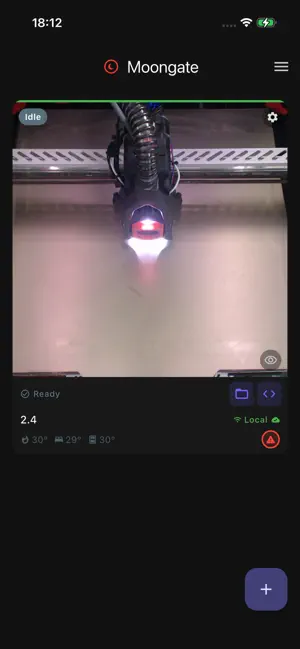
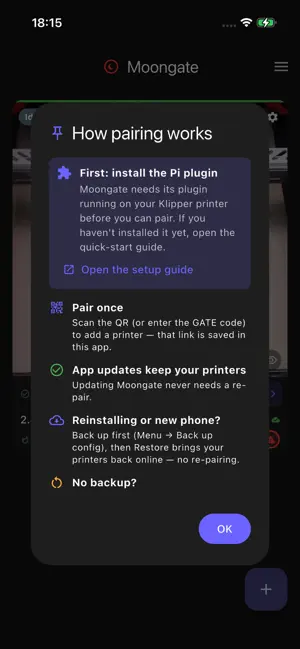
Moongate puts every Klipper 3D printer you own on one dashboard, at home or anywhere. It connects straight to your own Raspberry Pi running Klipper and Moonraker. Pair once by scanning a QR code, and Moongate reaches your printer directly on your Wi-Fi, or securely over an encrypted tunnel when you are away. No account, no email, no password. Sign-in is anonymous, and there are no ads, no analytics, and no tracking. Features: - One dashboard for your whole fleet, with live webcam, temperatures, and print progress - The full Mainsail or Fluidd web interface built in - Start, pause, and stop prints, plus a double-tap emergency stop - A Control panel for each printer: heater targets, homing, jogging, extrude and retract, and your macros as labelled buttons with their own icons, colours and parameters, arranged the way you want - A Klipper-aware config editor that suggests section and option names, checks values before you save, and edits macro G-code inline, plus a console with command completions - A file browser for your printer that hides backup clutter so your real config files stand out - Power machines on and off (smart plug or Klipper macro) - Preheat and heat-soak from the dashboard - Optional push notifications for print started, finished, and failed - App lock with Face ID, Touch ID, or a PIN - Custom themes, drag-to-arrange tiles, and an adjustable display size - Back up and restore your setup - Available in 9 languages Moongate is free and source available. You host everything yourself, and your printers stay yours. Note: Moongate needs the free Moongate plugin installed on your printer's Raspberry Pi. Setup guide: github.com/PEEKYPAUL/Moongate
What’s new
Version 0.9.76 · Updated October 23, 2026
New G-code layer viewer: spin, zoom and step through a sliced file in 3D before you print, with heat maps for temperature, flow, layer time, speed and fan speed. Colour view: multi-material files in their filament colours with a key per tool, plus a Sliced / Loaded switch showing what is actually in your MMU gates (Happy Hare, AFC; needs plugin 0.6.29). Colour view uses the extruder colours you picked in PrusaSlicer and reads Happy Hare tool changes. Save to phone: download any stored G-code file from Start a print or the viewer. Files you view or save are cached for the session. Hold a thumbnail in Start a print to see it big.
App privacy
The developer, Paul Sharman, reported these privacy practices to Apple.
Data Linked to You
The following data, which may be collected and linked to your identity, may be used for the following purposes:
- Contact Info: Email Address
- User Content: Customer Support
- Identifiers: User ID, Device ID
- Diagnostics: Other Diagnostic Data
- Other Data: Other Data Types
Used for: App Functionality
Alternatives to Moongate: Klipper Control
Looking for apps like Moongate: Klipper Control? Here are 6 similar apps on the App Store. The highest rated is Moonraker Buddy (5.0/5), and all 6 are free to download.
-
 Moonraker Buddy
5.0
Moonraker Buddy
5.0
-
 Printer Tools App
2.2
Printer Tools App
2.2
-
 SpotVahti: Electricity Price
-
 Foundry Control
5.0
Foundry Control
5.0
-
 DDD Connect
-
 HfNZ Easylog
| App | Rating | Price | Last updated | Compare |
|---|---|---|---|---|
| Moongate: Klipper Control | – | Free | October 23, 2026 | |
| Moonraker Buddy | 5.0 / 5 (2) | Free | Sep 15, 2026 | Compare |
| Printer Tools App | 2.3 / 5 (4) | Free | Oct 24, 2026 | Compare |
| SpotVahti: Electricity Price | – | Free | Oct 16, 2026 | Compare |
| Foundry Control | 5.0 / 5 (3) | Free | Feb 10, 2026 | Compare |
| DDD Connect | – | Free | Oct 21, 2026 | Compare |
| HfNZ Easylog | – | Free | Oct 14, 2024 | Compare |