

SigLume: Signature Scanner
Alessandro Penna Productivity iPhoneiPadiPod touch
SigLume: Signature Scanner is a free Productivity app for iPhone and iPad by Alessandro Penna. Requires iOS 18.6. Updated July 13, 2026.
- Price
- Free
- on the App Store
- Size
- 14 MB
- Age 4+
- Updated
- Jul 13
- 2026 · v1.0
Screenshots

About SigLume: Signature Scanner
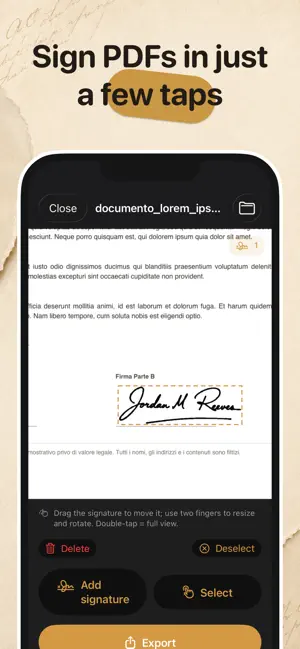
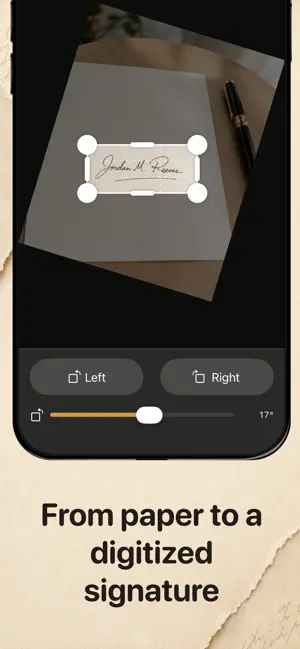
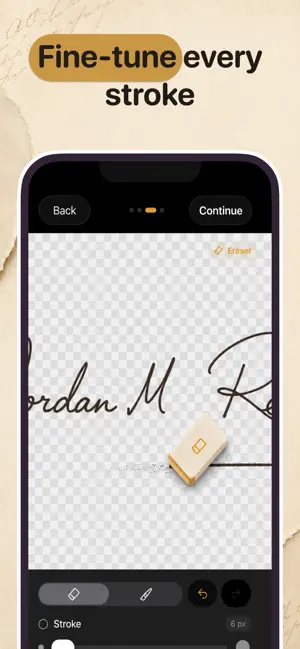
With Siglume, you can capture a handwritten signature from a photo, clean it up using advanced tools, save it on your device, and reuse it whenever you need to sign a PDF. Everything is processed locally, with no account required and without uploading your documents or signatures to external servers. CREATE YOUR SIGNATURE Take a photo of your signature or import an image from your photo library. Siglume guides you through a simple and precise process: • crop and straighten the image; • rotate it freely; • automatically remove the background; • adjust sensitivity, contrast, and speckle reduction; • choose the ink color; • create a signature with a transparent background. The real-time preview lets you check the result as you make each adjustment. REFINE EVERY DETAIL Use the built-in editor to perfect your signature before saving it: • erase unwanted areas; • restore or correct strokes with the brush; • rotate the signature. Your signature is saved in high quality and automatically cropped around the handwritten strokes. YOUR SIGNATURE LIBRARY Store multiple signatures directly on your device and quickly access them from your library. You can: • edit an existing signature; • duplicate it to create different versions; • delete it when you no longer need it; • reuse it across different documents. SIGN YOUR PDF DOCUMENTS Open a PDF from the Files app, import it from another application, or capture a document directly with the camera. Select a signature from your library and place it on the document. You can add multiple signatures to the same page and, for each one: • move it; • resize it; • rotate it; • delete or reposition it. Browse through the pages, zoom in for greater precision, and review the document before exporting it. SIMPLE EXPORTING When you are finished, Siglume creates a new copy of the PDF with the signatures applied. The document is flattened to keep signatures, annotations, and completed form fields visible, and can then be saved or shared using the system share menu. CHOOSE THE FILE SIZE Use a simple slider to set the maximum size of the exported PDF. Siglume automatically optimizes the document to help you meet the file size limits required by email services, online portals, and sharing platforms. PRIVACY FIRST Siglume works entirely locally: • no account required; • no mandatory synchronization; • no signatures or documents uploaded to external servers; • your content stays on your device. ------------- Terms of Use (EULA): https://www.apple.com/legal/internet-services/itunes/dev/stdeula/ ------------- Preview template created by @aweb: https://www.figma.com/community/file/1398605779101833507 Adapted by changing colors, typography, text highlights, and visual emphasis elements. CC BY 4.0 License: https://creativecommons.org/licenses/by/4.0/
App privacy
The developer, Alessandro Penna, reported these privacy practices to Apple.
Data Not Linked to You
The following data, which may be collected but is not linked to your identity, may be used for the following purposes:
- Purchases: Purchase History
Used for: App Functionality
Alternatives to SigLume: Signature Scanner
Looking for apps like SigLume: Signature Scanner? Here are 6 similar apps on the App Store. The highest rated is Signature Scanner - SignaScan (5.0/5), and all 6 are free to download.
-
 Contex
-
 Plico: firma documenti con CIE
-
 Easy Merchant By BizAdvisor
-
 Signature Scanner - SignaScan
5.0
Signature Scanner - SignaScan
5.0
-
 Signature Maker: Scan&Sign PDF
-
 Signature PDF: Fill & Scan
5.0
Signature PDF: Fill & Scan
5.0
| App | Rating | Price | Last updated | Compare |
|---|---|---|---|---|
| SigLume: Signature Scanner | – | Free | July 13, 2026 | |
| Contex | – | Free | Apr 13, 2026 | Compare |
| Plico: firma documenti con CIE | – | Free | Aug 26, 2026 | Compare |
| Easy Merchant By BizAdvisor | – | Free | Jul 17, 2026 | Compare |
| Signature Scanner - SignaScan | 5.0 / 5 (1) | Free | May 19, 2026 | Compare |
| Signature Maker: Scan&Sign PDF | – | Free | Nov 5, 2025 | Compare |
| Signature PDF: Fill & Scan | 5.0 / 5 (1) | Free | Jun 21, 2026 | Compare |