

Shema: Sermon Notes & Bible
Kola Systems LLC Reference iPhoneiPadiPod touch
Shema: Sermon Notes & Bible is a free Reference app for iPhone and iPad by Kola Systems LLC. Rated 5.0/5 from 1 ratings. Requires iOS 16.4.
- Rating
- 5.0
- 1 ratings
- Price
- Free
- on the App Store
- Size
- 116 MB
- Age 4+
- Updated
- Nov 23
- 2026 · v2.0.2
Screenshots
Save to Pinterest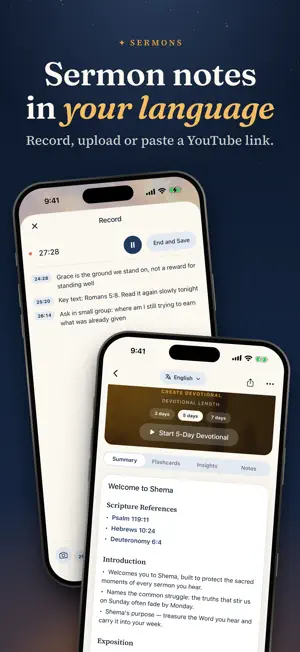


About Shema: Sermon Notes & Bible
Shema keeps what you heard on Sunday, and gives you the Bible to read the other six days. Record the sermon, hand Shema an audio file, or paste a YouTube link. You get back the transcript, a summary, flashcards and study insights, in the language you choose. Then open the reader: English opens on the King James, with NKJV, ESV, NASB and NLT beside it and hundreds more translations behind them. SUNDAY Take notes while you listen and each one keeps its timestamp, so a tap plays back the minute you wrote it in. Snap the slide. Afterwards, read the same sermon four ways: the summary, a Discussion Guide, a Life Application, or a Family Guide for the dinner table. Or listen to a spoken recap of it. Ask the sermon a question and the answer comes from what was actually said. THE READER Read a chapter at a time, or one verse at a time with everything else out of the way. Set the typeface, the theme and the size. Put a verse side by side across several translations, or ask what else Scripture says about it. Where a publisher has recorded a dramatized reading, that is what plays. Download a book or a whole Bible and read with no signal. • NKJV, ESV, NASB and NLT, plus hundreds more translations • Audio Bibles in over 2,000 languages, wherever a recording exists READING PLANS Say which book and how long you want to read each day, and Shema works out the pace and the day you finish. Or take one of nine ready-made plans, including all 1,189 chapters in the order the events happened. Today's reading waits for you in the reader, and marking it read counts toward your streak. STUDY Swipe sideways through verses and up into the Hebrew and Greek words inside them, each in its own script, with how it is said aloud and what it carries. Look up an English word and read Strong's own 1890 entry, word for word. Ask for a study on a passage or a theme and it comes back in eleven sections, or in S.O.A.P. form. Ask for a lesson and get a manuscript you could preach from. PRAYER, AND SITTING STILL Write what you are carrying and the Prayer Journal gives it back as something prayable, with a devotional and a prayer written for that situation. A Lock Screen widget opens straight into a new one. Abide in Him holds a verse over moving scenery, with an ambient bed and a blessing to close, and in most Bibles it will read the verse to you. EVERY DAY A short devotional, one thing at a time: read, answer the question, pray. What you write stays on your device. The Bible in Stories retells Scripture as short narrated chapters with artwork, each one a tap from the passage it came from, and more arrive as they are released. FREE, AND SHEMA+ Bible reading, Bible study, the audio Bibles, offline downloads and the daily devotional are free and unmetered. Free also includes two AI sermon runs a month. Recording is never blocked: a sermon captured past that keeps its audio and your own notes, and the writing lands when the month resets. Shema+ removes the cap and adds narration of recaps and devotionals, questions about the sermons you recorded, every chapter of The Bible in Stories as it is released, and PDF and Word export. Prices are shown in the app before you buy. Payment is charged to your Apple ID at confirmation of purchase. A subscription renews automatically unless auto-renew is turned off at least 24 hours before the end of the current period, and your account is charged within 24 hours of the period ending. Manage or cancel yours in your device's Account Settings. Any unused portion of a free trial is forfeited when you buy a subscription. Privacy Policy: https://shemaai.com/privacy Terms of Use: https://shemaai.com/terms Questions or feedback? Email [email protected]
What’s new
Version 2.0.2 · Updated November 23, 2026
Shema is made for iPhone Duo. Open it sideways and the Bible becomes a book: two pages at a time, set like print, with running heads, red chapter numbers and a page that curls as you turn it. A ribbon keeps your place, and the Bible opens on the page you left. Held upright, one page runs top to bottom, with a quiet pause at the fold. Stand it half-folded and you read on the top half while the bottom half becomes a study desk for the verse you are on, with its study, other versions and related passages. Home opens as one page that scrolls, with Abide across the top and the devotional, the story and your reading plan side by side. The Journal and Abide are laid out for every way you hold the phone, and the tabs and tools sit in a glass column beside the page. Closed, Shema is the app you already know. On every iPhone, the Psalm 23 line that opens Abide now reads in the King James words.
App privacy
The developer, Kola Systems LLC, reported these privacy practices to Apple.
Data Not Linked to You
The following data, which may be collected but is not linked to your identity, may be used for the following purposes:
- Contact Info: Email Address
- User Content: Photos or Videos, Audio Data, Other User Content
- Identifiers: User ID
Used for: App Functionality
Alternatives to Shema: Sermon Notes & Bible
Looking for apps like Shema: Sermon Notes & Bible? Here are 6 similar apps on the App Store. The highest rated is Audio Bible Journeys (5.0/5), and all 6 are free to download.
-
 Audio Bible Journeys
5.0
-
 Audio Bible app free
5.0
-
 Calvary Solid Ground
-
 Shas in Yiddish
3.0
-
 Daven Lock: Personal Siddur
4.9
-
 Reform Study
5.0
| App | Rating | Price | Last updated | Compare |
|---|---|---|---|---|
| Shema: Sermon Notes & Bible | 5.0 / 5 (1 rating) | Free | November 23, 2026 | |
| Audio Bible Journeys | 5.0 / 5 (1) | Free | Nov 13, 2026 | Compare |
| Audio Bible app free | 5.0 / 5 (5) | Free | Nov 20, 2026 | Compare |
| Calvary Solid Ground | – | Free | Oct 19, 2026 | Compare |
| Shas in Yiddish | 3.0 / 5 (2) | Free | Oct 19, 2026 | Compare |
| Daven Lock: Personal Siddur | 4.9 / 5 (19) | Free | Nov 16, 2026 | Compare |
| Reform Study | 5.0 / 5 (8) | Free | Nov 24, 2026 | Compare |