

AgentDeck Dashboard
Serendipity Bound Developer Tools iPhoneiPadiPod touchMac
AgentDeck Dashboard is a free Developer Tools app for iPhone and iPad by Serendipity Bound. Requires iOS 17.0. Updated October 14, 2026.
- Price
- Free
- on the App Store
- Size
- 34 MB
- Age 4+
- Updated
- Oct 14
- 2026 · v1.9.1
Screenshots
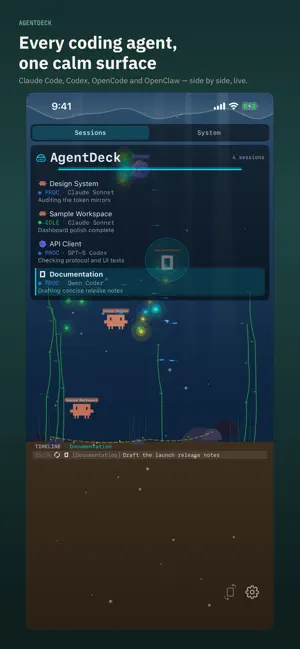


About AgentDeck Dashboard
AgentDeck for iOS is a companion that pairs with AgentDeck running on your Mac and mirrors your running sessions, live. Live sessions require a Mac on the same Wi-Fi network; the built-in Device Preview works offline without a Mac. "Stop Chatting. Start Steering." While Claude Code or another AI agent runs on your Mac, see session progress, tool calls, token usage, and evaluation scores live on your iPad or iPhone. Step away from the desk without missing the moment you're needed. — Highlights — • Choose your view On iOS 18 and later, select an optional 3D aquarium with familiar agent characters, reactive fish, and a wandering snail. Tap empty water to hide the panels and move closer, then tap again to return. The classic dashboard remains available and existing choices are preserved. • Live session monitoring Your Mac's Claude Code hooks, opt-in Codex lifecycle hooks, OpenCode local-server events, and OpenClaw Gateway events render as terrarium creatures. Each session swims, processes, or awaits input so status is clear at a glance. • Mac pairing (free) Auto-discovers your Mac over Wi-Fi via Bonjour. QR pairing is available on reachable networks. Keep your agents visible from a second screen without alt-tabbing. • APME score viewing See agent-turn evaluation scores, scored against category-specific rubrics on your Mac. Scoring itself runs on the Mac; the iOS app only displays the results. • OpenClaw Gateway status mirror View the session list, model catalog, and tool approval requests of an OpenClaw Gateway paired to your Mac, read-only. • Hardware status mirror View the status of hardware connected to your Mac — Ulanzi D200H, supported ESP32 boards, Divoom Pixoo/Timebox Mini, iDotMatrix — read-only. Explore synthetic device previews offline on iPhone and iPad. Voice input, Claude Code hook installation, and direct hardware control are Mac-app-only features. — Privacy and security — • The app itself collects no data and only talks to your paired Mac on the same Wi-Fi network. • Fully App Sandbox compliant (Apple Review Guideline 2.5.2). • Local network access is used only to discover and pair with your Mac; no external server is contacted. — System requirements — • iOS 17 / iPadOS 17 or later • A Mac on the same Wi-Fi network running AgentDeck — Independence and trademarks — AgentDeck is independent and is not affiliated with or endorsed by Anthropic, OpenAI, Google, SST, Corsair/Elgato, DIVOOM, Ulanzi, Waveshare, or any other third party mentioned. All trademarks belong to their owners. Full notices: https://github.com/puritysb/AgentDeck/blob/master/ATTRIBUTION.md
What’s new
Version 1.9.1 · Updated October 14, 2026
• Improved recovery during initial setup, Mac selection and QR pairing. • Refined consistency of background-task displays. • Fixed creature timeline filters and separated each screen’s history selection from the device control target.
App privacy
The developer, Serendipity Bound, reported these privacy practices to Apple.
Data Linked to You
The following data, which may be collected and linked to your identity, may be used for the following purposes:
- User Content: Other User Content
- Usage Data: Product Interaction
Used for: App Functionality
Alternatives to AgentDeck Dashboard
Looking for apps like AgentDeck Dashboard? Here are 6 similar apps on the App Store.


| App | Rating | Price | Last updated | Compare |
|---|---|---|---|---|
| AgentDeck Dashboard | – | Free | October 14, 2026 | |
| SpinCat AI Monitor | – | Free | Sep 19, 2026 | Compare |
| TethrX | – | Free | Oct 29, 2026 | Compare |
| Happy Next | – | Free | Oct 26, 2026 | Compare |
| Pi Companion | – | Free | Aug 12, 2026 | Compare |
| JAR DLL EXE File Viewer | – | Free | Sep 30, 2026 | Compare |
| Pinpoint for Safari | – | Free | Aug 5, 2026 | Compare |