

SnapSpend
Fredy Soussou Finance iPhoneiPadiPod touch
SnapSpend is a free Finance app for iPhone and iPad by Fredy Soussou. Requires iOS 17.0. Updated July 23, 2026.
- Price
- Free
- on the App Store
- Size
- 2 MB
- Age 4+
- Updated
- Jul 23
- 2026 · v1.2
Screenshots



About SnapSpend
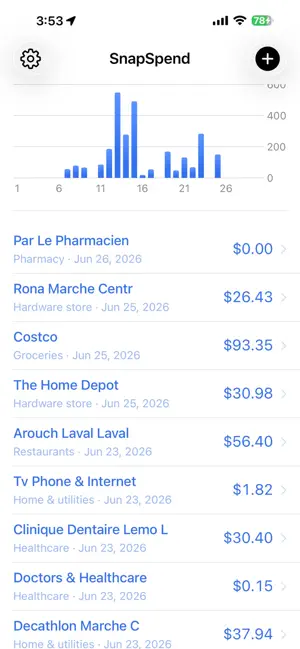
SnapSpend turns a photo of your statement or receipt into organized spending — privately, on your device. Pay once, no subscription. Most budgeting apps make you hand over your bank login and pay every month. SnapSpend doesn't. Snap a screenshot of your credit card, bank, or chequing statement (or a single receipt) and it reads every transaction right on your iPhone. No account. No bank connection. Nothing is uploaded. PERSONAL & BUSINESS, KEPT SEPARATE (Pro) • Two independent books — Personal and Business — switch between them anytime • Scan an expense straight into the book you're in • Each book keeps its own dashboard, categories, trends and totals — clean separation for tax time SCAN ANYTHING • Card and bank statements — pulls every line into a review screen you confirm • Single receipts and bills — grabs the total; tap to pick it on itemised receipts • Import several statement screenshots at once (Pro) • Direct PDF statement import works best with Tangerine credit-card statements; other banks may import partially — you review and fix every row before saving (Pro) • Reads English and French statements (and more), accents included IT LEARNS YOUR SPENDING • Set a vendor's category once and SnapSpend remembers it next time • Rename or merge vendors — future scans follow automatically • Auto-categorizes common merchants out of the box STAY IN CONTROL • Dashboard with category breakdown and spend-over-time • Per-category trends — up or down vs last week, month, or year • Budgets with alerts at 80% and 100% (Pro) • Detects recurring charges and subscriptions (Pro) • Duplicate detection across receipts and statements, even with spelling differences YOUR DATA STAYS YOURS • On-device — OCR and parsing run locally, with no servers of ours • Free iCloud backup — privately stored in your own iCloud, so deleting and reinstalling brings everything back • Source images stored encrypted; delete them anytime • No sign-up, no analytics, no tracking Import from Mint, YNAB, or a bank CSV, and export your data to CSV anytime — opens in Excel & Numbers (Pro). SnapSpend Pro is a one-time purchase — pay once, keep it forever. No subscription.
What’s new
Version 1.2 · Updated July 23, 2026
NEW: Share expenses with someone (Pro). Send a month or a year to a partner or bookkeeper by AirDrop, Messages or email — they open it in SnapSpend to review and save, with duplicates caught automatically. Plus Backup & restore: save a backup file you keep, and restore it anytime. As always: on-device, no account, no subscription.
App privacy
The developer, Fredy Soussou, reported these privacy practices to Apple.
Data Not Collected
The developer does not collect any data from this app.
Alternatives to SnapSpend
Looking for apps like SnapSpend? Here are 6 similar apps on the App Store. The highest rated is Expense Tracker AI Budget (5.0/5), and all 6 are free to download.
-
 Snap - Spending Tracker
-
 OpenTeller: Budget planner
-
 Gageboo : Expense Tracker
-
 Pair with Me
-
 OwnFi
-
 Expense Tracker AI Budget
5.0
| App | Rating | Price | Last updated | Compare |
|---|---|---|---|---|
| SnapSpend | – | Free | July 23, 2026 | |
| Snap - Spending Tracker | – | Free | Jul 20, 2026 | Compare |
| OpenTeller: Budget planner | – | Free | Sep 7, 2026 | Compare |
| Gageboo : Expense Tracker | – | Free | Aug 1, 2026 | Compare |
| Pair with Me | – | Free | Aug 9, 2026 | Compare |
| OwnFi | – | Free | Sep 26, 2026 | Compare |
| Expense Tracker AI Budget | 5.0 / 5 (1) | Free | Oct 8, 2026 | Compare |
Compare SnapSpend with the top alternatives: ratings, updates, ASO score and keyword gaps →