

VibeScan: PDF Document Scanner
TU LUU Productivity iPhoneiPadiPod touch
VibeScan: PDF Document Scanner is a free Productivity app for iPhone and iPad by TU LUU. Requires iOS 17.0. Updated September 22, 2026.
- Price
- Free
- on the App Store
- Size
- 20 MB
- Age 4+
- Updated
- Sep 22
- 2026 · v2.0.0
Screenshots
About VibeScan: PDF Document Scanner
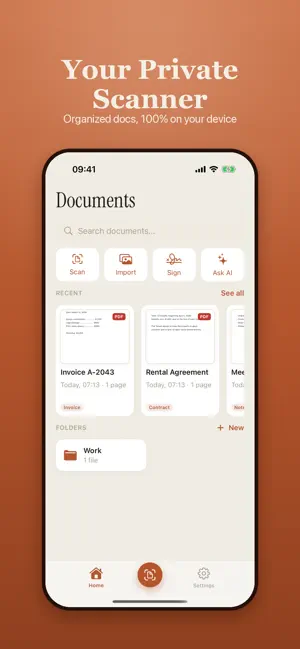
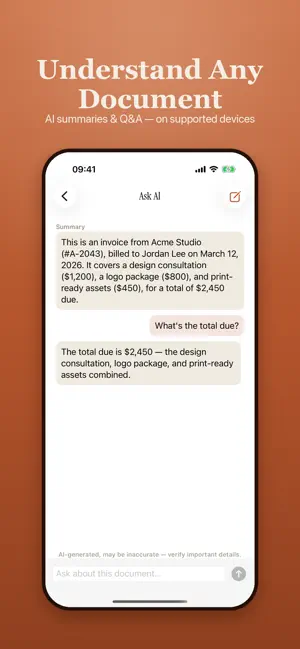
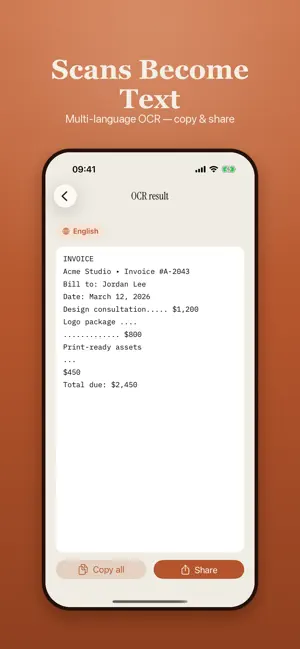
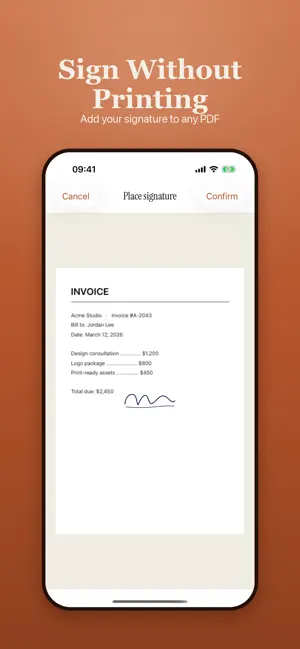
VibeScan turns your iPhone and iPad into a fast, private document scanner. Point, capture, and get a clean, sharp PDF in seconds — with everything processed right on your device. WHY VIBESCAN • 100% on-device — your documents never leave your phone. No account, no sign-up, no cloud upload. • Scanning, OCR, and export all work offline. • Free to use, powered by ads — no subscription required. SCAN ANYTHING • Automatic edge detection finds the page and crops it for you. • Perspective correction straightens angled shots into flat, readable pages. • Single-page mode, or batch capture for long multi-page documents. • Turn on auto-capture and it shoots as soon as the page is in frame. • Import photos from your library and turn them into documents. • Card mode adds an ID-sized framing guide for ID cards and passports. • Business card mode reads the details and saves the contact to your address book. • Filters and manual crop let you fine-tune any page before you save. TEXT & OCR • Multi-language OCR pulls editable text out of any scan. • Copy the whole text, share it, or send it to another app. • Pick your preferred OCR language, or let VibeScan detect it. FINISH & SHARE • Export as PDF or JPEG at the quality you choose. • Add an electronic signature to any PDF — draw it once, reuse it forever. • Add a diagonal watermark, and tune its size and opacity. • Annotate with handwritten ink or typed notes, page by page. • Share anywhere, or print straight to AirPrint. ORGANIZE • Organize documents with nested folder hierarchies. • Star the ones you keep coming back to. • Filter by document type, and search your library by name or full-text OCR content with snippet previews. • Full native iPad support, with a layout built for the bigger screen. SMART & SECURE • AI summaries and Q&A help you understand long documents (on supported devices). • Smart naming and auto-classification keep your library tidy (on supported devices). • Lock individual files with a password and Face ID. • Lock the whole app behind Face ID. Scan receipts, contracts, notes, IDs, business cards, and whole books — then keep them private, organized, and ready to share. Download VibeScan and turn your camera into a scanner you can trust. Free with ads. All document processing happens on your device.
What’s new
Version 2.0.0 · Updated September 22, 2026
VibeScan 2.0 makes every scan cleaner, right on your device. • Smarter Auto: The default Auto filter now works like a pocket scanner: an even, clean white page, deeper black text and brighter stamps and colored ink. ID cards and photos keep their natural colors. • Auto flatten: Curved book pages and folded paper are flattened automatically when you crop, no button needed. • Clean edges: Table corners, dark background and fingers holding the page are removed from the edges and filled with the paper color. • Filter previews: Every filter now shows a live preview of your page, so you can pick the best look at a glance. • Sharper B&W: The rebuilt black & white mode keeps text crisp in both bright and shadowed areas of the page. All image processing stays 100% on your device. Thank you for using VibeScan! We read every review and message.
App privacy
The developer, TU LUU, reported these privacy practices to Apple.
Data Used to Track You
The following data may be used to track you across apps and websites owned by other companies:
- Identifiers: Device ID
- Usage Data: Product Interaction
Data Linked to You
The following data, which may be collected and linked to your identity, may be used for the following purposes:
- Identifiers: Device ID
Used for: Third-Party Advertising
Data Not Linked to You
The following data, which may be collected but is not linked to your identity, may be used for the following purposes:
- Usage Data: Product Interaction
- Diagnostics: Crash Data
Used for: Analytics, App Functionality
Alternatives to VibeScan: PDF Document Scanner
Looking for apps like VibeScan: PDF Document Scanner? Here are 6 similar apps on the App Store. The highest rated is ShieldData (5.0/5), and all 6 are free to download.
-
 SyncKitchen
-
 Pressto
-
 ShieldData
5.0
ShieldData
5.0
-
 TimeBreak Pomodoro
-
 AI Document Smart Scanner
-
 SwiftScan: PDF Scanner & Tools
| App | Rating | Price | Last updated | Compare |
|---|---|---|---|---|
| VibeScan: PDF Document Scanner | – | Free | September 22, 2026 | |
| SyncKitchen | – | Free | Aug 7, 2026 | Compare |
| Pressto | – | Free | Jun 5, 2025 | Compare |
| ShieldData | 5.0 / 5 (1) | Free | Jan 30, 2025 | Compare |
| TimeBreak Pomodoro | – | Free | May 8, 2026 | Compare |
| AI Document Smart Scanner | – | Free | Dec 11, 2025 | Compare |
| SwiftScan: PDF Scanner & Tools | – | Free | Jul 30, 2026 | Compare |