

AGBoard - PCBEditor
GUILLAUME PIERRE AGNETTI Productivity iPhoneiPadiPod touch
AGBoard - PCBEditor is a free Productivity app for iPhone and iPad by GUILLAUME PIERRE AGNETTI. Rated 3.0/5 from 1 ratings. Requires iOS 17.0.
- Rating
- 3.0
- 1 ratings
- Price
- Free
- on the App Store
- Size
- 17 MB
- Age 4+
- Updated
- Sep 30
- 2026 · v1.3
Screenshots


About AGBoard - PCBEditor
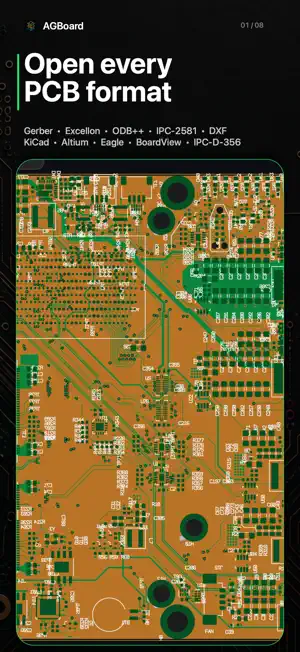
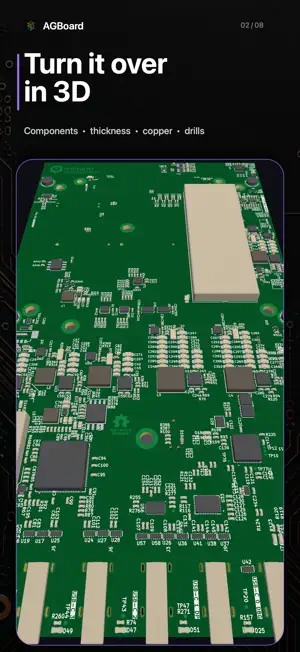
AGBoard - PCBEditor is a touch-friendly PCB viewer and inspection tool for iPhone and iPad. Open Gerber, Excellon, ODB++, KiCad boards and schematics, Altium, DXF, Eagle, BoardView, netlist and placement files, then zoom, measure, edit and save — all processed locally. OPEN ANY PCB FILE • Gerber RS-274X, X2 and X3 — X3 carries components and nets on its own; X2 sets each layer's role • Gerber job files (.gbrjob): a whole export in one tap, layers identified • Excellon drill files (.drl, .tap, .nc…) • ODB++ jobs (.tgz / .tar / .zip / .gz) — panels expanded, nets included • IPC-2581 designs (.cvg / .xml): layers, pads, traces and nets in one file • AutoCAD DXF (.dxf): layers, lines, arcs, circles, polylines, blocks, text • KiCad natively (.kicad_pcb, .kicad_pro, .kicad_mod) — tracks, vias, pads, zones, silkscreen, components and nets • KiCad schematics (.kicad_sch) — symbols, wires, buses, junctions, net labels, hierarchical sheets; one net search covers schematic and board • KiCad symbol libraries (.kicad_sym) and drawing sheets (.kicad_wks) • Altium natively (.PcbDoc, .PcbLib) — copper, pours, silkscreen, outline, components and nets • Save ODB++, DXF, IPC-2581 or Gerber, or convert any board to ODB++, IPC-2581 or DXF. Untouched KiCad, Eagle, Altium and BoardView sources come back exactly; compatible edits are patched • Eagle .brd boards (XML) • Landrex BoardView .brd: outline, component envelopes, pins, test points, nets • IPC-D-356 netlists for net search • CSV / TXT / POS component placement (pick-and-place) files LAYER CONTROL • Show, hide, reorder, lock, recolor, duplicate, export layers • Realistic colors • Interactive 3D view: real thickness, copper, holes and components — flip it over MEASUREMENT & ANALYSIS • Three modes: Edges for true clearance between the nearest copper, Centers for pitch, Points for anywhere • Each reading: dX/dY, angle, midpoint, clearance, overlap • Snapping to pads, holes and the grid • Export all measurements as CSV • Board statistics: size, area, hole table by diameter, smallest drill and trace • Light DRC report (CSV) • Stencil area and aspect ratios (IPC-7525C), step zones drawn on the board, PDF/CSV report NET TRACE & SEARCH • Tap a trace or pad to light its whole net across layers, no netlist needed • In BoardView files, tap a pad to light its whole net, top and bottom • Nets from IPC-D-356 netlists, ODB++ jobs or IPC-2581 files • Search any net (GND, VCC…) and highlight all of its pads MARKUP & ANNOTATIONS • Add notes, arrows, rectangles and ellipses straight on the board • Annotations stay pinned through zoom and pan, and are saved in the project EDITING TOOLS • Move, duplicate, resize and delete shapes, with editable corner radius • Single-tap or marquee multi-selection, group transforms • Mirror, rotate, reset and panelize layers COMPONENT SEARCH • Component data from Gerber X3, KiCad, Altium, ODB++, Eagle and BoardView files • Search by reference, value or package; highlight top/bottom parts FAST WORKFLOW • Drag and drop from Files (iPad) • Open from Mail, Files or any cloud provider EXPORT & SHARE • High-resolution PNG images • Multi-page vector PDF (composite + one per layer) and AirPrint • Layer CSV reports and shareable project files PRIVATE BY DESIGN Your PCB files are opened and processed entirely on your device. AGBoard does not track you and never sells personal data. It contacts agboard-app.com only to check the installed version is current; no PCB file, account, payment or analytics identifier is sent. Includes an illustrated guide in English and French. Request an improvement or another format from Help -> Request feature. Free to download and opens five files at no charge. After that, an auto-renewable monthly or annual AGBoard Pro subscription is required. Subscriptions renew until cancelled in your Apple Account settings. Terms of Use (EULA): https://www.apple.com/legal/internet-services/itunes/dev/stdeula/ Support: [email protected]
What’s new
Version 1.3 · Updated September 30, 2026
- A guided tour on first launch, with a real board already open. A CC0-licensed STM32 breakout is loaded so there is something to look at before you choose a file, and each tip points at the control it describes, which stays usable as you go. The demo does not count against the free openings. - Open KiCad schematics (.kicad_sch). Symbols, wires, buses and their entries, junctions, net labels, references, values and footprints, with hierarchical sheets followed and laid out side by side. It arrives as separate layers you can hide, and every field is drawn at the angle and alignment the file asks for. Symbol libraries (.kicad_sym) and drawing sheets (.kicad_wks) open too. - Schematic nets are the nets KiCad reports. Across 31 of KiCad's own public designs, all 890 named nets match its netlist exactly: a bus names the nets inside it, a net crossing sheets takes the name it has nearest the root, and two power symbols on one wire are one rail. Searching a net finds the pins that carry it, and lights the bus a signal travels along. - Convert a board into another format. Whatever it was opened as, a design can now be written out as ODB++, IPC-2581 or DXF from the Save menu. When the destination cannot carry everything, the app says so first — then offers to export anyway, naming what it left out. - 3D: internal cutouts, islands, holes and routed slots remove real substrate. Supported declared spans limit blind and buried holes. Copper aperture voids no longer invent drills; dark/clear order and negative mask are respected. - 3D: stated thickness and usable KiCad/IPC-2581 stack depths are used; hiding layers keeps their depth. Approximations are identified. Documentation stays off the copper, and bodies use their stated size and height, not keep-outs. - 3D: turn with one finger, move with two, and move while pinching to zoom. Idle redraws stop; obsolete scene builds are cancelled without overlapping. Scene changes wait until gestures end. - Edit a shape that is really several. An ODB++ pad can be one symbol holding six openings, and it could only be selected or moved whole. The parts button takes it apart — move, resize or delete a piece — and Finish puts it back as one object, in its own place in the drawing order. The action bar also names the symbol it came from. - The selection outline follows the shape instead of boxing it, and the width and height you edit are the shape's own, its angle shown beside them: a pad turned 30° no longer reports the size of the box around it. - Pads drawn approximately are now drawn as specified: chamfered corners, custom shapes built from arcs and lines, mask and paste openings grown by the stated clearance, and merged where the board asks for a minimum web. - Altium and Eagle: a through-hole pad now appears on every copper layer, as it does on the board. One board's Gerber export was missing 46 lands, and tracing a net stopped at every through-hole pin. Eagle inner layers are read too, where a four-layer board used to lose them silently. - Text written on the board-outline layer is no longer read as part of the edge — it cost one published board its ODB++ export. Drill files gained the same care: .xnc opens like any other drill program, and every number keeps its decimal point, so no CAM tool reads -70 mm as -0.07 mm. - Check a solder-paste stencil against IPC-7525C: each opening's area and aspect ratios, the ones below the limit listed and lit up on the board, the report as CSV or PDF. Choose the stencil layer, state the foil — no file carries it — and draw step zones over the board. Declared text, legend and fiducials are left out; tap any other artwork to leave it out. - Text is drawn as the design drew it: KiCad text boxes, tables, knockout and italic text, dashed lines and curves, matched to KiCad 8, 9 and 10's own plots, and Altium text placed as KiCad imports it. Exports keep text marked as text.
App privacy
The developer, GUILLAUME PIERRE AGNETTI, reported these privacy practices to Apple.
Data Not Collected
The developer does not collect any data from this app.
Alternatives to AGBoard - PCBEditor
Looking for apps like AGBoard - PCBEditor? Here are 6 similar apps on the App Store.


| App | Rating | Price | Last updated | Compare |
|---|---|---|---|---|
| AGBoard - PCBEditor | 3.0 / 5 (1 rating) | Free | September 30, 2026 | |
| Horizontal PCB | – | Free | Sep 15, 2026 | Compare |
| Tertiary Planner | – | Free | Oct 21, 2026 | Compare |
| 1zip | – | Free | Jul 12, 2026 | Compare |
| Macaos Rover | – | Free | Oct 7, 2026 | Compare |
| OhmniView | – | Free | Feb 15, 2026 | Compare |
| Sandia Mini Connect | – | Free | Sep 29, 2026 | Compare |