

Japanese Learning: Speak Words
Adem Uresin Education iPhoneiPadiPod touch
Japanese Learning: Speak Words is a free Education app for iPhone and iPad by Adem Uresin. Rated 3.0/5 from 2 ratings. Requires iOS 17.0.
- Rating
- 3.0
- 2 ratings
- Price
- Free
- on the App Store
- Size
- 21 MB
- Age 4+
- Updated
- Sep 22
- 2026 · v1.1.3
Screenshots


About Japanese Learning: Speak Words
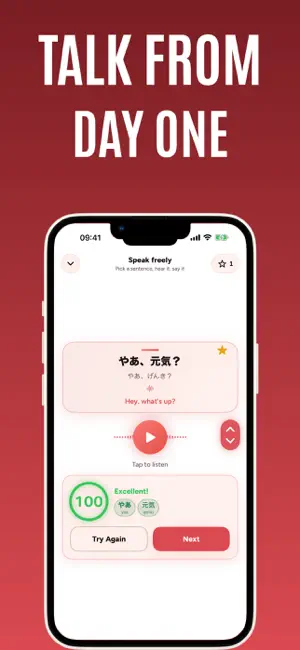
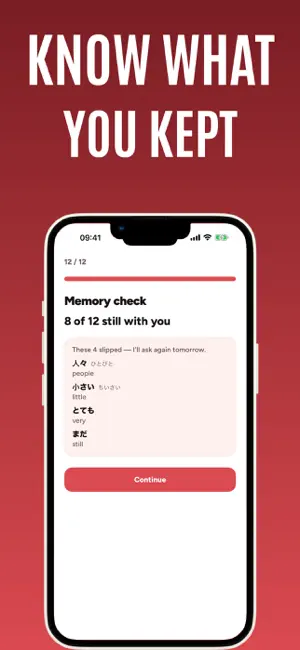
Japanese learning that speaks — learn words from your very first one to a real conversation. You see the words and sentences, you hear them, and you say them out loud. Every Japanese word and sentence carries its kana reading right underneath, so kanji never blocks you, and when you speak, the score shows each word with its reading. Vocabulary, listening and offline study run as one daily flow. Words, sentences, pronunciation and speaking belong to the same routine, and audio you've already played stays on your device, so a lost signal doesn't end the session. We teach first and ask afterward: a word you've never seen never starts with a test. HOW YOU LEARN Learn first, check afterward. New words and new sentences only turn into questions once you've had time to take them in. One word, tracked from several angles: recognizing the meaning, recalling it yourself, understanding it by ear and saying it out loud are each recorded separately. Spaced repetition. A word comes back just as you're about to forget it, and each angle returns on its own schedule, so you never grind through what you already know. Memory check. A few days after you learn words, the app asks them back — no hints, no kana. You see which ones stayed and which slipped, and it asks again tomorrow. Practice follows the way you got it wrong. What comes next depends on where you got stuck. TYPES OF PRACTICE Word cards: the word and what it means With pictures: the picture, the word and the meaning By listening: hear the word, then read it Sentence cards: the sentence and what it means Pick the picture, pick the meaning, match the sentence Listen and pick the word, listen and pick the sentence Speaking cards: listen and repeat, scored word by word Hands-free mode plays sentences one after another. Keep studying by ear while you drive or walk — three minutes free, ten with a subscription. FREE CONVERSATION SCREEN Flip through sentences, pick the ones you like, listen and say them back. You're scored word by word. Green and red show which words you said right and which you missed, with the reading under each word. If the microphone couldn't hear you, it doesn't count as a mistake. Save sentences you like to favorites and practice just those later. Free users get this screen, word-by-word scoring included, for the first 15 sentences. WHAT'S INSIDE Vocabulary and example sentences grouped by real situations: greetings, shopping, transportation, phone calls, technology and more — each topic with its own picture A step-by-step build from beginner to upper-intermediate Audio on every word and every sentence The kana reading under every word and sentence ALSO A start made for new learners: your first word, why you're learning, and your first 30 days — before anything else Home screen widget Daily reminder. For the first few days the question arrives inside the notification. Light mode, dark mode, or your system setting Audio you've listened to is kept on your device, so from then on you can study with no connection Interface fully in English No ads FREE PLAN Core vocabulary is free to study, with no daily limit. The free conversation screen and word-by-word scoring are included for the first 15 sentences, and hands-free mode runs three minutes a sitting. A subscription opens the full vocabulary and every example sentence, and unlocks the Speaking cards: listen and repeat, scored word by word. Listen to your first sentence today. Terms of Use (EULA): https://www.apple.com/legal/internet-services/itunes/dev/stdeula/ Privacy Policy: https://rsndijital.com/link/legal/privacy-policy.html
What’s new
Version 1.1.3 · Updated September 22, 2026
Memory check: a few days after you learn words, the app asks them back — no hints, no kana. You see which ones stayed and which slipped, and it asks again tomorrow. Two new ways to learn: With pictures and By listening. Every Japanese word and sentence now shows its kana reading. Speaking: if the microphone couldn't hear you, it no longer counts as a mistake. New start for new learners: your first word, why you're learning, and your first 30 days — before anything else. Fresh look: new pictures for every topic, light and dark.
App privacy
The developer, Adem Uresin, reported these privacy practices to Apple.
Data Not Collected
The developer does not collect any data from this app.
Alternatives to Japanese Learning: Speak Words
Looking for apps like Japanese Learning: Speak Words? Here are 6 similar apps on the App Store. The highest rated is Benkyo: Speak & Learn Japanese (5.0/5), and all 6 are free to download.
-
 Nande - Learn & Speak Japanese
4.9
Nande - Learn & Speak Japanese
4.9
-
 Benkyo: Speak & Learn Japanese
5.0
Benkyo: Speak & Learn Japanese
5.0
-
 Moji - Learn Japanese Daily
4.8
Moji - Learn Japanese Daily
4.8
-
 Japanese Vocabulary Words
4.2
Japanese Vocabulary Words
4.2
-
 Mugi - Japanese Immersion
4.5
Mugi - Japanese Immersion
4.5
-
 Gravity - Japanese Immersion
4.0
Gravity - Japanese Immersion
4.0
| App | Rating | Price | Last updated | Compare |
|---|---|---|---|---|
| Japanese Learning: Speak Words | 3.0 / 5 (2 ratings) | Free | September 22, 2026 | |
| Nande - Learn & Speak Japanese | 4.9 / 5 (10) | Free | Oct 14, 2026 | Compare |
| Benkyo: Speak & Learn Japanese | 5.0 / 5 (1) | Free | Oct 15, 2026 | Compare |
| Moji - Learn Japanese Daily | 4.8 / 5 (6) | Free | Oct 16, 2026 | Compare |
| Japanese Vocabulary Words | 4.2 / 5 (6) | Free | Oct 11, 2024 | Compare |
| Mugi - Japanese Immersion | 4.5 / 5 (2) | Free | Sep 20, 2026 | Compare |
| Gravity - Japanese Immersion | 4.0 / 5 (32) | Free | Oct 2, 2026 | Compare |