

ScanLingua Photo Translator
辉全 钟 Productivity iPhoneiPadiPod touch
ScanLingua Photo Translator is a free Productivity app for iPhone and iPad by 辉全 钟. Requires iOS 18.0. Updated September 9, 2026.
- Price
- Free
- on the App Store
- Size
- 9 MB
- Age 4+
- Updated
- Sep 9
- 2026 · v1.0.23
Screenshots


About ScanLingua Photo Translator
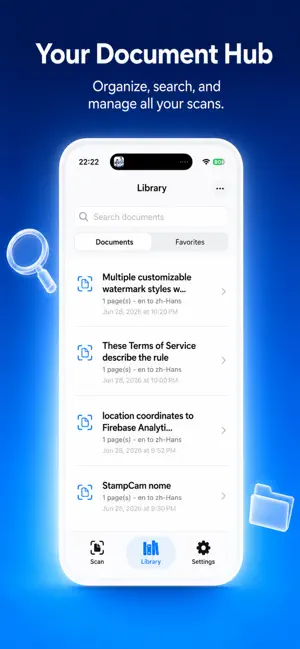
Scan paper documents, extract editable OCR text, translate on device, and export clean TXT or PDF files without an account or watermark. Documents are kept in the app's local storage and are not used for server-side processing by ScanLingua. ScanLingua is built for travelers, students, language learners, and anyone who needs a private document scanner with OCR translation. Capture receipts, notices, menus, study notes, manuals, screenshots, or printed pages with the document camera, then turn images into editable text and bilingual reading material on your iPhone. Key features: - Scan single-page or multi-page documents. - Import photos and screenshots for image-to-text OCR. - Recognize text on device with local OCR. - Edit OCR text before translation. - Download offline language pairs for local translation. - Read original text and translation side by side. - Copy original text, translation, or bilingual segments. - Save useful sentences for local search and study. - Export bilingual TXT, bilingual PDF, and image PDF files. - Share exports through the iOS share sheet. - Keep documents local by default. Why ScanLingua: Many scanner apps focus on cloud storage or subscriptions. ScanLingua focuses on a free local workflow: scan, OCR, translate, edit, export, and share without requiring an account. Your documents stay in the app container unless you choose to share an export with another app. Privacy: Scanned images, OCR text, translations, saved sentences, and exports stay on your device for the core workflow. ScanLingua does not use document content for server-side processing.
What’s new
Version 1.0.23 · Updated September 9, 2026
Preview TXT, bilingual PDF, and image PDF exports before sharing in this update. - Read OCR results more easily with clearer headings, paragraphs, and lists. - Create cleaner bilingual PDFs with improved sections, headers, and pagination. - Improved scanning experience and smoother document workflows. - Benefit from export reliability and overall stability improvements.
App privacy
The developer, 辉全 钟, reported these privacy practices to Apple.
Data Not Linked to You
The following data, which may be collected but is not linked to your identity, may be used for the following purposes:
- Usage Data: Product Interaction, Other Usage Data
- Diagnostics: Crash Data, Performance Data, Other Diagnostic Data
- User Content: Photos or Videos
Used for: Analytics, App Functionality
Alternatives to ScanLingua Photo Translator
Looking for apps like ScanLingua Photo Translator? Here are 6 similar apps on the App Store. The highest rated is ThinkAloud Notes (5.0/5), and 5 of the 6 are free to download.
-
 Calcium Text Calculator
-
 Tasking - with dependency
-
 SAYANA OCR
-
 CleanScan: PDF Scanner & OCR
-
 Ai Scan Lite - PDF Scanner
-
 ThinkAloud Notes
5.0
| App | Rating | Price | Last updated | Compare |
|---|---|---|---|---|
| ScanLingua Photo Translator | – | Free | September 9, 2026 | |
| Calcium Text Calculator | – | Free | Oct 20, 2026 | Compare |
| Tasking - with dependency | – | 1.99 USD | Sep 4, 2026 | Compare |
| SAYANA OCR | – | Free | Mar 15, 2024 | Compare |
| CleanScan: PDF Scanner & OCR | – | Free | Aug 5, 2026 | Compare |
| Ai Scan Lite - PDF Scanner | – | Free | Jul 16, 2026 | Compare |
| ThinkAloud Notes | 5.0 / 5 (2) | Free | Oct 21, 2026 | Compare |