

Laboro: Construction PM
Rafael Figueredo Business iPhoneiPadiPod touch
Laboro: Construction PM is a free Business app for iPhone and iPad by Rafael Figueredo. Rated 5.0/5 from 1 ratings. Requires iOS 16.4.
- Rating
- 5.0
- 1 ratings
- Price
- Free
- on the App Store
- Size
- 61 MB
- Age 4+
- Updated
- Oct 30
- 2026 · v1.9.8
Screenshots


About Laboro: Construction PM
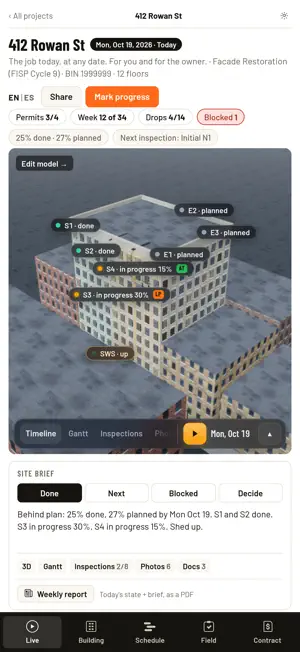
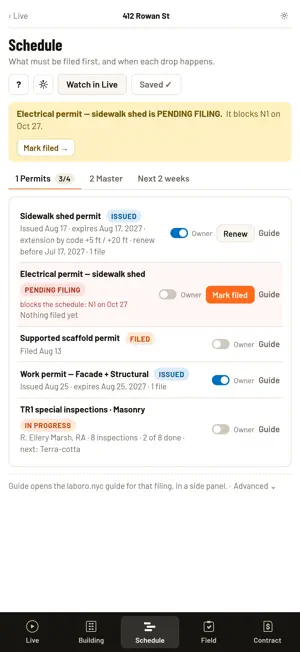
Laboro runs NYC facade jobs — LL11 / FISP repairs, restoration, sidewalk sheds and scaffolds — from the drawing set to the last sign-off. Five sections, in the order the job happens: Live · Building · Schedule · Field · Contract. LIVE — THE JOB TODAY • The building in 3D at today's date, or any date: the drops working with their crews, the sidewalk shed and the roof protection while they're up, and your team in the trailer • Play the job week by week • Site brief: Done · Next · Blocked · Decide, straight from your schedule and the field • Weather from the National Weather Service: wind over 30 mph (gusts count) stops the suspended scaffold, rain stops pointing and coatings, under 40°F holds the mortar. Weather days are marked; you decide which ones count as non-working days • Share with the owner: one link, an optional 4-digit PIN, your logo and colors. The owner sees the 3D, the brief, the photos, the team by role and name (never phone numbers), the weather and the days lost. Never the money BUILDING — DRAWINGS, 3D MODEL, FILES • Upload the drawing set: every sheet listed by its title-block number — roof plan, elevations, details • Measure right on the sheet • Build the 3D from the architect's elevations: windows, floor levels, bands, cornice • Draw the drops on every facade, the sidewalk shed sized by code (BC 3307.6.3), roof and overhead protection, controlled access zones • Several buildings under one contract, in one 3D • Every file in the cloud, the same on iPhone, iPad and the web SCHEDULE — PERMITS FIRST, THEN THE DROPS • Permits: DOB filings, work permits, the sidewalk shed permit (issued, expires, renew by) and the TR1 special inspections. If a permit blocks the schedule, it says so • DOB NOW permits and DOB / ECB violations for each BIN • Master schedule: a Gantt by drop and rig. Type or drag any start or duration and it stays; an order that doesn't make sense gets flagged • Next 2 weeks: the lookahead by zone, filled from the master, ready for the crew meeting • Your company's holidays and working days, and the Work Schedule PDF FIELD — WHAT GOT DONE, DROP BY DROP • The engineer's tags on each drop's elevation sheet: mark what's done with the quantity and a photo • Initial and Final for each drop, signed by the engineer or the foreman • Links for the engineer and the foreman, no account needed • Field reports and the weekly inspection log, with dated photos CONTRACT — THE MONEY, NEVER SHARED • Bid form, locked as the bid when the job is awarded • Quantities against the contract, filled from the field marks, code by code • Change orders with a backup page of marks and photos • Forecast by month from the master, the 3D and your price book YOUR COMPANY • Your logo; the colors come from it and you can change them • People with roles — PM, super, safety — and a foreman for each crew • Company plan for the whole team, with admins WHO DOES WHAT TR1 and TR8 are sealed by the RDP. Laboro runs the PM's side: it coordinates the inspections, gets the work ready to pass and hands the engineer an inspection-ready package. iPhone, iPad and the web, with the same account. Want to look around first? Open the sample job: fictitious, complete and read-only. Terms of Use (EULA): https://www.apple.com/legal/internet-services/itunes/dev/stdeula/ Privacy Policy: https://laboro.nyc/privacy
What’s new
Version 1.9.8 · Updated October 30, 2026
Laboro 1.9.8 — the owner link gets a code Laboro makes, a QR sign for the site, and carried-over work. • Live › Share is one panel for the owner link: Copy link, Send link…, and the access code. Laboro makes the code, so you no longer type one: turn it on or off, Copy code, Send code…, New code (every phone already let in must enter the new one) and Unpublish. • "Send…" sends two messages: the link, then the code apart. New links start with the code on; links already open stay as they are, with a "Turn on code" line. • The owner's code screen shows your brand and the job, with "Remember this phone" (30 days from the last visit), "Where is the code?" and "Ask the project manager for it", which sends you a "Code requested" alert (at most once an hour per link). • Share › QR: the owner link's QR to show in a meeting (the code stays hidden until "Show the code"). With the code on, "Print a sign (Letter)" makes a sign for the site with your brand, the job and the QR. The code is never printed. • Owner page: "Add to Home Screen" is always in its menu, with the steps for each browser (iPhone, iPad, Android; one-tap Install in Chrome and Edge). The icon is named with the job's address and shows your company logo (or Laboro's). The owner's phone keeps its own list of the jobs it opened ("Your projects"); nothing is sent to Laboro. Owner pages refresh every morning at 6 AM. • Next 2 weeks carries over unfinished work: work that started but did not finish within its master days shows on the first workdays as "carried over · N %" in the Late color, on the screen, the PDF, the 3D and the owner page. • Next 2 weeks: your own lines (e.g. "R1 · Concrete pour") name the work in each cell, not "R1"; on a weekday the second window choice says "from next Monday". On the 3D, a workday with nothing scheduled says "no work". • Weekly report: on Monday it opens the week that just ended. • PDFs: Work Schedule names wrap to 2 lines instead of being cut, and milestones stay inside the page. Tables keep their columns from page to page (on iPhone a Project Report's table no longer runs over the footer), a big job's weekly keeps its footer clear, and "On hold" drops are grouped by reason. • Owner pages stay steady: every publish from the app checks DOB like the server does, so held drops no longer come and go. The New owner page says "updated" instead of "snapshot". • Also: a Gantt line like "R1 · …" takes its drop's phase; the Agenda's "Open violations" no longer counts the "Other violations" lines; All projects drops the "Planned" legend; Profile has one Save (the orange one in the bar) and a guest's Profile line says what it holds; bar labels that don't fit go on 2 lines ("View as owner"); when the Live 3D bar is short, play and the date move to a second row so the tabs read whole, and the 3D tags say "Sidewalk shed · up"; on iPad the hints say "easier in landscape or on desktop". • Fixed on iPhone and iPad: reading the drawings and uploading files no longer stop with a "getRandomValues" error.
App privacy
The developer, Rafael Figueredo, reported these privacy practices to Apple.
Data Linked to You
The following data, which may be collected and linked to your identity, may be used for the following purposes:
- User Content: Other User Content, Photos or Videos, Customer Support
- Identifiers: User ID, Device ID
- Usage Data: Other Usage Data
- Purchases: Purchase History
- Contact Info: Email Address, Name, Phone Number
- Diagnostics: Other Diagnostic Data
Used for: Analytics, App Functionality
Alternatives to Laboro: Construction PM
Looking for apps like Laboro: Construction PM? Here are 6 similar apps on the App Store. The highest rated is ASCEND AI: Gamify Life (4.6/5), and all 6 are free to download.
-
 Planaway: Planner & Organizer
-
 Dominate Life Lite
3.9
-
 ASCEND AI: Gamify Life
4.6
-
 Rent Savvy | Pay Rent Monthly
3.3
-
 Deltek ArchiSnapper
4.4
-
 JD Power MarketValues
1.9
| App | Rating | Price | Last updated | Compare |
|---|---|---|---|---|
| Laboro: Construction PM | 5.0 / 5 (1 rating) | Free | October 30, 2026 | |
| Planaway: Planner & Organizer | – | Free | Oct 29, 2026 | Compare |
| Dominate Life Lite | 3.9 / 5 (7) | Free | Feb 26, 2025 | Compare |
| ASCEND AI: Gamify Life | 4.6 / 5 (70) | Free | Oct 31, 2026 | Compare |
| Rent Savvy | Pay Rent Monthly | 3.3 / 5 (3) | Free | Oct 24, 2026 | Compare |
| Deltek ArchiSnapper | 4.4 / 5 (9) | Free | Oct 5, 2026 | Compare |
| JD Power MarketValues | 1.9 / 5 (22) | Free | Oct 30, 2026 | Compare |