

SaveBox - Web Library
映秀 赵 Utilities iPhoneiPadiPod touch
SaveBox - Web Library is a free Utilities app for iPhone and iPad by 映秀 赵. Requires iOS 17.0. Updated July 31, 2026.
- Price
- Free
- on the App Store
- Size
- 53 MB
- Age 17+
- Updated
- Jul 31
- 2026 · v1.1.1
Screenshots

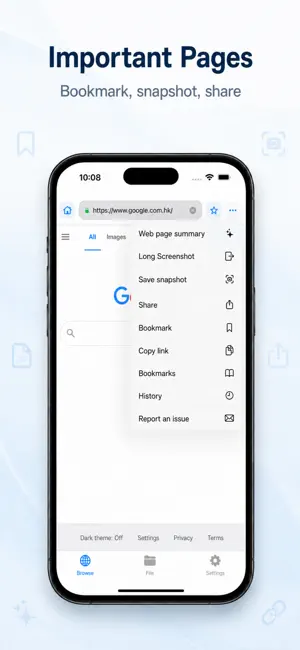
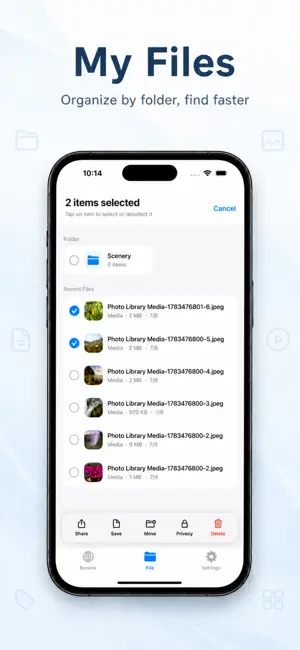

About SaveBox - Web Library
SaveBox is a local-first web content saving and file organization tool. It brings browsing, importing, WiFi transfer, previewing, folder management, and Private Space into one simple workflow for managing web pages, web snapshots, and local media files. Browse and save in one place The built-in browser supports search and URL entry, with tools for frequently used sites, bookmarks, history, web snapshots, sharing, and copying page links. When you find useful content, SaveBox helps you move into an organized saving flow. Keep web references organized Manage frequently used sites, bookmarks, browsing history, and web snapshots in one place. SaveBox is useful for collecting course materials, references, inspiration, research pages, and items to revisit later. Some third-party websites may restrict embedded browsers, sign-in status, regional access, or page display behavior, and availability depends on the website itself. Unified file library After importing from Photos or the Files app, you can filter by video, image, document, or audio, switch between list and grid views, sort by date, view, play, move, rename, organize into folders, select in batches, share, save back to Photos, or export through the system file picker. Transfer files over WiFi Connect your iPhone and computer to the same WiFi, then start the service from Transfers. Scan the QR code or open the displayed browser address and enter the pairing code to connect. Use the browser interface to send standard-library files between your computer and SaveBox, browse folders, create folders, and follow transfer progress. Allow Local Network access and keep SaveBox in the foreground while transferring. Transfers are started by you on the local network and are not relayed through SaveBox cloud services. One transfer hub The Transfers tab lets you start WiFi transfer, follow transfer progress, and review completed records. Completed records can be cleared when you no longer need them. Private Space Move sensitive items into Private Space and unlock them with a numeric passcode, Face ID, or Touch ID. Private Space is designed to reduce casual visibility when someone opens the app; it is not cloud backup or a system-level encrypted vault. Please keep your own backups of important files. Local-first SaveBox does not require an account by default. Your file library, browsing history, bookmarks, cookies, cache, and Private Space content are primarily stored on your device until you delete them, clear data, or uninstall the app. Use SaveBox to: • Save web snapshots, bookmarks, and frequently used sites • Organize course materials, references, inspiration, and items to revisit • Manage local media files • Transfer files between your iPhone and computer on the same WiFi • Keep selected items in a separate private area • Clear browsing history, cookies, and cache Terms of Service https://saveboxapp.com/pages/terms-of-service-en Privacy Policy https://saveboxapp.com/pages/privacy-policy-en
What’s new
Version 1.1.1 · Updated July 31, 2026
SaveBox 1.1.1 brings a redesigned interface, WiFi file transfer, improved file organization, and SaveBox Pro. • Added two-way WiFi file transfer between SaveBox and a computer browser on the same network • Added a dedicated Transfers tab for starting WiFi service and viewing progress and completed records • Improved WiFi pairing, status feedback, and completed-record cleanup • Redesigned Browse, Files, Transfers, and Settings; Files now offers type filters, list/grid views, and date sorting • Improved browser display options, Private Browsing status, and the separate History entry • Added SaveBox Pro subscriptions and purchase restore, in-app feedback, announcements, and version notifications • Refined onboarding, Private Space, file preview, and English, Japanese, and Simplified Chinese support • Fixed interaction, transfer, and multilingual display issues
App privacy
The developer, 映秀 赵, reported these privacy practices to Apple.
Data Not Linked to You
The following data, which may be collected but is not linked to your identity, may be used for the following purposes:
- Usage Data: Other Usage Data
Used for: App Functionality
Alternatives to SaveBox - Web Library
Looking for apps like SaveBox - Web Library? Here are 6 similar apps on the App Store.


| App | Rating | Price | Last updated | Compare |
|---|---|---|---|---|
| SaveBox - Web Library | – | Free | July 31, 2026 | |
| SAV E-BOX | – | Free | May 14, 2026 | Compare |
| Hidey - Web, Files & Privacy | – | Free | May 22, 2026 | Compare |
| Ezo | – | Free | Sep 2, 2026 | Compare |
| Enumurl | – | Free | Sep 10, 2026 | Compare |
| 轻羽浏览器 | – | Free | Aug 3, 2026 | Compare |
| Carnival - SMB Media Player | – | Free | Oct 25, 2026 | Compare |