

DoodlePlot: Kids Coloring
BOBBY JOSE Education iPhoneiPadiPod touch
DoodlePlot: Kids Coloring is a free Education app for iPhone and iPad by BOBBY JOSE. Requires iOS 17.0. Updated October 23, 2026.
- Price
- Free
- on the App Store
- Size
- 130 MB
- Age 4+
- Updated
- Oct 23
- 2026 · v1.2.5
Screenshots


About DoodlePlot: Kids Coloring
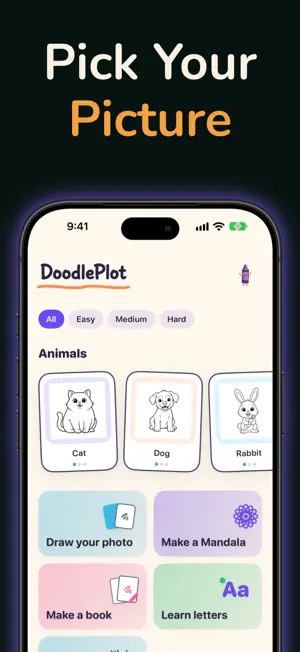
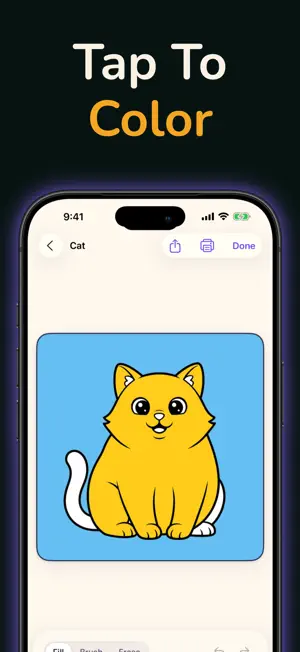
DoodlePlot turns your iPhone or iPad into a cozy art studio — and a window onto real paper. Prop your phone above a sheet of paper, pick a picture, and trace it right through the screen with a real pencil — then snap a photo of your finished drawing to keep. Or draw right on the screen, color inside the lines, solve a puzzle, or bloom a mandala. Five ways to play with one adorable library of art — made for kids, loved by families. FIVE WAYS TO PLAY EVERY PICTURE • Trace — prop the phone over paper and trace the picture onto the page. Adjust the size, fade and brightness; a built-in light helps in dim rooms. When you're done, photograph your real drawing and it goes into your gallery. • Doodle — draw on the screen over a faint picture guide with crayons and markers that feel real. Works with a finger, and shines with Apple Pencil on iPad. Finish and watch your doodle redraw itself, stroke by stroke. • Color — tap to fill, or paint inside the lines with a soft brush and an eraser, a big friendly crayon box, and easy undo and redo. • Puzzle — every picture becomes a drag-and-drop jigsaw that snaps together with a satisfying click. • Mandala — scribble once and watch it bloom into a symmetric, kaleidoscope pattern. MORE TO LOVE • A growing library of hand-drawn packs — animals, cats, dogs, dinosaurs, vehicles, space, ocean, dragons and more. • Draw your photo — turn a picture from your camera roll into a clean outline to trace and color, made right on your device. • Make a Book — pick your favorite pictures and print your own coloring book at home, cover page and all. • Doodle on your own photos — party hats and mustaches welcome. • A sticker album that fills in as you finish drawings — gentle progress, no streaks, no pressure. • Gentle, joyful sounds and haptics for fills, snaps and finishes (easy to switch off). • Share a masterpiece with the family in one tap, or print it with AirPrint. • Save your creations to your own gallery, and pick up your work in progress where you left off. MADE WITH PARENTS IN MIND • No ads. • No account or sign-in needed. • The core studio works offline — trace, color, puzzle and doodle without an internet connection. • Photos you trace, outline or doodle on are processed on your device. BUILT FOR EVERY KID DoodlePlot supports VoiceOver, Larger Text, Reduce Motion and Differentiate Without Color — plus optional "say the colors and buttons aloud" modes for pre-readers learning as they play. Draw. Color. Solve. Create. Print. — DoodlePlot. REQUIREMENTS • iPhone or iPad with iOS 17 or later • A rear camera (used to trace pictures onto real paper) DOODLEPLOT PRO Free to start. DoodlePlot Pro is an optional one-time purchase that unlocks the premium picture packs, Pro lessons and Make a Book. No subscription. Purchases can be restored on your devices with Restore Purchases. • Privacy Policy: https://doodleplot.com/privacy • Terms of Use (EULA): https://www.apple.com/legal/internet-services/itunes/dev/stdeula/ • Terms of Service: https://doodleplot.com/terms
What’s new
Version 1.2.5 · Updated October 23, 2026
A new Your Plan page in Settings shows your plan and when it renews or ends. • See every way to have DoodlePlot Pro, with prices: Monthly, Yearly or Pay once • Switch between Monthly and Yearly, or cancel, through the App Store • Bought Pay once? You can add a subscription to open the packs added since • Restore Purchases is here too Also fixed: the pumpkins on the Halloween card no longer have a white outline.
App privacy
The developer, BOBBY JOSE, reported these privacy practices to Apple.
Data Linked to You
The following data, which may be collected and linked to your identity, may be used for the following purposes:
- Identifiers: Device ID
Used for: Analytics, App Functionality
Data Not Linked to You
The following data, which may be collected but is not linked to your identity, may be used for the following purposes:
- Purchases: Purchase History
- Usage Data: Product Interaction
- Diagnostics: Crash Data
Used for: Analytics, App Functionality
Alternatives to DoodlePlot: Kids Coloring
Looking for apps like DoodlePlot: Kids Coloring? Here are 6 similar apps on the App Store. The highest rated is Wordzlet!: Writing Game (5.0/5), and 5 of the 6 are free to download.
-
 Color Bud
-
 SDPS MAHARAJPUR
-
 Wordzlet!: Writing Game
5.0
Wordzlet!: Writing Game
5.0
-
 Little Zoo Coloring
-
 Kidalu: Read by Syllables
-
 Numbers Land: Math for kids
| App | Rating | Price | Last updated | Compare |
|---|---|---|---|---|
| DoodlePlot: Kids Coloring | – | Free | October 23, 2026 | |
| Color Bud | – | 4.99 USD | May 15, 2026 | Compare |
| SDPS MAHARAJPUR | – | Free | Oct 23, 2026 | Compare |
| Wordzlet!: Writing Game | 5.0 / 5 (3) | Free | Apr 11, 2025 | Compare |
| Little Zoo Coloring | – | Free | Jul 2, 2026 | Compare |
| Kidalu: Read by Syllables | – | Free | Oct 16, 2026 | Compare |
| Numbers Land: Math for kids | – | Free | Sep 5, 2026 | Compare |