

Sweep: Speaker Tuning
Carl Sieber Utilities iPhoneiPadiPod touch
Sweep: Speaker Tuning is a free Utilities app for iPhone and iPad by Carl Sieber. Rated 4.0/5 from 2 ratings. Requires iOS 17.0. Updated October 14, 2026.
- Rating
- 4.0
- 2 ratings
- Price
- Free
- on the App Store
- Size
- 3 MB
- Age 4+
- Updated
- Oct 14
- 2026 · v1.8.1
Screenshots



About Sweep: Speaker Tuning
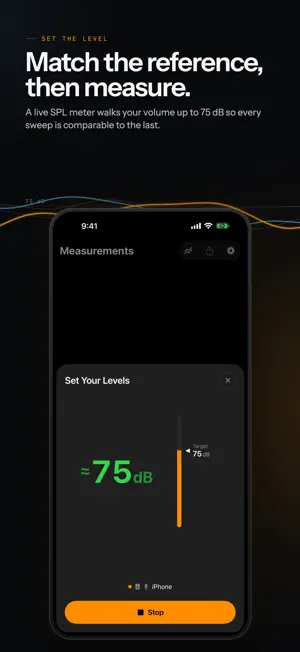
See how your speakers really sound. Sweep plays a log sweep through your speaker and plots its frequency response — measured from your listening position. No laptop, no audio interface, no mic stand. Just your iPhone or iPad, a calibrated mic, and a clear picture of what you're hearing. The untethered scout between full bench sessions — the fast check from your chair you'll actually run. A minute, not an afternoon. SWEEP. CAPTURE. COMPARE. • Sweep — tap once and a 20 Hz–20 kHz log sweep plays through your speaker (the Farina ESS method the bench tools use). • Capture — a calibrated measurement mic (Dayton iMM-6C, miniDSP UMIK-1/UMIK-2/EARS, Behringer ECM8000, or any REW .cal file) or your device's built-in mic records it; on-device math extracts the impulse response and plots the curve. • Compare — overlay runs, each in its own color (twenty to choose from), to see exactly what a change did. Measure, adjust, measure again. TWO WAYS IN No audiophile experience required. Tune My Receiver runs a guided measurement, then hands back actual settings — "Bass +5, Treble +8" — instead of a chart to interpret. A plain-language results tour walks through what it found, and Balance Speakers checks your channels match before you start. Measure Again starts a new before-and-after round without losing the first. Prefer the full picture? Everything above is one tap away, from the same library. ALSO IN THE APP • Scrub any frequency — drag the cursor; it snaps to peaks and troughs and reads frequency · dB right where you need it. Pinch to zoom into any band; hold near the edge to pan. • Target curves — overlay Harman Room, B&K, a tilt, or Room Gain as a dashed reference so you know what "good" looks like, not just what you measured. • Aim at what you listen to — pick a listening style (Bass-forward, Warm, Bright, and more) and Tune My Receiver's recommendation steers toward it, not just flat. • Average or Difference — power-average two or more captures (walk the room, average the seats) or compute A − B to see exactly what a change did, both as new measurements you can keep comparing. • Real smoothing, applied after the fact — every capture keeps its full resolution; change 1/24 to 1/3-octave anytime and every trace redraws, no re-measuring. • Set levels with confidence — a built-in test tone and live meter get your output where it should be, and the sweep then plays at exactly that level. Each measurement mic keeps its own calibration file and trim, matched automatically when you plug it in. • Share your capture — export the chart as a labeled image card: color-coded traces, an optional cursor callout, one tap to send anywhere. From Tune My Receiver, the card carries your verdict and knob settings too. • Handoff to your Mac — pair once, and send a capture straight to Sweep for Mac's library: device to device, encrypted, no internet, no cable. Off by default; turn it on in Settings. • Open Sweep files — tap a .sweep file in Files, Mail or AirDrop to add its measurements to your library. HONEST BY DESIGN Sweep shows relative frequency response — the shape you need to tune speaker DSP and EQ. A time-gate isolates the direct sound; down low, the room is part of every measurement, so what you see there is speaker plus room, not the speaker alone — and wherever a reading can’t be fully trusted, low or high, the line turns dashed. Results are only as calibrated as the mic file you import; levels without a known mic sensitivity are marked ≈. Not an SPL meter, not a full bench replacement — it names its limits up front, so you can trust its strengths. PRIVATE BY DEFAULT Everything runs on your device. No account, no signup, no cloud, no tracking, no analytics SDK. Your measurements are processed entirely on your device. They go only where you send them — a paired Mac in the same room, or a file you share. Free. No in-app purchases, no account. Sweep is part of a family of focused instruments alongside Pull, Grip, Lean, and Level.
What’s new
Version 1.8.1 · Updated October 14, 2026
Sweep files now open in Sweep. Tap a .sweep file in Files, Mail or AirDrop and choose Sweep: its measurements land in your library. Thanks for measuring with Sweep.
App privacy
The developer, Carl Sieber, reported these privacy practices to Apple.
Data Not Collected
The developer does not collect any data from this app.
Alternatives to Sweep: Speaker Tuning
Looking for apps like Sweep: Speaker Tuning? Here are 6 similar apps on the App Store. The highest rated is Audio Function Generator (4.7/5), and all 6 are free to download.
-
 Ultimate Car Audio App
4.3
-
 Speaker Box Lite
4.1
-
 Audio Function Generator
4.7
-
 SofaBaton
2.4
-
 Frequency: Sound Generator
4.7
-
 Decibel X:dB Sound Level Meter
4.6
| App | Rating | Price | Last updated | Compare |
|---|---|---|---|---|
| Sweep: Speaker Tuning | 4.0 / 5 (2 ratings) | Free | October 14, 2026 | |
| Ultimate Car Audio App | 4.3 / 5 (85) | Free | Jul 29, 2026 | Compare |
| Speaker Box Lite | 4.1 / 5 (339) | Free | Oct 6, 2026 | Compare |
| Audio Function Generator | 4.7 / 5 (2,216) | Free | Oct 17, 2026 | Compare |
| SofaBaton | 2.4 / 5 (304) | Free | Sep 23, 2026 | Compare |
| Frequency: Sound Generator | 4.7 / 5 (1,150) | Free | Feb 13, 2025 | Compare |
| Decibel X:dB Sound Level Meter | 4.6 / 5 (163,508) | Free | Oct 27, 2026 | Compare |