

Budget Crab Money Tracker
DMITRY LOGACHEV Finance iPhoneiPadiPod touch
Budget Crab Money Tracker is a free Finance app for iPhone and iPad by DMITRY LOGACHEV. Rated 5.0/5 from 5 ratings. Requires iOS 17.0.
- Rating
- 5.0
- 5 ratings
- Price
- Free
- on the App Store
- Size
- 7 MB
- Age 4+
- Updated
- Oct 8
- 2026 · v1.0.6
Screenshots

About Budget Crab Money Tracker
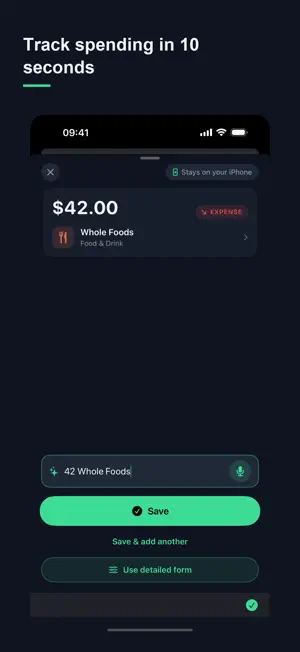
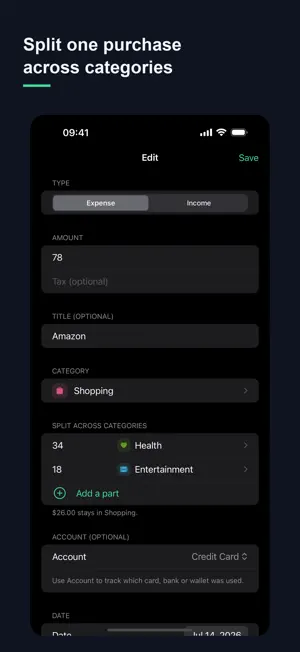
Budget Crab is the private way to track your money — no bank linking, no ads, no surprise charges. Type or speak a transaction and it's logged in seconds. Everything stays on your iPhone. Know what's safe to spend. Set a monthly budget and see exactly how much is left, every day. WHY BUDGET CRAB • Private by design — all data stays on your iPhone, nothing is transmitted, no account needed • No bank linking — add expenses manually or by voice, in seconds • Safe-to-spend — a clear monthly number, not a spreadsheet • Daily allowance — see what's safe to spend today, and whether you're on pace for the month • Split a purchase across categories — one receipt, split across the buckets it really belongs to • Category limits — a gentle heads-up when a category is running low, never a scolding • Honest billing — cancel anytime, no ads, no dark patterns • Unlimited transactions, free to start • Export anytime — CSV, PDF, Excel • Works fully offline PREMIUM Start free — full access for 14 days, no card needed. After that, keep using the free plan, or choose Premium: $4.99/month, $34.99/year (about $2.92/month), or $99.99 Lifetime — one-time, no subscription, shareable via Family Sharing. Cancel anytime in Settings. Budget Crab is a personal expense-tracking tool for informational purposes only. It does not provide financial, investment, or tax advice. Subscriptions auto-renew until cancelled; manage or cancel anytime in Settings › Apple ID › Subscriptions. Privacy Policy and Terms of Use: https://budgetcrab.app
Ratings & reviews
5.0
5 ratings
What’s new
Version 1.0.6 · Updated October 8, 2026
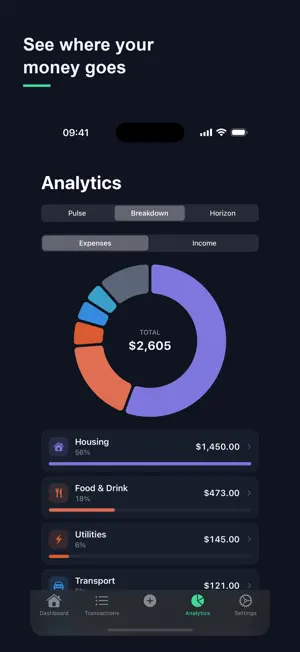
New: Reports. Pick a week, a month, a year or your own date range and see where your money went — income, expenses, what changed since the previous period, your biggest categories and your largest purchases. Open Reports from Analytics or from Settings. Share a monthly report as a PDF with the analysis on the first page, or as an Excel file. With Premium: reports for any period, and a weekly or monthly reminder when the period closes — tap it to open the report. Reports are built on your iPhone when you open them, and nothing leaves your phone. Also fixed: music and podcasts resume after you dictate an entry. Also in this release: - Analytics no longer stops working on a ledger with an amount it cannot add up — it tells you instead. - Excel export: a split purchase is now one row per part, so totals by category in your spreadsheet match the app. Two columns were added at the end (Split, Transaction ID); the first eight are unchanged. - Excel export dates are always plain year-month-day. - Wording and translation fixes across all five languages.
App privacy
The developer, DMITRY LOGACHEV, reported these privacy practices to Apple.
Data Not Collected
The developer does not collect any data from this app.
Alternatives to Budget Crab Money Tracker
Looking for apps like Budget Crab Money Tracker? Here are 6 similar apps on the App Store. The highest rated is Pelican: Weekly Budget & Money (5.0/5), and all 6 are free to download.
-
 Pelican: Weekly Budget & Money
5.0
Pelican: Weekly Budget & Money
5.0
-
 Purser · Budget & Expenses
-
 Money Tracker: Income Month
-
 Moondane: Expense Tracker
-
 DyvoBudget: Budget & Money
-
 Keepersy: budget tracker
| App | Rating | Price | Last updated | Compare |
|---|---|---|---|---|
| Budget Crab Money Tracker | 5.0 / 5 (5 ratings) | Free | October 8, 2026 | |
| Pelican: Weekly Budget & Money | 5.0 / 5 (3) | Free | Oct 10, 2026 | Compare |
| Purser · Budget & Expenses | – | Free | May 12, 2026 | Compare |
| Money Tracker: Income Month | – | Free | Nov 10, 2025 | Compare |
| Moondane: Expense Tracker | – | Free | Oct 14, 2026 | Compare |
| DyvoBudget: Budget & Money | – | Free | Sep 10, 2026 | Compare |
| Keepersy: budget tracker | – | Free | May 17, 2026 | Compare |