

Storage Cleaner: Spaceback
Vlada Misici Utilities iPhoneiPadiPod touchMac
Storage Cleaner: Spaceback is a free Utilities app for iPhone and iPad by Vlada Misici. Requires iOS 17.0. Updated October 17, 2026.
- Price
- Free
- on the App Store
- Size
- 42 MB
- Age 4+
- Updated
- Oct 17
- 2026 · v1.7
Screenshots



About Storage Cleaner: Spaceback
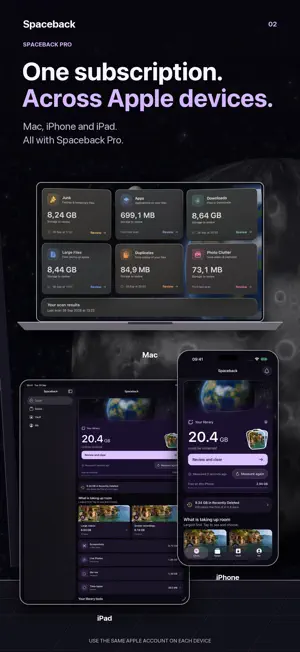
Storage Cleaner: Spaceback measures what your photo library is actually using, helps you clear it, and then tells you the truth about what iPhone did with the space. Here is the part other cleaners leave out. A deleted photo moves to Recently Deleted and keeps using the same storage for 30 more days, and no app is allowed to empty that album for you — including this one. So a number shown the moment you tap delete is not true yet. Spaceback does the opposite. It records what you queued, counts down the days iOS holds it, and tells you when the space genuinely came back. If you want it sooner, it shows you exactly where to empty Recently Deleted yourself. WHAT IT MEASURES • Screen recordings — usually the single largest win on a phone. • Screenshots — the ones that pile up hundreds at a time. • Large videos — newest and biggest first. • Slow-motion and time-lapse — high frame rates cost several times the size. • Live Photos — each one carries a short video beside the still. • Bursts — grouped by iOS's own burst identifier. • Near-identical shots and exact duplicates — grouped on this device. Every size is read from the file itself, and nothing is counted twice. TWO WAYS TO CLEAN Review a whole category at once, or swipe through one photo at a time, month by month. Whichever you use: nothing is pre-selected, and nothing is deleted until you say so. Every card shows the photo's real size and the date it was taken. STUDIO Make videos smaller and convert files, all on this device: compress videos into copies that keep their date, place and albums; convert videos to MP4 or MOV and photos to JPEG, PNG or HEIC; make GIFs and Live Photos. Share a video from any app to Spaceback to make it small enough to send. Your originals stay until you choose to remove them. THE KEEP LIST A permanent never-delete set you build before you start — not an undo afterwards. Favourites are never offered for deletion at all. THE RECLAIM LEDGER Every removal you queue, its purge date, a reminder before the 30 days close, and a measured free-space reading when it settles. If your free space went down because you installed things, the ledger says so. PRIVATE VAULT A PIN and Face ID protected space on this device. Items inside are encrypted, never uploaded, and stay accessible to you even if a subscription lapses. They are also excluded from your backups — we say so before you create it. WIDGETS Keep the figure on your Home Screen and Lock Screen, and start a cleanup from either. WHAT WE DO NOT DO No junk scanner, no RAM boost, no virus warnings, no speed meter. iOS does not permit any of it. BUILT TO BE TRUSTED • Every measurement runs on this device. No account, no sign-in, no tracking. • Your photos are never sent to us. Usage statistics are opt-in. • Removals go to Recently Deleted, where iOS keeps them for 30 days. WHAT PRO ADDS Similar-shot detection, the private vault, selecting by size and age, reminders before iOS clears Recently Deleted, unlimited removal and Studio with no daily limit. Everything else is free forever, including 10 removals and five Studio results a day. ONE PURCHASE, EVERY DEVICE Pro is a Universal Purchase across Mac, iPhone and iPad. If you bought it on your Mac, it is already unlocked here. SUBSCRIPTION DETAILS Pro is available as a weekly subscription, with a lower introductory price for the first week if you are eligible, as an annual or a monthly subscription, or as a one-time lifetime purchase. Payment is charged to your Apple Account at confirmation. Subscriptions renew automatically unless auto-renew is turned off at least 24 hours before the end of the current period, and your account is charged for renewal within 24 hours of the end of that period. You can manage and cancel your subscriptions in your Apple Account settings after purchase. Terms: https://www.apple.com/legal/internet-services/itunes/dev/stdeula/ Privacy: https://spaceback.queazy.app/privacy
What’s new
Version 1.7 · Updated October 17, 2026
• A new look: every tab, and every kind of photo and video, now has its own color. • New: a one-minute tour of the five tabs. Spaceback offers it once, and you can take it again any time from Me. • Optimized for iPhone Duo. Open it like a book and the swipe deck becomes two pages: the photo on one, its details and your four choices on the other. Partly folded, the two pages meet at the fold. • Stand it up like a laptop and the screen splits at the fold: the photo stays on top while you swipe below, Studio's previews play above their sliders, and the Vault's keys lie flat. • In a category or among duplicate files, the photo you tap is shown large next to the grid. • The Clean overview spreads across the inner display, with what was measured on one side and what to review on the other. • Fold or unfold in the middle of anything and you stay exactly where you were. A Studio job keeps its progress. • With another app beside Spaceback, drag a video or photo onto a Studio tool, then drag the finished file straight back out. • Studio has a new look: every tool is a tile of its own. • A new extra-large widget for the Home Screen on iOS 27.
App privacy
The developer, Vlada Misici, reported these privacy practices to Apple.
Data Not Linked to You
The following data, which may be collected but is not linked to your identity, may be used for the following purposes:
- Purchases: Purchase History
- Identifiers: Device ID
- Usage Data: Product Interaction
- Diagnostics: Other Diagnostic Data
Used for: Analytics
Alternatives to Storage Cleaner: Spaceback
Looking for apps like Storage Cleaner: Spaceback? Here are 6 similar apps on the App Store. The highest rated is Fotolozo (5.0/5), and all 6 are free to download.
-
 Fotolozo
5.0
Fotolozo
5.0
-
 Duplicate Photos: LessPhoto
5.0
Duplicate Photos: LessPhoto
5.0
-
 Clica Sat
-
 Gallery Organizer: Photo Swipe
-
 Wipeo - Camera Roll Cleaner
-
 Storage Cleaner Fit
| App | Rating | Price | Last updated | Compare |
|---|---|---|---|---|
| Storage Cleaner: Spaceback | – | Free | October 17, 2026 | |
| Fotolozo | 5.0 / 5 (1) | Free | Oct 23, 2026 | Compare |
| Duplicate Photos: LessPhoto | 5.0 / 5 (2) | Free | Oct 17, 2026 | Compare |
| Clica Sat | – | Free | Oct 1, 2026 | Compare |
| Gallery Organizer: Photo Swipe | – | Free | Aug 22, 2026 | Compare |
| Wipeo - Camera Roll Cleaner | – | Free | Jul 28, 2026 | Compare |
| Storage Cleaner Fit | – | Free | Aug 8, 2026 | Compare |