

My Day Off
Yune Cho Productivity iPhoneiPadiPod touch
My Day Off is a free Productivity app for iPhone and iPad by Yune Cho. Requires iOS 17.0. Updated October 12, 2026.
- Price
- Free
- on the App Store
- Size
- 2 MB
- Age 4+
- Updated
- Oct 12
- 2026 · v1.0.2
Screenshots

About My Day Off
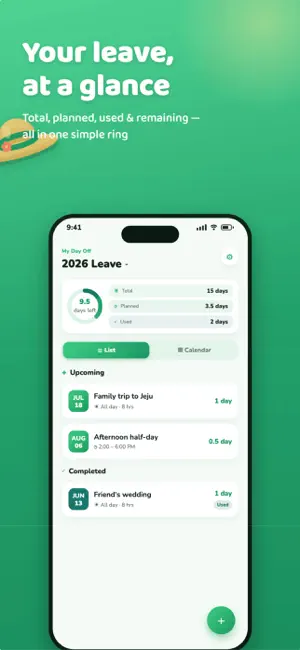
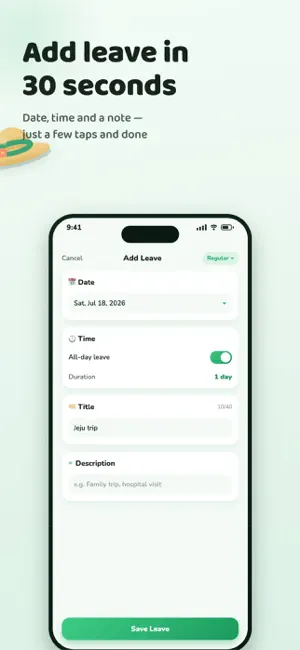
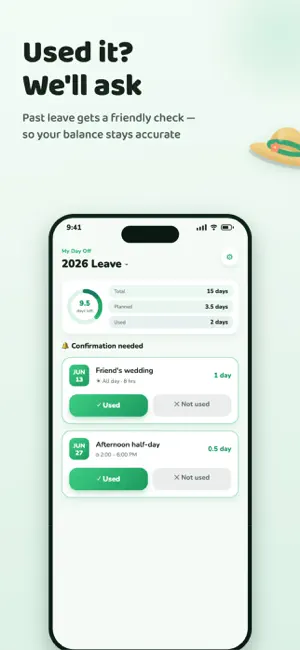
Still doing annual leave math in your head? My Day Off shows your remaining leave in a single ring and helps you plan your days off ahead of time. No account, no login — just open it and start. ■ YOUR BALANCE IN ONE RING Total, planned, used and remaining leave. All four numbers on one screen the moment you open the app. ■ HALF DAYS, TRACKED BY THE HOUR Full days, afternoon half days, or a quick two-hour errand — pick a start and end time and the hours are calculated for you. Break time is excluded automatically. Set your work hours and work days once. ■ COLOR-CODED ON THE CALENDAR Planned, used and special leave each get their own color. Public holidays from your region's calendar appear too, so it's easy to spot the days worth attaching to a long weekend. ■ SPECIAL LEAVE THAT ISN'T DEDUCTED Bereavement days, reward days, anything granted outside your allowance — record it as Special leave. It shows on your calendar, but your balance stays untouched. ■ THE APP ASKS ABOUT LEAVE YOU'VE TAKEN When a leave ends, a notification arrives. Just tap Used or Not used. You can answer straight from the notification, so cancelled plans never quietly eat into your balance. ■ TWO HOME SCREEN WIDGETS · Leave Status — total, planned, used and remaining at a glance · Next Leave — a D-day countdown to your closest day off Both available in small and medium sizes. ■ PREVIOUS YEARS ARE KEPT Your records don't disappear when the year turns. Look back anytime. At the start of a new year, the app helps you settle any leave you never confirmed. ■ STAYS ON YOUR DEVICE My Day Off never sends anything to a server. It has no networking code at all. · No account, no login · No ads, no tracking · No third-party analytics Everything you enter lives on your device and is removed with the app. ■ ENGLISH · 한국어 Switch the display language anytime inside the app. Days off are better when you plan them. Start planning this year with My Day Off.
What’s new
Version 1.0.2 · Updated October 12, 2026
- You can now sync My Day Off with Apple Calendar to view your time off directly in Apple Calendar.
App privacy
The developer, Yune Cho, reported these privacy practices to Apple.
Data Not Collected
The developer does not collect any data from this app.
Alternatives to My Day Off
Looking for apps like My Day Off? Here are 6 similar apps on the App Store. The highest rated is Leave Balance Tracker (5.0/5), and all 6 are free to download.
-
 Leave & Absence Tracker
-
 PLM - Personal leave manager
-
 Time to Dot - a braille clock
-
 Annual Leave & PTO Expiry
-
 Leave Balance Tracker
5.0
Leave Balance Tracker
5.0
-
 IDEON: Bookmark, Image Manager
| App | Rating | Price | Last updated | Compare |
|---|---|---|---|---|
| My Day Off | – | Free | October 12, 2026 | |
| Leave & Absence Tracker | – | Free | Jun 24, 2026 | Compare |
| PLM - Personal leave manager | – | Free | Sep 16, 2026 | Compare |
| Time to Dot - a braille clock | – | Free | Oct 21, 2024 | Compare |
| Annual Leave & PTO Expiry | – | Free | Sep 23, 2026 | Compare |
| Leave Balance Tracker | 5.0 / 5 (2) | Free | Feb 2, 2025 | Compare |
| IDEON: Bookmark, Image Manager | – | Free | Nov 29, 2025 | Compare |
Compare My Day Off with the top alternatives: ratings, updates, ASO score and keyword gaps →