

DXcompanion
Marian Fujara Music iPadMac
DXcompanion is a free Music app for iPad and Mac by Marian Fujara. Requires iOS 17.0. Updated November 9, 2026.
- Price
- Free
- on the App Store
- Size
- 5 MB
- Age 4+
- Updated
- Nov 9
- 2026 · v1.6.7
Screenshots


About DXcompanion
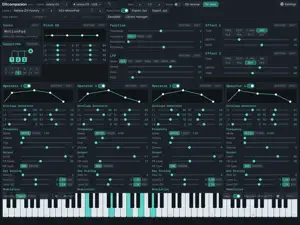
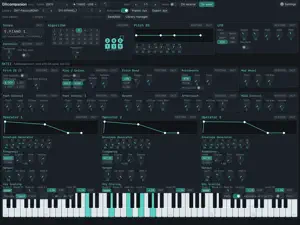
DXcompanion is a voice editor and librarian for Yamaha FM synths: the reface DX, the DX7 (and TX7 / TX816), the DX7II / TX802 and the DX7-compatible M-Vave FM-1. Every parameter on one screen, edited live as you play, with 7,070 factory voices to start from. The native edition of the DXcompanion web app. PICK YOUR SYNTH • Choose the synth next to the app name; the app remembers its MIDI ports and channel • reface DX: four operators, 12 algorithms, both effect blocks • DX7 / TX7 / TX816: six operators, all 32 algorithms, pitch EG, LFO, keyboard scaling with break point • DX7II / TX802: everything the DX7 has, plus the additional voice (AMS and scaling mode per operator, unison, pitch bend and portamento modes, controller depths) • M-Vave FM-1: the DX7 editor plus the FM-1's six built-in effects EDIT EVERYTHING • All operators side by side: drag the envelope graphs, set frequency (ratio or fixed Hz), output level, feedback, key scaling and modulation • Algorithm diagrams for every algorithm — tap an operator to jump to it • Every change is heard on the synth as you make it • Sliders or round knobs: pick under Settings; the compact knob layout fits much more on screen • Undo and redo, RESTORE and INIT on every section, double-tap any slider or knob to restore it • On the Mac, scroll the mouse wheel over any slider or knob to step it • Receive the voice the synth is playing, send a voice back, step through its 32 memories VOICES • 4,382 reface DX voices in 27 libraries and 2,688 DX7 voices in 21 libraries, ready to load and send • Your own User Library: save, rename, tag, favourite, reorder and search — synced between your iPad and Mac through iCloud • Capture the synth's current voice, or read all 32 memories in one go • DX7: send 32 voices to the synth's memory as one bank; a bank sent from the synth lands in your library • Open and save .syx files from Files, Mail, AirDrop or Finder; whole banks are split into voices • Backups in the DXcompanion web app's format, so a library moves between browser and app SORT AND CLEAN UP YOUR DX7 VOICES • Browse by sound: every voice sorted into Piano, Bass, Brass, Strings, Organ, Bells and more, read from its recipe rather than its name; filter by attack, length and brightness, or find voices that sound like the one you are editing • Collection clean-up: import a whole folder of downloaded .syx files and keep one of each sound; copies are found by how they sound, even when renamed, and Init and silent voices are left out • Build banks: 32 varied voices of one kind, a mixed starter bank, or your whole library as banks of similar voices; export the .syx or send it to the synth HEAR IT WITHOUT THE HARDWARE • Audio Preview plays voices in the app: a reface DX engine and a DX7 engine (the msfa core Dexed is built on) • On-screen keyboard (C0 to C7) with touch velocity, or play from your computer keyboard CONNECT • reface DX by USB: plug it straight into an iPad or Mac with USB-C (the reface needs its own power) • DX7, DX7II and TX802 through any USB MIDI interface with 5-pin DIN In and Out • Bluetooth: pair a MIDI adapter such as the Yamaha MD-BT01 or UD-BT01 in the app — DXcompanion finds the reface behind it by itself • Tuned sending, so dragging a control never floods a slow link PRIVATE DXcompanion collects no data. Your library syncs through your own iCloud account only. Not affiliated with Yamaha Corporation or M-Vave. "reface", "DX7", "DX7II", "TX802" and "FM-1" are used to describe compatibility.
What’s new
Version 1.6.7 · Updated November 9, 2026
Sound librarian, knobs and a quieter DX7 preview. • Sound browser (DX7, DX7II, FM-1): every voice sorted into Piano, Bass, Brass, Strings, Organ, Bells and more, read from its recipe rather than its name. Filter by attack, length and brightness, find voices that sound like the one you are editing, and tag your User Library by sound • Collection clean-up: import a whole folder of downloaded DX7 .syx files and keep one of each sound. Copies are found by how they sound, even when renamed or re-saved; Init Voices and voices that are silent when played are left out • Build banks: 32 varied voices of one kind, a mixed starter bank, or your whole library as banks of similar voices, laid out like the DX7's memory. Export the .syx or send it to the synth • Round knobs: Settings → Controls switches the editor between sliders and knobs, with compact layouts that leave room for more of the editor • Mac: the mouse wheel steps any slider or knob under the pointer • The Settings button shows its name when there is room; with the piano off, only its switch stays on screen • Audio Preview: DX7 voices that use amplitude modulation (many electric pianos, flutes and organs) were silent or too quiet; they now play as on the DX7 • Big User Libraries stay quick: the Library manager opens at once with thousands of voices, and the top bar's User Library picker is a searchable list
App privacy
The developer, Marian Fujara, reported these privacy practices to Apple.
Data Not Collected
The developer does not collect any data from this app.
Alternatives to DXcompanion
Looking for apps like DXcompanion? Here are 6 similar apps on the App Store.


| App | Rating | Price | Last updated | Compare |
|---|---|---|---|---|
| DXcompanion | – | Free | November 9, 2026 | |
| FIRST LOOP ON THE MOON | – | 11.99 USD | Oct 28, 2026 | Compare |
| Waveboard: modular synth maker | – | Free | Nov 13, 2026 | Compare |
| Steckfeld SF1 | – | Free | Nov 19, 2026 | Compare |
| SynthGarage | – | Free | Nov 3, 2026 | Compare |
| FloppyDisQ | – | Free | Nov 5, 2026 | Compare |
| Hoju-106 | – | Free | Nov 13, 2026 | Compare |
Compare DXcompanion with the top alternatives: ratings, updates, ASO score and keyword gaps →