

Auto Clicker™: Automatic Tap
Muhammad Fatthullah Bin Iskandar Productivity iPhoneiPadiPod touch
Auto Clicker™: Automatic Tap is a free Productivity app for iPhone and iPad by Muhammad Fatthullah Bin Iskandar. Rated 3.4/5 from 137 ratings.
- Rating
- 3.4
- 137 ratings
- Price
- Free
- on the App Store
- Size
- 41 MB
- Age 17+
- Updated
- Aug 24
- 2026 · v1.0.2
Screenshots


About Auto Clicker™: Automatic Tap
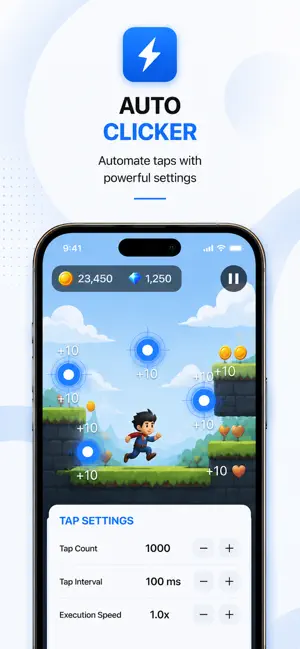
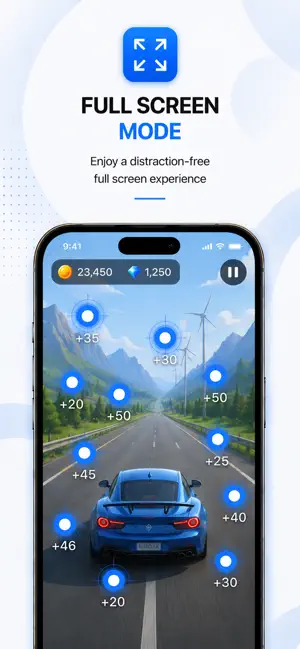
Auto Clicker: Automatic Tap+ is a productivity app designed to automate repetitive touch actions with customizable timing controls and precise automation settings. Configure tap count, tap interval, and execution speed to create consistent tap sessions through a simple and intuitive interface. Designed for productivity, accessibility, and repetitive workflows, the app helps simplify routine touch interactions while keeping all processing local on your device. No account is required, and your settings are automatically saved for future sessions. Key Features • Auto Clicker with customizable tap count, interval, and speed. • Smart Touch Assistant for simple and efficient automation. • Draggable touch target for accurate positioning. • Full Screen Mode for a distraction-free experience. • Tap Speed Tester with CPS measurement and score tracking. • Saved preferences stored locally on your device. • Optimized for iPhone and iPad. • Fast, responsive, and fully on-device. Important Notice Auto Clicker works only inside the application’s integrated browser. It does not control other applications, games, system functions, device settings, background processes, or the iOS Home Screen. All touch automation is performed exclusively within the application. Integrated Browser The application includes a built-in browser where touch automation can be performed. Position the touch target, configure automation settings, and start automation directly within the browser. The integrated browser supports address navigation, back and forward controls, refresh, and Full Screen Mode. Premium The free version includes Tap Speed Tester and basic application features. Premium unlocks the complete Auto Clicker experience, including: • Integrated Browser • Unlimited automation sessions • Advanced tap controls • Extended customization options Premium is available as Weekly, Monthly, Yearly, and Lifetime In-App Purchases. Premium purchases unlock additional functionality within the application only. No external content, online services, or server-based features are included. Subscription Information Payment will be charged to your Apple ID account at confirmation of purchase. Subscriptions renew automatically unless canceled at least 24 hours before the end of the current billing period. You can manage or cancel subscriptions at any time through Apple Account Settings. Lifetime Purchase is a one-time purchase and does not renew. Purchases are non-refundable except where required by Apple policy or applicable law. Privacy The application does not collect, store, transmit, or share personal information. No registration or login is required. All settings remain stored locally on your device. No backend servers, cloud synchronization, analytics, tracking technologies, or server-side storage are used. Privacy Policy: https://sites.google.com/view/32383 Terms of Use: https://sites.google.com/view/32802 End User License Agreement: https://sites.google.com/view/323902
Ratings & reviews
3.4
137 ratings
What’s new
Version 1.0.2 · Updated August 24, 2026
- Bug fixes and performance improvements.
App privacy
The developer, Muhammad Fatthullah Bin Iskandar, reported these privacy practices to Apple.
Data Used to Track You
The following data may be used to track you across apps and websites owned by other companies:
- Usage Data: Advertising Data
Data Not Linked to You
The following data, which may be collected but is not linked to your identity, may be used for the following purposes:
- Usage Data: Advertising Data
Used for: Third-Party Advertising
Alternatives to Auto Clicker™: Automatic Tap
Looking for apps like Auto Clicker™: Automatic Tap? Here are 6 similar apps on the App Store. The highest rated is Auto Clicker|Automatic Tap (4.6/5), and all 6 are free to download.
-
 Auto Clicker - Tap Assistant
4.4
-
 Auto Clicker・Automatic Tapper
4.2
-
 Auto Clicker - Click Assistant
4.0
-
 Auto Clicker:Automatic Tapper
4.3
-
 Automatic Tap & Auto Clicker
4.2
-
 Auto Clicker|Automatic Tap
4.5
| App | Rating | Price | Last updated | Compare |
|---|---|---|---|---|
| Auto Clicker™: Automatic Tap | 3.4 / 5 (137 ratings) | Free | August 24, 2026 | |
| Auto Clicker - Tap Assistant | 4.4 / 5 (2,134) | Free | May 20, 2025 | Compare |
| Auto Clicker・Automatic Tapper | 4.2 / 5 (976) | Free | Apr 1, 2025 | Compare |
| Auto Clicker - Click Assistant | 4.0 / 5 (9,535) | Free | Oct 16, 2025 | Compare |
| Auto Clicker:Automatic Tapper | 4.3 / 5 (10,558) | Free | Nov 28, 2024 | Compare |
| Automatic Tap & Auto Clicker | 4.3 / 5 (8) | Free | Sep 2, 2026 | Compare |
| Auto Clicker|Automatic Tap | 4.6 / 5 (20) | Free | Oct 6, 2026 | Compare |