

PocketDJ: Your Music, Your Way
Levi Schoen Music iPhoneiPadiPod touchMac
PocketDJ: Your Music, Your Way is a free Music app for iPhone and iPad by Levi Schoen. Requires iOS 18.0. Updated October 15, 2026.
- Price
- Free
- on the App Store
- Size
- 21 MB
- Age 9+
- Updated
- Oct 15
- 2026 · v1.0.2
Screenshots

About PocketDJ: Your Music, Your Way
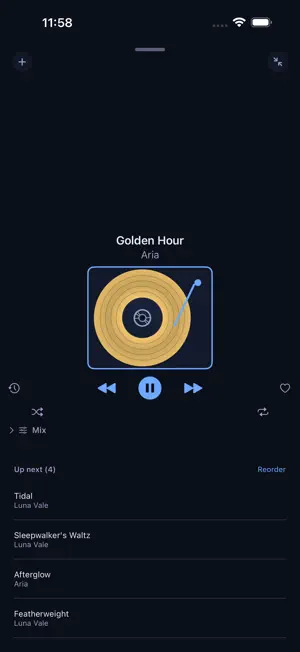
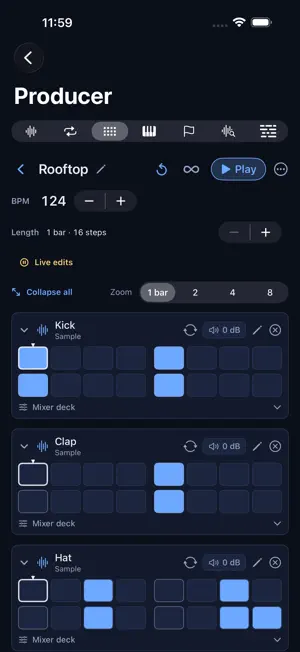
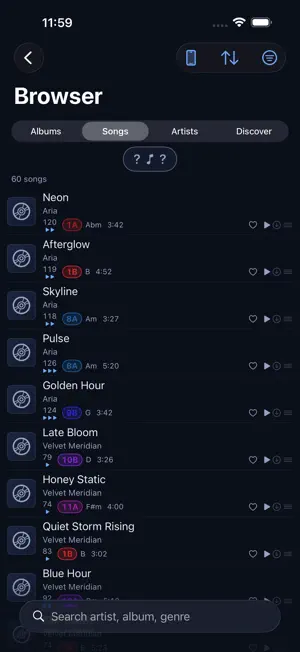
Your music. Two decks. One tap. PocketDJ turns the library you already own — vinyl you've digitized, your own files, your Apple Music — into a real DJ rig. Nothing is preloaded. Nothing leaves your device unless you ask. MIX Put a track on each deck and blend them for real: crossfade, tempo, pitch, a four-slot effects rack, cue points, loops, and stem control to pull the vocal out mid-phrase. PocketDJ reads every track's BPM and Camelot key, so you can see a harmonic match before you commit to it. Hit Auto-DJ and it runs the night on its own — step in whenever you want the wheel. Record the whole set while it plays. PRODUCER A real studio sitting next to your library, not a separate app to export into. Slice samples out of any track, build loops, program a 16-step sequencer, play software instruments, and arrange it all on a multitrack timeline with beat-matching. Split a song into stems, pull out its chords and lyrics, and sample what you find. NOW PLAYING One deck that follows you — iPhone, iPad, Mac, Apple TV, CarPlay, and Apple Vision Pro. Queue, transport, and up-next exactly where you left them, on whichever screen you pick up next. ORGANIZE Playlists for the quick stuff, reusable Pockets you build sets out of, and Setlists you can run start to finish. JUKEBOX Host a request line at a party. Guests scan a code and queue from your library — no app to download. RECOGNIZE Hear something good? Identify it and add it to your library on the spot. PocketDJ works with the music you bring to it. Add your own vinyl rips, your own digital files, or connect Apple Music for playback and search.
What’s new
Version 1.0.2 · Updated October 15, 2026
NEW GAME: IN THE POCKET PocketDJ picks three or four songs it thinks you'll play straight through, based on the time of day and (if you turn on places & trips) where you are. Play them without skipping to land the pocket, then type or dictate how it felt. Every round teaches it your taste. LISTENING POCKETS (OPT-IN) Find the runs of songs you play without skipping, and what they have in common: artists, genres, tempo, time of day, and anonymous places and trips. Off until you turn it on. MIX • Streaming mode: decks start playing while songs are still arriving, with a Buffering… badge • Stems now stream too, and switching them on never interrupts the music • Crate A/B: auto-mix between two collections • No more silence at the end of a song when the next one is still loading NOW PLAYING & CARPLAY • Stems in Now Playing • Stem Lock: lock your stem mix (which stems are on, muted and their levels) and it carries to every next song, with stems loading ahead of time • Next songs load ahead of time, so playback keeps going on a locked phone with a weak signal • The CarPlay and Lock Screen progress bar stays in sync ALSO • Collections list A–Z by default • Song details show analysed BPM, key and play count • Fixes for song captures and rips that got stuck
App privacy
The developer, Levi Schoen, reported these privacy practices to Apple.
Data Linked to You
The following data, which may be collected and linked to your identity, may be used for the following purposes:
- User Content: Other User Content, Audio Data
- Location: Coarse Location
- Contact Info: Name
- Search History: Search History
- Identifiers: User ID
- Usage Data: Product Interaction
- Diagnostics: Other Diagnostic Data
Used for: Analytics, Product Personalization, App Functionality
Data Not Linked to You
The following data, which may be collected but is not linked to your identity, may be used for the following purposes:
- User Content: Other User Content
Used for: App Functionality