

ParentBridge: Co-Parenting
Sami Mourched Productivity iPhoneiPadiPod touch
ParentBridge: Co-Parenting is a free Productivity app for iPhone and iPad by Sami Mourched. Requires iOS 15.1. Updated August 25, 2026.
- Price
- Free
- on the App Store
- Size
- 35 MB
- Age 4+
- Updated
- Aug 25
- 2026 · v1.0
Screenshots

About ParentBridge: Co-Parenting
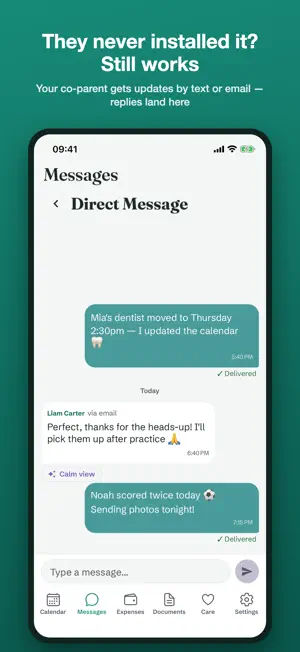
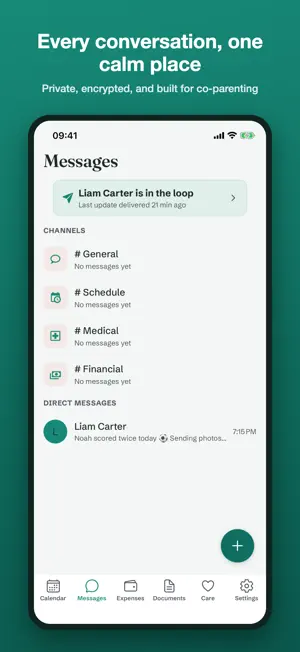
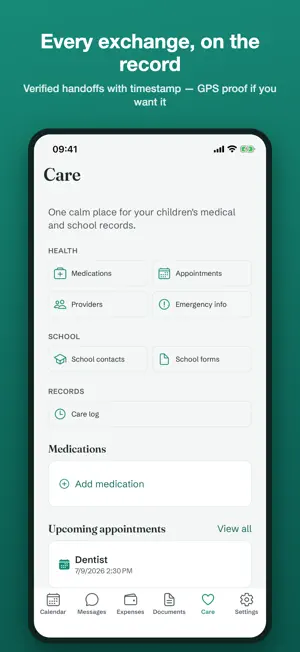
Get organized — even if your co-parent won't. ParentBridge keeps custody schedules, expenses, kids' health and school records, and communication in one calm, organized place. Unlike other co-parenting apps, it works even if your co-parent never installs an app: they stay in the loop by text message or email. WORKS WITHOUT THE OTHER PARENT • Share updates your co-parent receives as a text or email — no app needed on their side • Their email replies land right back in your chat • Delivery is tracked, so you know what reached them CUSTODY CALENDAR • Set your pattern once — alternating weeks, 2-2-3, holidays, school breaks • See whose day it is at a glance; request swaps with a tap • Handoff reminders with the exact exchange time VERIFIED HANDOFFS • Confirm each exchange with a timestamp — add location proof if you choose • Location is captured once, only when you tap, never in the background SHARED EXPENSES • Log expenses with receipt photos and your split ratio • Track reimbursements to settled — with payment confirmation KIDS' HEALTH & SCHOOL • Medications, allergies, providers, appointments, school contacts • Both homes see the same, current information CALMER MESSAGING • Private, encrypted messaging built for co-parenting • Calm View can rephrase a heated incoming message on your request COURT-READY RECORDS • Export expenses, messages, custody history, and verified handoffs as organized documents FREE TO START ParentBridge is free: custody calendar, messaging, expenses, health and school records, and 25 relay updates per month. ParentBridge Premium is an optional auto-renewing subscription ($9.99/month; price may vary by region). It unlocks unlimited relay updates including SMS, calendar sync (iCal), custody schedule templates, Calm View, GPS-verified handoffs, court-formatted exports, and payment confirmation. Payment is charged to your Apple ID at confirmation of purchase. The subscription renews automatically unless cancelled at least 24 hours before the end of the current period. Manage or cancel anytime in your Apple ID settings. Terms: https://parentbridge.space/terms Privacy: https://parentbridge.space/privacy Support: https://parentbridge.space/support
App privacy
The developer, Sami Mourched, reported these privacy practices to Apple.
Data Linked to You
The following data, which may be collected and linked to your identity, may be used for the following purposes:
- Purchases: Purchase History
- Identifiers: User ID
- Usage Data: Product Interaction
Used for: Analytics, App Functionality
Data Not Linked to You
The following data, which may be collected but is not linked to your identity, may be used for the following purposes:
- Diagnostics: Crash Data
Used for: Analytics, App Functionality
Alternatives to ParentBridge: Co-Parenting
Looking for apps like ParentBridge: Co-Parenting? Here are 6 similar apps on the App Store. The highest rated is Cal.com (4.8/5), and all 6 are free to download.
-
 Tempo Cloud
4.5
Tempo Cloud
4.5
-
 Cal.com
4.8
Cal.com
4.8
-
 Standard Notes
4.7
Standard Notes
4.7
-
 Proton Authenticator
4.4
Proton Authenticator
4.4
-
 Proton Calendar: Secure Events
4.1
Proton Calendar: Secure Events
4.1
-
 Proton Drive: Cloud Storage
4.1
Proton Drive: Cloud Storage
4.1
| App | Rating | Price | Last updated | Compare |
|---|---|---|---|---|
| ParentBridge: Co-Parenting | – | Free | August 25, 2026 | |
| Tempo Cloud | 4.5 / 5 (240) | Free | Mar 12, 2025 | Compare |
| Cal.com | 4.8 / 5 (175) | Free | Aug 4, 2026 | Compare |
| Standard Notes | 4.7 / 5 (3,733) | Free | Aug 18, 2026 | Compare |
| Proton Authenticator | 4.4 / 5 (266) | Free | Aug 26, 2026 | Compare |
| Proton Calendar: Secure Events | 4.1 / 5 (1,492) | Free | Jun 3, 2026 | Compare |
| Proton Drive: Cloud Storage | 4.1 / 5 (1,188) | Free | Sep 8, 2026 | Compare |