

Falcon File Manager
Paul Rowland Productivity iPhoneiPadiPod touchApple Watch
Falcon File Manager is a free Productivity app for iPhone and iPad by Paul Rowland. Rated 5.0/5 from 5 ratings. Requires iOS 16.4. Updated October 27, 2026.
- Rating
- 5.0
- 5 ratings
- Price
- Free
- on the App Store
- Size
- 178 MB
- Age 4+
- Updated
- Oct 27
- 2026 · v1.7.0
Screenshots


About Falcon File Manager
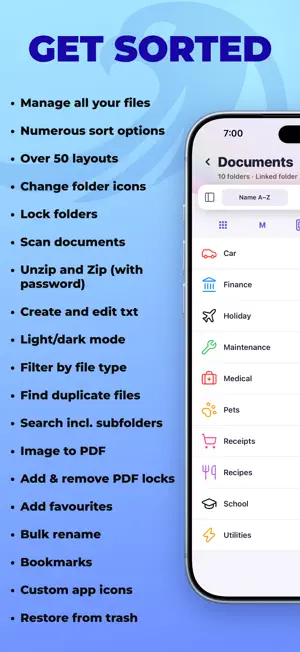
Falcon File Manager is a private home for your videos, music, photos, and files. Bring in your media or connect your cloud storage, organise it your way, and play almost anything in one app. ORGANISE EVERYTHING Sort your library into folders with different icons, and choose from over 50 layout options. Automatic bookmarks remember the last item you opened in each folder, so you can jump straight back in. SEARCH AND FAVOURITES Search by name within a folder or across your whole library, filter by file type, and mark anything as a favourite so it is always easy to find. VIDEO PLAYER A powerful built-in player with wide format support, including MP4, MOV, M4V, MKV, AVI, FLV, WMV, WebM, and TS. It plays HDR video, loads subtitles both embedded and as external SRT files, supports picture in picture, and remembers where you left off. MUSIC PLAYER Play your music and audiobooks in MP3, M4A, AAC, FLAC, WAV, and OGG. Build playlists, see album artwork, and keep playing in the background while you use other apps or lock your screen.Smart Resume picks long tracks back up exactly where you stopped, ideal for audiobooks and podcasts, while short tracks start from the beginning. Apple Music is also supported. PHOTOS AND LIVE PHOTOS Supports JPG, PNG, HEIC, AVIF, animated GIF, and WebP, including HDR photos. Live Photos play back with sound, and you can browse your Apple Photos library from inside the app. DOCUMENTS AND OTHER FILES Open PDFs and ePub books, read and edit text and code files including TXT, Markdown, JSON, XML, YAML, HTML, CSS, and JavaScript, and preview office documents such as Word, Excel, PowerPoint, and Pages. Scan documents and create new text files on the spot. Falcon stores and organises any file type at all, even ones it cannot open. LINKED FOLDERS AND CLOUD Link folders from the Files app, iCloud Drive, or a USB drive and work with them in place, with no need to import or copy. Connect your Dropbox, OneDrive, and Box accounts to browse, play and edit your files where they are. Everything stays where it is and in sync. PRIVATE Your files stay on your device, with no account, no tracking, and nothing synced to our servers. If you connect a cloud account, you sign in on the service's own page and your files travel directly between your device and that service. If you use iCloud Backup, your data is included in your own personal device backup, by your choice. Lock private folders with a PIN, Face ID, or Touch ID. CHOOSE YOUR LOOK Choose from over 35 themes, each with light and dark variants, or design your own using the built-in Theme Studio. Give any folder or your Home screen its own header photo, and switch the app icon to match your style. CAST TO YOUR TV Send your videos to the big screen with AirPlay, Screen Mirroring, Google Cast, and DLNA, with surround sound tracks playing through your TV or home theatre. Music can play to AirPlay too. If your TV supports one of these, you are ready to go. FILE TRANSFER Wi-Fi Transfer: move files between your iPhone or iPad and your computer through a web browser. No cable and no extra software needed. Network drive: open your folders on a Mac or PC like any other drive, or in apps that support WebDAV. Browse, copy, rename and delete straight from Finder or File Explorer. Portal Folder: link iPhones and iPads together to stream or download their contents onto another device over Wi-Fi. ZIP AND ARCHIVES Create zip files and lock them with a password, protected by AES-256, a strong and widely trusted encryption standard. You can also extract ZIP, RAR, and 7z archives, including password-protected ones. FIND DUPLICATES Track down duplicate files across your library, including folders you have linked. TRASH BIN Deleted items move to the Trash, so you can restore anything you remove by mistake, or empty it to reclaim space.
Ratings & reviews
5.0
5 ratings
What’s new
Version 1.7.0 · Updated October 27, 2026
MADE FOR IPHONE DUO - Falcon File Manager is now optimised for the new iPhone Duo. SIDE BY SIDE - On iPhone Duo and iPad, open a photo, video, document, book or text file in one half of the screen while your folders stay open in the other. Tap Side by Side at the top of the viewer, or on iPhone Duo simply start to fold the device to enter Side by Side. ALSO IN THIS UPDATE - On bigger screens held sideways, PDFs and books show two pages side by side, and the pages turn like paper. - Choose how pages turn: Scroll, Flip or Slide. PDFs and books each keep their own choice. - PDFs now open where you left off. - Make your own folders in the Apple Watch folder and organise your files how you like. - A new Music Library on your watch lists every song on it by album and artist, whichever folder it’s in. - Files in the Apple Watch folder now show their thumbnails on your iPhone. - Riptide, Retro, Silk and Flux themes have redesigned light versions. - Numerous bug fixes.
App privacy
The developer, Paul Rowland, reported these privacy practices to Apple.
Data Not Linked to You
The following data, which may be collected but is not linked to your identity, may be used for the following purposes:
- Diagnostics: Crash Data, Other Diagnostic Data
Used for: App Functionality
Alternatives to Falcon File Manager
Looking for apps like Falcon File Manager? Here are 6 similar apps on the App Store. The highest rated is Nodal: Private Offline AI Chat (5.0/5), and 5 of the 6 are free to download.
-
 Nodal: Private Offline AI Chat
5.0
Nodal: Private Offline AI Chat
5.0
-
 WishNote: Notes & To-Do
-
 Modo: Notes, Calendar, Widget
5.0
Modo: Notes, Calendar, Widget
5.0
-
 ETasks: To-Do List & Alarms
5.0
ETasks: To-Do List & Alarms
5.0
-
 PaperDraft
-
 Binly: Notes, Links & Files
4.4
Binly: Notes, Links & Files
4.4
| App | Rating | Price | Last updated | Compare |
|---|---|---|---|---|
| Falcon File Manager | 5.0 / 5 (5 ratings) | Free | October 27, 2026 | |
| Nodal: Private Offline AI Chat | 5.0 / 5 (5) | Free | Oct 25, 2026 | Compare |
| WishNote: Notes & To-Do | – | Free | Oct 22, 2026 | Compare |
| Modo: Notes, Calendar, Widget | 5.0 / 5 (5) | Free | Oct 28, 2026 | Compare |
| ETasks: To-Do List & Alarms | 5.0 / 5 (4) | Free | Oct 1, 2026 | Compare |
| PaperDraft | – | Free | Sep 26, 2026 | Compare |
| Binly: Notes, Links & Files | 4.4 / 5 (7) | 1.99 USD | Oct 19, 2026 | Compare |