

Share Me - Remote Assist
Elnatan Derech Utilities iPhoneiPadiPod touch
Share Me - Remote Assist is a free Utilities app for iPhone and iPad by Elnatan Derech. Requires iOS 16.0. Updated July 4, 2026.
- Price
- Free
- on the App Store
- Size
- 45 MB
- Age 4+
- Updated
- Jul 4
- 2026 · v3.3.1
Screenshots
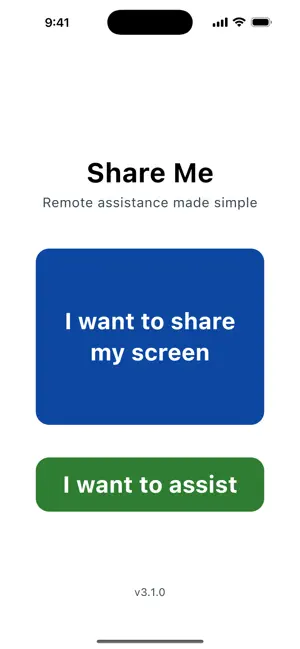


About Share Me - Remote Assist
Share Me - Remote assistance made simple Helping someone with their phone shouldn't mean "tap the blue button… no, the other one… now scroll up." With Share Me, they just show you. Share a screen in seconds with a simple code - no accounts, no sign-ups, no complicated setup. Whether you're helping a parent, supporting a customer, or getting help yourself, Share Me makes remote assistance fast, clear, and private. HOW IT WORKS 1. One person taps "I want to share my screen" and gets a 4-digit code. 2. The other taps "I want to assist" and enters the code. 3. That's it - you're connected and looking at the same screen, live. WHY YOU'LL LOVE IT • Instant connection - share a screen in seconds with a short code • No account required - open the app and go, nothing to sign up for • Works both ways - share your screen or assist someone else from the same app • Private and direct - a secure peer-to-peer connection between the two of you • Clean and simple - designed so anyone can use it, no tech skills needed PERFECT FOR • Helping family and friends with their phones - no more guessing what they see • Walking someone through settings, apps, or troubleshooting step by step • Getting help yourself when you're stuck • Remote support, tutoring, and showing someone how something's done SIMPLE BY DESIGN No menus to dig through. No jargon. Pick a role, share or enter a code, and you're connected. Share Me handles the rest so you can focus on the help - not the tech. Download Share Me and turn "let me try to explain it" into "let me just show you."
What’s new
Version 3.3.1 · Updated July 4, 2026
Share button added
App privacy
The developer, Elnatan Derech, reported these privacy practices to Apple.
Data Not Linked to You
The following data, which may be collected but is not linked to your identity, may be used for the following purposes:
- Identifiers: Device ID
- Usage Data: Product Interaction
- Diagnostics: Crash Data, Performance Data, Other Diagnostic Data
Used for: Analytics, App Functionality
Alternatives to Share Me - Remote Assist
Looking for apps like Share Me - Remote Assist? Here are 6 similar apps on the App Store. The highest rated is View My Screen (5.0/5), and all 6 are free to download.
-
 View My Screen
5.0
View My Screen
5.0
-
 ScreenCast: Share Files
-
 Camcast – Screen Sharing
-
 PulseMe: Heart Rate Tracker
4.5
PulseMe: Heart Rate Tracker
4.5
-
 Screen Mirroring: TV Cast ·
3.8
Screen Mirroring: TV Cast ·
3.8
-
 QuickRemote - Desktop Manager
1.0
QuickRemote - Desktop Manager
1.0
| App | Rating | Price | Last updated | Compare |
|---|---|---|---|---|
| Share Me - Remote Assist | – | Free | July 4, 2026 | |
| View My Screen | 5.0 / 5 (1) | Free | Jun 7, 2026 | Compare |
| ScreenCast: Share Files | – | Free | Mar 30, 2026 | Compare |
| Camcast – Screen Sharing | – | Free | Mar 15, 2026 | Compare |
| PulseMe: Heart Rate Tracker | 4.5 / 5 (15) | Free | Jul 8, 2026 | Compare |
| Screen Mirroring: TV Cast · | 3.8 / 5 (36) | Free | Sep 18, 2026 | Compare |
| QuickRemote - Desktop Manager | 1.0 / 5 (1) | Free | Aug 28, 2026 | Compare |