

Daylo - Video Diary Vlog Maker
HYOSEOK CHOI Photo & Video iPhoneiPadiPod touch
Daylo - Video Diary Vlog Maker is a free Photo & Video app for iPhone and iPad by HYOSEOK CHOI. Requires iOS 15.0. Updated November 14, 2026.
- Price
- Free
- on the App Store
- Size
- 166 MB
- Age 4+
- Updated
- Nov 14
- 2026 · v1.2.2
Screenshots
Save to Pinterest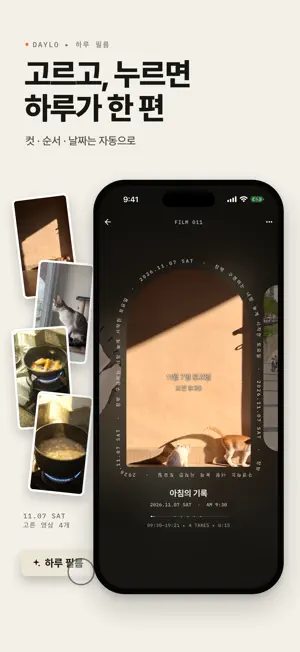


About Daylo - Video Diary Vlog Maker
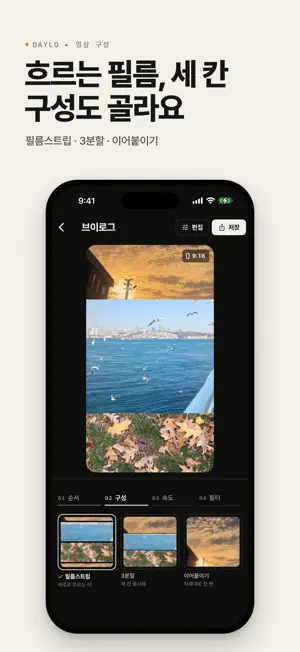
Easy videos. Days that last. All those clips you shot and never opened again — just pick them, and they become a film. Daylo turns the videos and photos in your library into a one-day vlog, then keeps each day on a calendar as your own video diary. Note: the app interface is currently in Korean. ■ Day Film — pick, tap, done Choose your clips and tap "Day Film" (하루 필름). They come together in the order you shot them. · The time of each scene sits in the center of the frame, and the date when the day changes · Cuts follow the beat of a matching track, or of your own music · Shaky or dark moments are skipped, but no clip you chose is dropped · You decide whether to open with a short montage You can edit the result by hand at any time. An optional scene-recognition model (about 390 MB) improves the results. Day Film works without it. ■ Open the app — today is already a film If you shot videos today, Daylo prepares a Day Film in advance. Tap it on the Today screen to watch. ■ Your past days, already on the calendar Allow photo library access and Daylo fills the calendar with day-by-day drafts from the last 3 months of your videos. Go back a month and it loads three more. Open a black-and-white draft and tap "Make it mine" — once you finish it, that day turns to color on the calendar. Only the dates of your videos are read. Everything happens on your phone. ■ Each day, hung in a frame Open a day and its video hangs in a frame — an arch, a rounded square or a circle, depending on the time of day you filmed. Add a one-line note and it flows along the frame. Not sure what to write? A question that fits the day starts you off. "Send this screen" shares the day as a single image. ■ A journal that builds up day by day Finished vlogs are saved to your photo library and stay on the in-app calendar. · Albums — bind a trip, a month, or your favorite days into one volume · Rewind — a week or a month in the best 2 seconds of each day, saved as one video (small Daylo mark; none with a subscription) If your videos carry location data, Daylo titles the day with its place and weather. ■ Three layouts · Sequence — one scene after another · Filmstrip — clips flowing vertically · Triple split — three scenes on one screen ■ Refine as much as you like · Auto captions — speech becomes captions (Korean · supported iPhones · 3 minutes a month without a subscription) · 27 film looks, with a "Recommend" button that picks one from the colors in your video (8 without a subscription) · 14 title cards and animated text (2 without a subscription) · Captions — choose a font and style, then drag into place · Scene effects — white flash, light, cinema bars, push-in · Scenes — reorder, split, trim, rotate, mute · Aspect ratios — 9:16, 4:5, 1:1, 4:3, 16:9 · Music — built-in tracks or your own audio ■ Your videos stay on your phone No sign-up. No ads. Editing, Day Film and auto captions all run on your device. Your videos are never uploaded. Only to show place and weather are a video's coordinates sent to the system geocoding service and a weather service (Open-Meteo). ■ With and without a subscription Day Film, editing and saving all work without a subscription, with no limit on quality, length or number of saves (up to 10 clips per vlog). A Daylo subscription (monthly or yearly) or the lifetime pass unlocks: · All 27 looks and all 14 title cards · A different look for each scene · Unlimited auto captions · Rewind videos saved without the mark · No limit on clips per vlog · New looks, cards and music every quarter Monthly and yearly subscriptions renew automatically unless cancelled at least 24 hours before the end of the current period. Manage or cancel at any time in your App Store account settings. The lifetime pass is a one-time purchase. Terms of Use: https://www.apple.com/legal/internet-services/itunes/dev/stdeula/ Privacy Policy: https://bald-crepe-4ca.notion.site/PRIVACY_POLICY-3ccfcd86cb438058a503feb74e5ad427
What’s new
Version 1.2.2 · Updated November 14, 2026
· Day Film — "AI Auto Edit", its four styles and Shorts are now one feature: Day Film. Pick your clips, tap once, and they become a film in the order you shot them, with the time of each scene in the center of the frame. It no longer needs a subscription and has no monthly limit. · Beat-matched cuts now work with your own music. · Your past days, already on the calendar — day-by-day drafts made from the last 3 months of videos in your library. Open a black-and-white draft and tap "Make it mine" to bring that day into color. · Days hung in frames — an arch, a rounded square or a circle, depending on the time of day. One-line notes flow along the frame, and a question that fits the day helps you start writing. · Anyone can now save weekly and monthly Rewind videos (small Daylo mark; no mark with a subscription). · "Send this screen" shares a day as a single image. · Higher export quality on iPhone, and much faster Filmstrip and Triple split exports. · Minor improvements.
App privacy
The developer, HYOSEOK CHOI, reported these privacy practices to Apple.
Data Not Linked to You
The following data, which may be collected but is not linked to your identity, may be used for the following purposes:
- Location: Precise Location
Used for: App Functionality
Alternatives to Daylo - Video Diary Vlog Maker
Looking for apps like Daylo - Video Diary Vlog Maker? Here are 6 similar apps on the App Store. The highest rated is Brooklyn AI Headshot Generator (4.0/5), and all 6 are free to download.
-
 브이로깅 - 브이로그 영상 일기
-
 Vlog Maker - Nowlog
-
 Photodesk: Photo Cleanup
-
 Caltype camera
-
 Threes: 3s × 3 Video Diary
-
 Brooklyn AI Headshot Generator
4.0
| App | Rating | Price | Last updated | Compare |
|---|---|---|---|---|
| Daylo - Video Diary Vlog Maker | – | Free | November 14, 2026 | |
| 브이로깅 - 브이로그 영상 일기 | – | Free | Aug 12, 2026 | Compare |
| Vlog Maker - Nowlog | – | Free | Nov 21, 2026 | Compare |
| Photodesk: Photo Cleanup | – | Free | Sep 27, 2026 | Compare |
| Caltype camera | – | Free | Nov 2, 2026 | Compare |
| Threes: 3s × 3 Video Diary | – | Free | Oct 8, 2026 | Compare |
| Brooklyn AI Headshot Generator | 4.0 / 5 (1) | Free | Oct 15, 2026 | Compare |