

Converty: Convert & Compress
VINCENZO GALLINA Utilities iPhoneiPadiPod touch
Converty: Convert & Compress is a free Utilities app for iPhone and iPad by VINCENZO GALLINA. Rated 5.0/5 from 2 ratings. Requires iOS 26.0.
- Rating
- 5.0
- 2 ratings
- Price
- Free
- on the App Store
- Size
- 11 MB
- Age 4+
- Updated
- Oct 15
- 2026 · v6.0
Screenshots

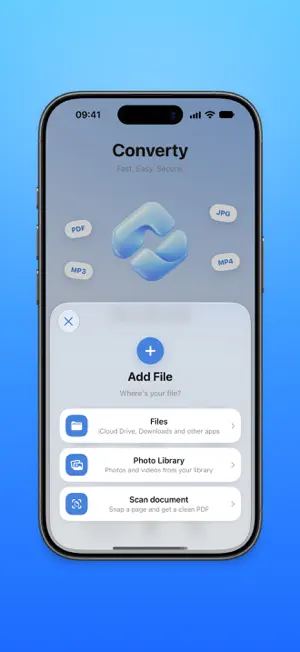

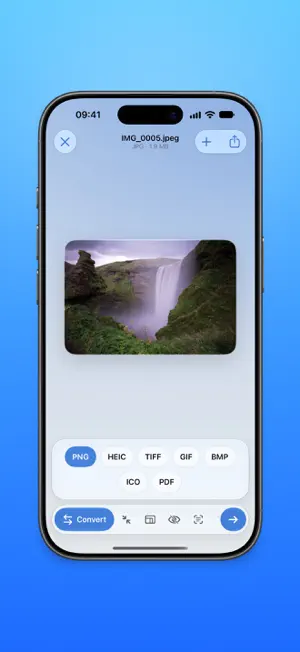
About Converty: Convert & Compress
Converty converts, compresses and fixes your files in a few taps — and it all happens right on your iPhone. No server uploads, no account, no ads: your documents never leave your device. CONVERT ANYTHING • Images between HEIC, JPG, PNG and more • Open RAW photos and AVIF images and convert them to JPG, PNG or HEIC • Documents and photos into PDF, in one tap • Turn a video into an animated GIF • Extract a video's audio track as M4A, WAV, AIFF, CAF or Apple Lossless — and open FLAC files • Convert from any app, straight from the share sheet SHRINK FILE SIZE • Compress in one tap: pick Low, Medium or High, with an estimate of the final size • Or set the quality, the exact size or the pixels yourself • Resize images to exactly the size you need VISUAL PDF TOOLS • Fill in PDF forms with iOS's native editor: fields, text and signature • Split, rotate, reorder and extract pages, visually • Merge several files into a single PDF SCAN AND RECOGNIZE • "Scan document" opens the camera straight away and names files from their content • Extract the text from a document or photo, then fix, copy or save it as .txt TRIM AND POLISH • Trim video and audio • Change video playback speed PRIVACY FIRST Converty works entirely offline. No file is ever sent to a server, no account is required, and we collect no data. Sensitive metadata (location, date, device) can be removed with a single tap. Designed for iOS with a glass design, light and dark mode, an accent color of your choice and 48 languages — following your iPhone's language automatically.
What’s new
Version 6.0 · Updated October 15, 2026
What's New in 6.0 • Everything on one screen — Open a file and pick what to do from the bar at the bottom: the options appear right above it and the result arrives on the same screen, ready to save. • Work right on the file — Tap a PDF's pages to split, rotate or extract them, and hold one to reorder; trim video and audio on the timeline; straighten documents by dragging their corners. • High-quality audio — Converted sound keeps its original quality, and you choose the bit rate and sample rate. • New icon — Two pieces turning into each other: Converty has a new face, in the Home too. • Save in one tap — Photos and videos go to your photo library, everything else to Files. And History now remembers every action. • Smoother and easier to read — Animations up to 120 Hz and text that follows the size you chose in Settings.
App privacy
The developer, VINCENZO GALLINA, reported these privacy practices to Apple.
Data Not Collected
The developer does not collect any data from this app.
Alternatives to Converty: Convert & Compress
Looking for apps like Converty: Convert & Compress? Here are 6 similar apps on the App Store. The highest rated is LongShot: Screenshot Stitch (5.0/5), and 5 of the 6 are free to download.
-
 unroll - Screenshot Stitch
-
 Inventory Scanner: Organizer
-
 Ambient Time
-
 LongShot: Screenshot Stitch
5.0
LongShot: Screenshot Stitch
5.0
-
 Flick: AI Remote for Claude
-
 ghleopeawr
| App | Rating | Price | Last updated | Compare |
|---|---|---|---|---|
| Converty: Convert & Compress | 5.0 / 5 (2 ratings) | Free | October 15, 2026 | |
| unroll - Screenshot Stitch | – | Free | Apr 3, 2026 | Compare |
| Inventory Scanner: Organizer | – | Free | Apr 16, 2026 | Compare |
| Ambient Time | – | Free | Aug 20, 2026 | Compare |
| LongShot: Screenshot Stitch | 5.0 / 5 (1) | Free | Jun 27, 2026 | Compare |
| Flick: AI Remote for Claude | – | Free | Jun 25, 2026 | Compare |
| ghleopeawr | – | 0.29 USD | Oct 5, 2026 | Compare |