

Videmus · QR & Barcode Scanner
Julian Schiemann Utilities iPhoneiPadiPod touch
Videmus · QR & Barcode Scanner is a free Utilities app for iPhone and iPad by Julian Schiemann. Requires iOS 17.0. Updated October 18, 2026.
- Price
- Free
- on the App Store
- Size
- 7 MB
- Age 4+
- Updated
- Oct 18
- 2026 · v2.3
Screenshots


About Videmus · QR & Barcode Scanner
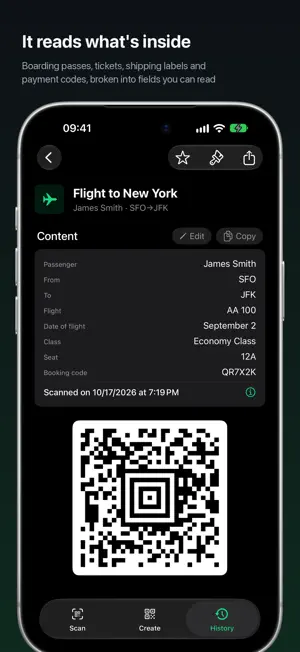
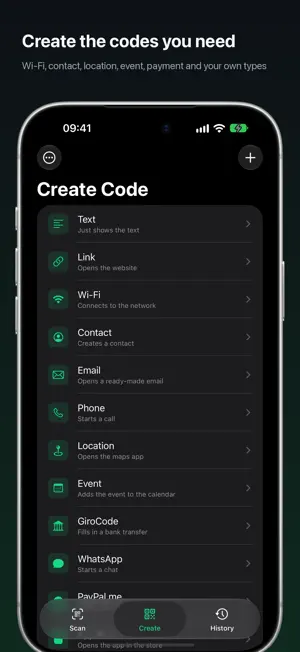
Scan any code – and create your own, with logo, colors and your design. Videmus checks by itself that your code stays readable everywhere. No full-screen ad after every scan, no tracking, no forced cloud. Videmus recognizes instantly, shows the result, and connects you to Wi-Fi networks with a single tap. SCANNING • QR codes and all common barcodes (EAN, Code 128, Data Matrix, Aztec …) • Wi-Fi 1-tap connect: scan SSID + password, connect right away • Scan from photos: a QR from a screenshot or your library • Zoom by pinch or slider, automatic lens switching • Several codes in view? You choose which one you mean UNDERSTANDING THE CONTENT Videmus breaks the code into labelled fields instead of one long string: retail and logistics codes (GS1, Digital Link), payment codes worldwide, boarding passes, rail tickets and driving licences. DHL and UPS shipments can be tracked directly. OPEN IT WHEREVER YOU LIKE Next to the open button sits a menu with the alternatives you have installed – browsers, map apps, wallets. You add your own app by pasting a link from it. CREATING CODES Every type has a form with named fields: link, text, Wi-Fi, contact, event, place, payment – or a type you define yourself. Colours, logo, background and frame shape the code; Videmus then scans it back itself and warns you when it is no longer reliably readable. SHARE, SAVE, PRINT Save to Photos, share and print – all natively through the iOS share sheet. As PNG, and for QR codes also as vector PDF. HISTORY Searchable, with favourites and an optional Face ID lock. Backup to your private iCloud, can be turned off anytime. PRIVACY No tracking, no analytics, no account. Your scans stay on the device and, if you use the backup, in your private iCloud. Only two things go online: for product barcodes, the barcode number goes to open product databases such as Open Food Facts, and once a day the app fetches a small list of our own apps and articles from iosapps.de – no identifier, both can be turned off. FREE Videmus is free – no purchases and no paid ads.
What’s new
Version 2.3 · Updated October 18, 2026
• Large text: readable and usable up to the largest size – icons move into the title line, buttons grow with the text. • Faster history search, even with thousands of entries. • More security: the Face ID lock closes open sheets, suspicious links never open automatically, auto-copied content expires after two minutes. • Easier to read: dark text on green buttons. • Amounts show their currency in the title, product names no longer appear twice. • More accurate privacy texts and a shorter introduction.
App privacy
The developer, Julian Schiemann, reported these privacy practices to Apple.
Data Not Collected
The developer does not collect any data from this app.
Alternatives to Videmus · QR & Barcode Scanner
Looking for apps like Videmus · QR & Barcode Scanner? Here are 6 similar apps on the App Store. The highest rated is QRCode ScanStudio: PDF Lab (5.0/5), and all 6 are free to download.
-
 QR Scanner Pro Scan
-
 Scanly: QR & Barcode Scanner
-
 Simple QR Code Generator Pro
-
 QReative: QR Code Scanner
-
 QRfiy
-
 QRCode ScanStudio: PDF Lab
5.0
| App | Rating | Price | Last updated | Compare |
|---|---|---|---|---|
| Videmus · QR & Barcode Scanner | – | Free | October 18, 2026 | |
| QR Scanner Pro Scan | – | Free | Oct 2, 2026 | Compare |
| Scanly: QR & Barcode Scanner | – | Free | Sep 23, 2026 | Compare |
| Simple QR Code Generator Pro | – | Free | Mar 26, 2026 | Compare |
| QReative: QR Code Scanner | – | Free | Jul 11, 2026 | Compare |
| QRfiy | – | Free | Jun 15, 2025 | Compare |
| QRCode ScanStudio: PDF Lab | 5.0 / 5 (1) | Free | Mar 30, 2026 | Compare |