

IDFA & Device Stats
James Baker Utilities iPhoneiPadiPod touch
IDFA & Device Stats is a free Utilities app for iPhone and iPad by James Baker. Requires iOS 16.0. Updated July 22, 2026.
- Price
- Free
- on the App Store
- Size
- 6 MB
- Age 4+
- Updated
- Jul 22
- 2026 · v1.3
Screenshots


About IDFA & Device Stats
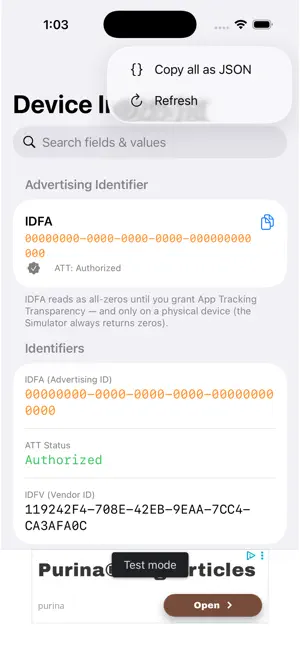
Device Inspector gives you a complete, real-time view of your iPhone or iPad's hidden configuration — the same data that ad networks, analytics SDKs, and diagnostic tools read every time you open an app. WHAT YOU CAN SEE • Advertising Identifier (IDFA) — your device's unique ad ID, shown clearly with its current status (zeroed-out when tracking is off) • App Tracking Transparency (ATT) status — Authorized, Denied, Restricted, or Not Determined • Device model, OS version, build number, and kernel info • Screen resolution, scale factor, and display metrics • Locale, region, preferred languages, and timezone • Network interface details (Wi-Fi, Cellular, VPN) • Carrier name, MCC/MNC, and radio access technology • Battery level, charging state, and low-power mode • Processor count, memory, and thermal state • Push notification permission status • And more — updated every time you pull to refresh WHY IT'S USEFUL If you work in mobile advertising, analytics, or app development, knowing exactly what your device reports is essential for debugging attribution, verifying ATT consent flows, or checking that your privacy controls are working correctly. Device Inspector shows you precisely what the OS exposes — no guessing. PRIVACY FIRST Everything you see stays on your device. No data is collected, no network requests are made (other than loading ads via AdMob), and no account is required. The app is open source. NOTES • IDFA reads as all-zeros until you grant App Tracking Transparency permission. • The iOS Simulator always returns zeros for IDFA — use a real device. • Tap any row to copy its value to the clipboard. • Use the search bar to filter across all fields instantly.
What’s new
Version 1.3 · Updated July 22, 2026
Under-the-hood improvements plus anonymous feature-usage insights (which sections you check, never your identifiers) to guide what we build next.
App privacy
The developer, James Baker, reported these privacy practices to Apple.
Data Used to Track You
The following data may be used to track you across apps and websites owned by other companies:
- Identifiers: Device ID
- Usage Data: Advertising Data
Data Not Linked to You
The following data, which may be collected but is not linked to your identity, may be used for the following purposes:
- Identifiers: Device ID
- Usage Data: Advertising Data, Product Interaction
Used for: Third-Party Advertising, Analytics
Alternatives to IDFA & Device Stats
Looking for apps like IDFA & Device Stats? Here are 6 similar apps on the App Store. The highest rated is Skip Notes (5.0/5), and all 6 are free to download.
-
 mailin
-
 Network Connect
-
 Skip Notes
5.0
-
 Pandora's Box: Track App Usage
5.0
-
 BaseStats: Phone & Device Info
4.2
-
 RocketTimer with announcements
| App | Rating | Price | Last updated | Compare |
|---|---|---|---|---|
| IDFA & Device Stats | – | Free | July 22, 2026 | |
| mailin | – | Free | Oct 18, 2026 | Compare |
| Network Connect | – | Free | May 12, 2026 | Compare |
| Skip Notes | 5.0 / 5 (1) | Free | Apr 24, 2026 | Compare |
| Pandora's Box: Track App Usage | 5.0 / 5 (5) | Free | Apr 1, 2025 | Compare |
| BaseStats: Phone & Device Info | 4.3 / 5 (4) | Free | Aug 3, 2026 | Compare |
| RocketTimer with announcements | – | Free | Aug 26, 2024 | Compare |