

CrewHour: Time & Attendance
Crew Hour LLC Business iPhoneiPadiPod touch
CrewHour: Time & Attendance is a free Business app for iPhone and iPad by Crew Hour LLC. Requires iOS 15.1. Updated October 29, 2026.
- Price
- Free
- on the App Store
- Size
- 27 MB
- Age 4+
- Updated
- Oct 29
- 2026 · v1.0.7
Screenshots
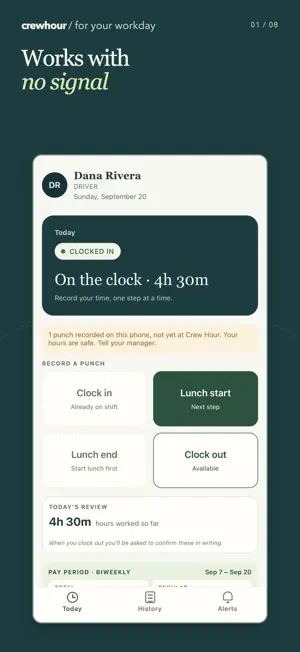


About CrewHour: Time & Attendance
Your hours, clearly recorded. Fewer surprises at payroll. CrewHour helps hourly employees record shifts and breaks, review their hours, and request corrections while the workday is still fresh. Built for California hourly crews, with English and Spanish workflows. RECORD YOUR WORKDAY Clock in and out, record lunch, and review your current shift. See available actions and clear confirmation of the time you recorded. KEEP YOUR HOURS CLEAR Review your timecard and pay-period hours. Missed a punch or noticed a mistake? Send a correction request to your manager. Corrections retain the original punch and a history of the change. CAPTURE TIME WHEN THE SIGNAL DROPS Supported offline punches are saved on your device and wait to sync when connectivity and service availability allow. The original capture time remains part of the record. RECORD BREAK DETAILS Follow the prompts to report meal and rest-break details. Your employer reviews exceptions and any required determinations in CrewHour; the app does not make those decisions for them. CONNECTED TO YOUR TEAM Phone and shared-kiosk punches feed the same time record. Managers and HR use the CrewHour web app to see approaching meal deadlines, review exceptions, approve corrections, and export hours through ADP paydata or CrewHour CSV. Your payroll provider calculates pay. LOCATION AT PUNCH TIME Your employer may require workplace location checks. CrewHour provides guidance when GPS is unavailable or a punch is outside an allowed workplace. Location is captured with punches, not as a background route. CrewHour requires an employer-provided account. Ask your employer for your company sign-in details, employee ID, and PIN. Downloading the app does not create a company account. CrewHour supports timekeeping and record review. It does not provide legal advice or guarantee compliance.
What’s new
Version 1.0.7 · Updated October 29, 2026
HR-assigned PINs must now be changed by the driver at first sign-in. Minor text fixes.
App privacy
The developer, Crew Hour LLC, reported these privacy practices to Apple.
Data Linked to You
The following data, which may be collected and linked to your identity, may be used for the following purposes:
- Location: Precise Location
- User Content: Photos or Videos
- Identifiers: User ID
Used for: App Functionality
Data Not Linked to You
The following data, which may be collected but is not linked to your identity, may be used for the following purposes:
- Diagnostics: Crash Data, Performance Data
Used for: App Functionality