

FocusTag: ADHD Pomodoro Timer
Nghia Nguyen Phu Productivity iPhoneiPadiPod touch
FocusTag: ADHD Pomodoro Timer is a free Productivity app for iPhone and iPad by Nghia Nguyen Phu. Requires iOS 18.0. Updated October 16, 2026.
- Price
- Free
- on the App Store
- Size
- 52 MB
- Age 4+
- Updated
- Oct 16
- 2026 · v1.3
Screenshots



About FocusTag: ADHD Pomodoro Timer
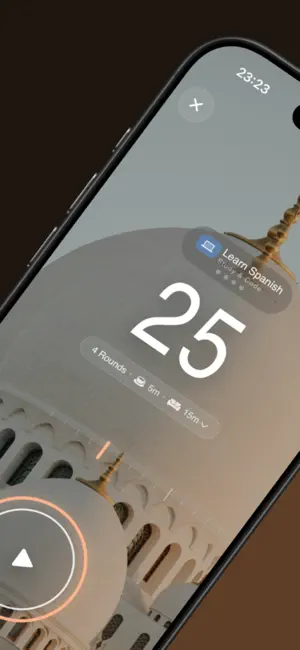
Beat distractions, conquer phone addiction, and get into deep work. FocusTag combines strict Screen Time app blocking, ADHD-friendly Pomodoro intervals, and visual color-coded task tags into one seamless focus flow. Whether you're studying for exams, coding, or managing ADHD executive dysfunction, FocusTag provides the digital friction and visual structure you need to stop scrolling and start finishing. KEY FEATURES VISUAL TASK MANAGEMENT (FOCUSTAGS) • Structure your day by grouping tasks under visual, color-coded FocusTags. • Set dedicated presets for work, study, reading, and daily routines. • Switch contexts smoothly without mental fatigue or cognitive overload. SMART ON-DEVICE APP BLOCKING • Custom App Shields: Select exactly which distracting apps to block for each specific task. • Native Screen Time Integration: Powered directly by Apple's Screen Time framework for minimal battery use. • Zero Distractions: Keep social media, games, and notifications locked until your focus session ends. ADAPTABLE POMODORO & DEEP WORK TIMERS • Flexible Intervals: Classic 25/5 Pomodoro or custom deep work blocks tailored to your energy levels. • ADHD-Friendly Break Alerts: Distinct completion chimes and ambient soundscapes to support smooth transitions. • One-Tap Focus: Start or pause your focus sessions instantly. LOCK SCREEN & LIVE ACTIVITIES • Track your remaining time, active task, and tag directly on the Lock Screen and Dynamic Island. • Check your progress at a glance without unlocking your phone and risking distraction. INSIGHTFUL STATISTICS & TRENDS • Visual charts breaking down your focus time daily, weekly, and monthly. • See exactly how much time you dedicate to each FocusTag and project. • Compare planned targets against actual focus time to build long-term consistency. PRIVACY FIRST FocusTag operates entirely on your device using Apple's native Screen Time API. We do not collect, track, or share your app usage, browsing activity, or personal data. IDEAL FOR: • Individuals with ADHD seeking visual structure and frictionless routines • Students managing multiple subjects and study schedules • Remote workers, developers, and writers requiring uninterrupted deep work • Anyone looking to reduce screen time and build mindful digital habits Take control of your focus and achieve your daily targets with FocusTag. Terms of Use: https://www.apple.com/legal/internet-services/itunes/dev/stdeula/
What’s new
Version 1.3 · Updated October 16, 2026
• Hard Mode: Keep apps continuously blocked until the session ends and prevent skipping break phase. • Rotate Desk Mode: Rotate your device to landscape for a dedicated desk clock and timer display.
App privacy
The developer, Nghia Nguyen Phu, reported these privacy practices to Apple.
Data Not Linked to You
The following data, which may be collected but is not linked to your identity, may be used for the following purposes:
- Purchases: Purchase History
- Identifiers: Device ID
- Usage Data: Product Interaction
- Diagnostics: Crash Data, Performance Data, Other Diagnostic Data
Used for: Analytics
Alternatives to FocusTag: ADHD Pomodoro Timer
Looking for apps like FocusTag: ADHD Pomodoro Timer? Here are 6 similar apps on the App Store. The highest rated is Pomodoro Timer - SaintFocus (5.0/5), and all 6 are free to download.
-
 Rice Pop: Visual Study Timer
-
 Stow Timer | Focus Timer
-
 Study Organizer For Students
-
 StudyQuest Focus Timer
-
 Pomodoro Timer - SaintFocus
5.0
Pomodoro Timer - SaintFocus
5.0
-
 insighto 洞见笔记-卢曼卡片·待办清单·AI洞察
| App | Rating | Price | Last updated | Compare |
|---|---|---|---|---|
| FocusTag: ADHD Pomodoro Timer | – | Free | October 16, 2026 | |
| Rice Pop: Visual Study Timer | – | Free | Aug 3, 2026 | Compare |
| Stow Timer | Focus Timer | – | Free | May 15, 2026 | Compare |
| Study Organizer For Students | – | Free | Sep 30, 2026 | Compare |
| StudyQuest Focus Timer | – | Free | Feb 4, 2026 | Compare |
| Pomodoro Timer - SaintFocus | 5.0 / 5 (2) | Free | Jun 28, 2026 | Compare |
| insighto 洞见笔记-卢曼卡片·待办清单·AI洞察 | – | Free | Oct 23, 2026 | Compare |