

StashPin
Tanner Bair Productivity iPhoneiPadiPod touch
StashPin is a free Productivity app for iPhone and iPad by Tanner Bair. Requires iOS 17.0. Updated August 28, 2026.
- Price
- Free
- on the App Store
- Size
- 12 MB
- Age 4+
- Updated
- Aug 28
- 2026 · v1.4
Screenshots


About StashPin
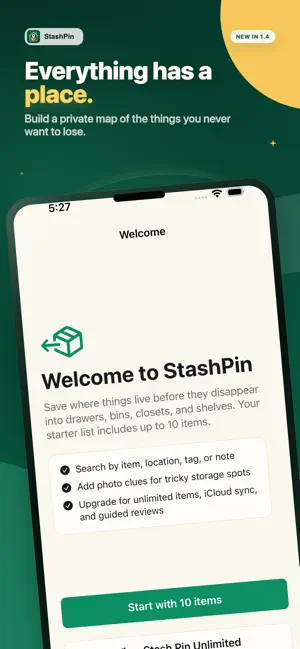
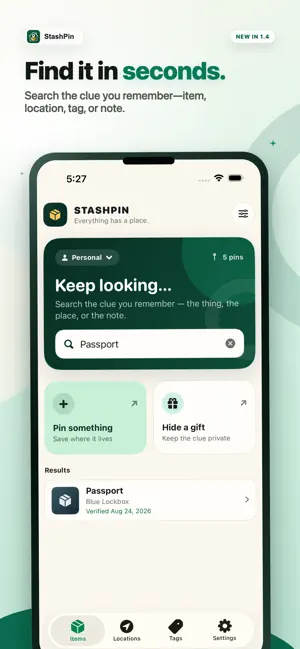
Where did I put the passport? Which bin has the camping stove? StashPin remembers, so you don't have to open every drawer and box. Save an item and the exact place you put it. Add a photo clue, note, tags, or alternate names when they help. When you need the item again, search by any of those details. That item might be a passport, spare key, hidden gift, tool, supply bin, or anything else you put away for later. What you can do: • Save the exact drawer, closet, shelf, cabinet, bin, or box • Add photo clues when words are not enough • Keep a location history when something moves • Browse everything by location or tag • Hide private items from your usual lists • Recover items from Recently Deleted • Export your data for backup The free version holds up to 10 active items. You can also make manual lists and set reminders. Personal removes the item limit. It adds optional private iCloud Sync for your Personal items and photo clues. You can also turn on weekly or monthly Smart Check-ins to see what may need a quick review. The Household plan gives you a separate inventory to share with people you invite. Create and manage one Household, or join multiple Households that others share with you. Copy selected Personal items, manage members, and export shared data. The activity history records basic changes without including notes or photo content. Apple Family Sharing can share the Household subscription. It does not share anyone's inventory. Each person still needs a separate StashPin invitation. StashPin keeps a local copy on your device. You don't need a StashPin account, and there are no ads or tracking. If you turn on Personal iCloud Sync, StashPin uses your private CloudKit database. StashPin does not send your saved content to servers run by the developer. Terms of Use (EULA): https://www.apple.com/legal/internet-services/itunes/dev/stdeula/
What’s new
Version 1.4 · Updated August 28, 2026
StashPin 1.4 has a redesigned home and a faster way to save where things belong. • The new home layout puts search, spaces, quick actions, important items, and recent pins where they are easier to scan. • Save an item as soon as its name and location are entered. Add photos, notes, tags, alternate names, privacy, importance, and reminders only when you need them. • Unlimited members get Keep It Current, a guided review for confirming locations, recording moves, or saving a check for later. • After creating a Household, go straight to inviting people or copying selected Personal items. Apple Family Sharing can share the Household subscription. A separate StashPin invitation is still required to share Household inventory.
App privacy
The developer, Tanner Bair, reported these privacy practices to Apple.
Data Not Collected
The developer does not collect any data from this app.
Alternatives to StashPin
Looking for apps like StashPin? Here are 6 similar apps on the App Store. The highest rated is LastPage: Save Links with AI (5.0/5), and all 6 are free to download.
-
 LastPage: Save Links with AI
5.0
LastPage: Save Links with AI
5.0
-
 WhereBox – Home Inventory
5.0
WhereBox – Home Inventory
5.0
-
 Notes and Folders - Notepad
4.5
Notes and Folders - Notepad
4.5
-
 PDF Scanner: Document CAM Scan
4.5
PDF Scanner: Document CAM Scan
4.5
-
 Grafana
4.7
Grafana
4.7
-
 Zoho Calendar
3.6
Zoho Calendar
3.6
| App | Rating | Price | Last updated | Compare |
|---|---|---|---|---|
| StashPin | – | Free | August 28, 2026 | |
| LastPage: Save Links with AI | 5.0 / 5 (2) | Free | Apr 16, 2026 | Compare |
| WhereBox – Home Inventory | 5.0 / 5 (3) | Free | Mar 18, 2026 | Compare |
| Notes and Folders - Notepad | 4.5 / 5 (302) | Free | Oct 21, 2026 | Compare |
| PDF Scanner: Document CAM Scan | 4.5 / 5 (13) | Free | Mar 1, 2026 | Compare |
| Grafana | 4.7 / 5 (65) | Free | Oct 27, 2026 | Compare |
| Zoho Calendar | 3.6 / 5 (5) | Free | Sep 9, 2026 | Compare |
Compare StashPin with the top alternatives: ratings, updates, ASO score and keyword gaps →