

CareDial
Roderick Africa Utilities iPhoneiPadiPod touch
CareDial is a free Utilities app for iPhone and iPad by Roderick Africa. Requires iOS 17.6. Updated July 30, 2026.
- Price
- Free
- on the App Store
- Size
- 1 MB
- Age 4+
- Updated
- Jul 30
- 2026 · v1.4
Screenshots


About CareDial
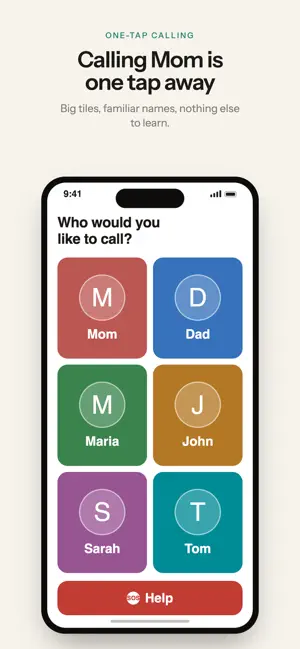
CareDial gives an aging parent or grandparent the simplest possible phone experience: big photo tiles, one tap to call. No menus, no passwords, nothing to get lost in. You set it up and manage it from your own iPhone. FOR THE FAMILY MEMBER'S PHONE • Up to 6 large contact tiles with photos and colors • One tap calls the person. That's it • Optional red Help button that calls a contact you choose • Optional FaceTime and text choices on each tile (off unless you turn them on) • Nothing to configure, delete, or break. The phone simply shows the people who matter FOR YOUR PHONE (THE CAREGIVER) • Add, edit, and reorder their contacts from anywhere • Changes appear on their phone automatically • Turn FaceTime and texting on or off for them • Set up the Help button and decide whether it calls immediately or asks first • Pair once with a 6-digit code. No accounts to create, no passwords to remember WHAT YOU NEED CareDial connects two iPhones: yours and your family member's. • Two iPhones, each signed in to its own Apple Account. Two phones sharing one Apple Account can't connect — separate accounts are what keep each family's contacts private • iOS 17.6 or later on both phones • iCloud Drive turned on for both (Settings > your name > iCloud) • An internet connection during setup HOW SETUP WORKS 1. Install CareDial on both phones 2. On your phone, choose "I'm the caregiver." You'll get a 6-digit code 3. On your family member's phone, choose "This is a family member's phone" and enter the code 4. Add their contacts from your phone. They appear on theirs automatically Setup takes about five minutes. After that, you manage everything from your own phone. CareDial is free. PRIVACY Contacts are stored in your own iCloud account and shared only with the phone you pair. CareDial has no servers and no sign-ups, and it collects nothing.
What’s new
Version 1.4 · Updated July 30, 2026
CareDial has a new look. • Contact tiles are bigger and easier to tell apart. • Tapping a contact now shows large Call, FaceTime and Text buttons instead of a small menu. • The manager screen shows when your changes last synced, so you can tell they reached the other phone. • When setting up a phone you now choose how it will be used and then confirm, so a stray tap can't set the wrong one. Your contacts, tile colors and Help button carry over. There's nothing to set up again.
App privacy
The developer, Roderick Africa, reported these privacy practices to Apple.
Data Not Collected
The developer does not collect any data from this app.
Alternatives to CareDial
Looking for apps like CareDial? Here are 6 similar apps on the App Store. The highest rated is Fast Speed Dial (3.4/5), and all 6 are free to download.
-
 Swipe Dialer
-
 PhotoCaller: Call by Photo
-
 Speed Dial
1.9
-
 Renovio - Renovation Calc
-
 HD Wallpapers 4K Backgrounds
-
 Fast Speed Dial
3.4
| App | Rating | Price | Last updated | Compare |
|---|---|---|---|---|
| CareDial | – | Free | July 30, 2026 | |
| Swipe Dialer | – | Free | May 27, 2026 | Compare |
| PhotoCaller: Call by Photo | – | Free | Jul 1, 2026 | Compare |
| Speed Dial | 1.9 / 5 (14) | Free | Nov 26, 2023 | Compare |
| Renovio - Renovation Calc | – | Free | Sep 24, 2026 | Compare |
| HD Wallpapers 4K Backgrounds | – | Free | Sep 4, 2024 | Compare |
| Fast Speed Dial | 3.4 / 5 (44) | Free | Oct 13, 2026 | Compare |
Compare CareDial with the top alternatives: ratings, updates, ASO score and keyword gaps →