

KIDaccount Campus
Robert Dickey Education iPhoneiPadiPod touch
KIDaccount Campus is a free Education app for iPhone and iPad by Robert Dickey. Rated 5.0/5 from 2 ratings. Requires iOS 15.0. Updated August 20, 2026.
- Rating
- 5.0
- 2 ratings
- Price
- Free
- on the App Store
- Size
- 12 MB
- Age 4+
- Updated
- Aug 20
- 2026 · v1.3.0
Screenshots



About KIDaccount Campus
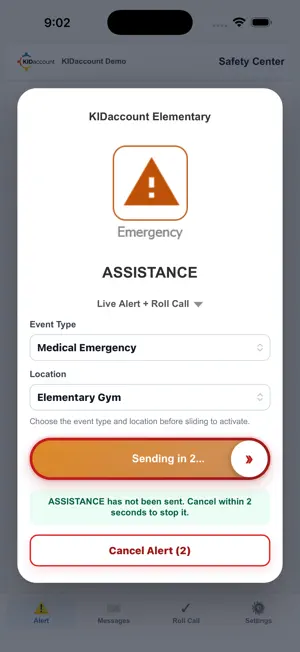
KIDaccount Campus brings school safety alerts, drills, communication, and accountability together in one staff app. It works with the KIDaccount safety system used by participating schools and districts. When normal school operations are disrupted, Campus gives staff clear event information and familiar tools to help them respond, communicate, and account for themselves and their students. Key Features: • Safety Alerts and Drills: Start district-configured Hold, Secure, Lockdown, Evacuate, Shelter, and Assistance events. • Confirmation Countdown: A brief cancellation period helps prevent accidental alert activation. • Staff Safety Status: During an active event, quickly report “I’m Safe” or “I Need Help.” • Safety Messaging: Communicate with school staff through event-specific message threads. • Classroom Roll Call: Account for assigned students and report classroom status during an active event. • Real-Time Updates: Receive push notifications, event instructions, and safety status changes. • Secure Sign-In: Access Campus using a Google or Microsoft account approved by your school or district. Available actions, procedures, and access are configured by each participating school or district. A KIDaccount-enabled school or district account is required. KIDaccount Campus supports your school’s established safety plan. It does not replace emergency services, building alarms, or district emergency procedures. Always follow your school’s instructions and contact emergency services when appropriate.
What’s new
Version 1.3.0 · Updated August 20, 2026
1.3.0 - Added Critical Alert Support - Added Additional PUSH notification alert sounds.
App privacy
The developer, Robert Dickey, reported these privacy practices to Apple.
Data Linked to You
The following data, which may be collected and linked to your identity, may be used for the following purposes:
- Contact Info: Email Address, Name
- User Content: Emails or Text Messages, Other User Content
- Identifiers: User ID, Device ID
- Usage Data: Product Interaction, Other Usage Data
- Other Data: Other Data Types
Used for: App Functionality
Alternatives to KIDaccount Campus
Looking for apps like KIDaccount Campus? Here are 6 similar apps on the App Store. The highest rated is Ottumwa Schools Connect (5.0/5), and all 6 are free to download.
-
 Moberly School District
2.6
Moberly School District
2.6
-
 Ottumwa Schools Connect
5.0
Ottumwa Schools Connect
5.0
-
 InstaSub
4.5
InstaSub
4.5
-
 Wapello Life
3.0
Wapello Life
3.0
-
 Randolph County Sheriff MO
-
 Farmington R-7 Schools
2.4
Farmington R-7 Schools
2.4
| App | Rating | Price | Last updated | Compare |
|---|---|---|---|---|
| KIDaccount Campus | 5.0 / 5 (2 ratings) | Free | August 20, 2026 | |
| Moberly School District | 2.6 / 5 (8) | Free | Oct 20, 2026 | Compare |
| Ottumwa Schools Connect | 5.0 / 5 (6) | Free | Oct 18, 2026 | Compare |
| InstaSub | 4.5 / 5 (259) | Free | May 20, 2025 | Compare |
| Wapello Life | 3.0 / 5 (2) | Free | Dec 11, 2025 | Compare |
| Randolph County Sheriff MO | – | Free | Jul 30, 2025 | Compare |
| Farmington R-7 Schools | 2.4 / 5 (17) | Free | Oct 21, 2026 | Compare |
Compare KIDaccount Campus with the top alternatives: ratings, updates, ASO score and keyword gaps →