

Baby Tracker: Plumi
Soner Eker Health & Fitness iPhoneiPadiPod touchApple Watch
Baby Tracker: Plumi is a free Health & Fitness app for iPhone and iPad by Soner Eker. Rated 5.0/5 from 1 ratings. Requires iOS 17.0.
- Rating
- 5.0
- 1 ratings
- Price
- Free
- on the App Store
- Size
- 57 MB
- Age 4+
- Updated
- Oct 21
- 2026 · v1.3.1
Screenshots

About Baby Tracker: Plumi
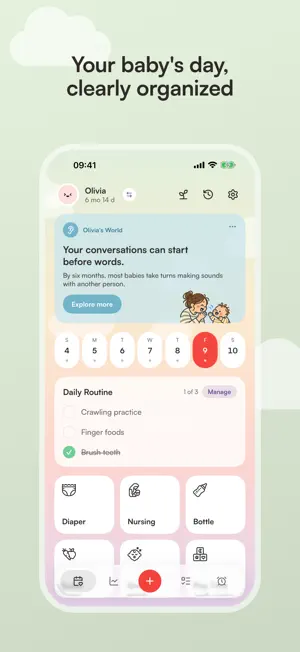
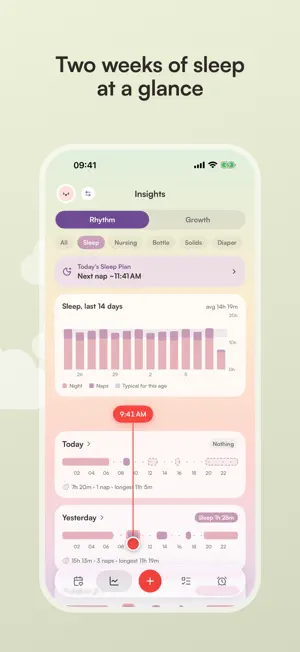
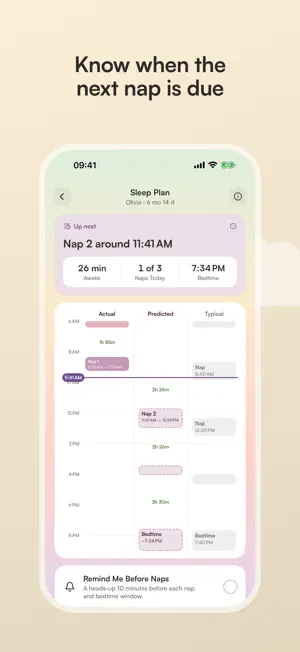
Plumi brings your baby's day into one calm place. Log care offline with one hand, without an account or ads. FREE EVERYDAY TRACKING • Feeding: nursing with left/right timers, bottles, pumping by side and volume, solids with a readiness check. • Sleep: naps and nights, timers or past entries. Time sleep and feeds that started earlier. • Care and play: diapers, potty, baths, teeth brushing, strolls, tummy time, play, reading, screen time limits and timer alerts. • Growth: WHO percentile charts for weight, length and head circumference, with corrected age for early births. • Health: doctor visits, vaccines, temperatures, illnesses, medicines, allergies and food reactions. • Milestones: first steps, sitting, first word, first tooth, custom memories and a milestone guide. Add notes, reuse book titles, edit logs and see daily totals. Reorder Today favorites. Daily routine checklists auto-check matching logs. Child's World cards offer discoveries, activity ideas and birthday moments. Set an expected baby's due date for a countdown. ONE PRESS OR ONE PHRASE AWAY • Pro Siri: say "Log a wet diaper in Plumi", "Start a sleep timer in Plumi" or "When was the last feed in Plumi" while you hold your baby. No setup needed. • Free Home Screen widgets: Since Last shows time since care and live timers. Today shows daily totals. Choose the baby and items. • Pro widgets: Timers and Favorites run timers in place; Favorites also opens logs. Sleep Forecast shows the next sleep window and opens Sleep Plan. • Lock Screen: free Since Last; Pro Sleep Forecast. • Control Center and Action Button (iOS 18): New Log opens the log list and Log opens a chosen log, both free. The Pro Timer control starts or stops a timer in one press. • Apple Watch: recent care is free to view. Pro adds care logging, timers and the next sleep window. • Pro Live Activities: running timers on the Lock Screen and Dynamic Island, with Stop. PLAN AND SHARE WITH PLUMI PRO Sleep Plan and Sleep Forecast suggest nap and bedtime windows from age and recent sleep, with reminders. Rhythm adds 24-hour timelines, a time cursor, 14-day charts and typical sleep ranges. Sleep windows are guides, not medical advice. Milk Stash tracks pumped milk in the fridge and freezer: totals, bag ages and use-by guidance. Store milk from a pumping log, feed the oldest bags first and print bag labels. Storage times are guides. Pro adds reminders at set times, after care or before appointments, with Log now and snooze. Print a Baby Card with growth, daily averages, allergies and health history. Scan book barcodes and documents. Pro adds automatic sync, full history and multiple babies. Share selected babies with parent or caregiver permissions and see who logged care. One subscription covers family Pro access. Creating invites and adding your own extra babies need a personal subscription. FREE AND PRIVATE Free includes one baby and one month of journal history. Older logs stay stored; growth and saved milestones keep full history. CSV export and encrypted iCloud backup and restore are free. Care records stay on your device unless you choose Pro sync, which encrypts records before upload. Our servers cannot read their contents. Entry photos stay on your device. No account is needed for local tracking, and Plumi has no tracking SDKs. Metric or imperial units, light or dark mode, widgets for tinted Home Screens. In English, German, Spanish, French, Japanese, Brazilian Portuguese, Turkish and Simplified Chinese. Plumi Pro is a monthly or annual auto-renewable subscription. Eligible users can try it free for 3 days; current prices appear before purchase. Your Apple Account is charged when the trial ends, or at purchase confirmation if no trial applies. It renews unless cancelled at least 24 hours before the period ends. Manage or cancel in your Apple Account settings. Privacy Policy: https://plumi.app/privacy Terms of Use (EULA): https://www.apple.com/legal/internet-services/itunes/dev/stdeula/
What’s new
Version 1.3.1 · Updated October 21, 2026
Now in Simplified Chinese. • Plumi now speaks Simplified Chinese, in the app, widgets and on Apple Watch. You can change the app language in Settings. • Journal: filter a day to see the time between logs, how long it has been so far, and the typical gap. • Journal entries show their exact start and end times. To see time passed instead, turn on Show Time Passed on Today in Settings. • Today tiles show how long ago you last logged each one. • Pro: your own devices on the same account now sync without an invite. • A Nursing Guide, one tap away from the nursing log. • Bug fixes and improvements.
App privacy
The developer, Soner Eker, reported these privacy practices to Apple.
Data Linked to You
The following data, which may be collected and linked to your identity, may be used for the following purposes:
- Purchases: Purchase History
- Contact Info: Email Address
- Identifiers: User ID, Device ID
Used for: App Functionality
Alternatives to Baby Tracker: Plumi
Looking for apps like Baby Tracker: Plumi? Here are 6 similar apps on the App Store. The highest rated is Luli: Baby Sleep Tracker (4.9/5), and all 6 are free to download.
-
 Pebbi: Newborn Baby Tracker
4.8
-
 Luli: Baby Sleep Tracker
4.9
-
 Blumy: Baby Sleep Tracker
4.9
-
 Baby Tracker & Newborn Log
4.8
-
 Baby Daybook - Newborn Tracker
4.8
-
 Baby Tracker!
4.8
| App | Rating | Price | Last updated | Compare |
|---|---|---|---|---|
| Baby Tracker: Plumi | 5.0 / 5 (1 rating) | Free | October 21, 2026 | |
| Pebbi: Newborn Baby Tracker | 4.8 / 5 (39) | Free | Oct 18, 2026 | Compare |
| Luli: Baby Sleep Tracker | 4.9 / 5 (41) | Free | Oct 18, 2026 | Compare |
| Blumy: Baby Sleep Tracker | 4.9 / 5 (34) | Free | Oct 11, 2026 | Compare |
| Baby Tracker & Newborn Log | 4.8 / 5 (31,538) | Free | Oct 10, 2026 | Compare |
| Baby Daybook - Newborn Tracker | 4.8 / 5 (3,315) | Free | Oct 15, 2026 | Compare |
| Baby Tracker! | 4.8 / 5 (5,162) | Free | Oct 17, 2026 | Compare |