

Inbox To Audio: Text To Speech
Status Recap, LLC Productivity iPhoneiPadiPod touch
Inbox To Audio: Text To Speech is a free Productivity app for iPhone and iPad by Status Recap, LLC. Rated 5.0/5 from 1 ratings. Requires iOS 17.0.
- Rating
- 5.0
- 1 ratings
- Price
- Free
- on the App Store
- Size
- 24 MB
- Age 4+
- Updated
- Oct 2
- 2026 · v1.7.0
Screenshots


About Inbox To Audio: Text To Speech
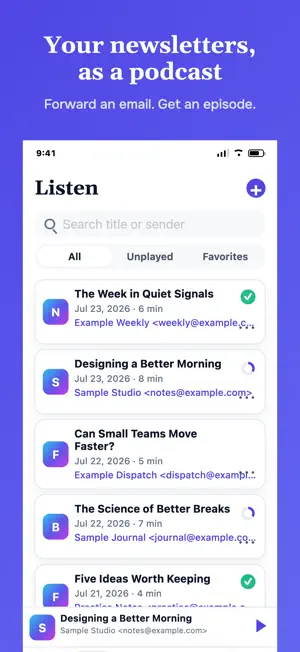
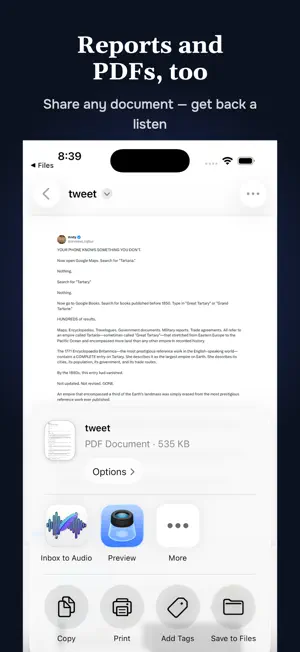
Your inbox is full of great writing you never have time to read. Inbox to Audio turns it into a private audio episode. Forward any newsletter, report, or email to your personal address, and a few minutes later it appears in the app as an audio episode, read in a natural voice you choose. Catch up on your favorite writers while you commute, walk the dog, cook, or work out — hands-free and screen-free. HOW IT WORKS Get your private forwarding address — yours alone, like [email protected] Forward any newsletter, report, or email. That's it — your episode appears in your library, usually within a couple of minutes. Prefer to start from a file or the web? Use the share extension to turn any article, PDF, or Word document into audio too. A REAL PODCAST PLAYER • Background audio with full lock screen and AirPods controls • Chapters generated from the sections of your newsletter, email, or document — skip straight to what you care about • Playback speed control • Mini player, resume where you left off, and AirPlay MADE FOR NEWSLETTERS AND MORE • Works with anything you can forward: Substack, beehiiv, Ghost, Mailchimp, your company digest • Reads the writing, not the noise — headers, footers, and unsubscribe links are stripped out • Completely private: this is your personal feed, never a public podcast • Optional sender allowlist, so only email you trust becomes audio • Favorite, archive, and search your library • View the original newsletter or email any time BEYOND YOUR INBOX • Share a PDF or Word document straight from Files and get a listen back — board decks, research, long reports • Share a webpage to turn any article into audio • Same private library, same voices, same player VOICES YOU'LL ACTUALLY WANT TO LISTEN TO Preview and pick from a catalog of natural, expressive voices, and change your mind whenever you like. On Individual Pro, Two Speaker Audio turns a newsletter into a two-voice, podcast-style conversation. TRY IT FREE Your first episode is free. Then pick the plan that fits how much you read. Stop letting good writing pile up unread. Put it in your ears instead. See our terms of service at: https://inboxtoaudio.app/terms Privacy policy available at: https://inboxtoaudio.app/privacy
What’s new
Version 1.7.0 · Updated October 2, 2026
Performance improvements
App privacy
The developer, Status Recap, LLC, reported these privacy practices to Apple.
Data Linked to You
The following data, which may be collected and linked to your identity, may be used for the following purposes:
- Contact Info: Email Address, Name
- Purchases: Purchase History
- Identifiers: Device ID, User ID
- Usage Data: Product Interaction, Other Usage Data
- Diagnostics: Crash Data, Performance Data
- User Content: Emails or Text Messages, Other User Content
Used for: Developer’s Advertising or Marketing, Analytics, App Functionality, Other Purposes
Alternatives to Inbox To Audio: Text To Speech
Looking for apps like Inbox To Audio: Text To Speech? Here are 6 similar apps on the App Store. The highest rated is Note Flow Pro (5.0/5), and all 6 are free to download.
-
 Note Flow Pro
5.0
Note Flow Pro
5.0
-
 Buckets: Time Blocking Planner
5.0
Buckets: Time Blocking Planner
5.0
-
 XEQ41
5.0
XEQ41
5.0
-
 Resume Builder, CV Maker: Lexa
-
 Slotmark: Reminder & To Do
5.0
Slotmark: Reminder & To Do
5.0
-
 Ritua: Habit Tracker
5.0
Ritua: Habit Tracker
5.0
| App | Rating | Price | Last updated | Compare |
|---|---|---|---|---|
| Inbox To Audio: Text To Speech | 5.0 / 5 (1 rating) | Free | October 2, 2026 | |
| Note Flow Pro | 5.0 / 5 (2) | Free | Sep 8, 2026 | Compare |
| Buckets: Time Blocking Planner | 5.0 / 5 (4) | Free | Sep 2, 2026 | Compare |
| XEQ41 | 5.0 / 5 (1) | Free | Sep 20, 2026 | Compare |
| Resume Builder, CV Maker: Lexa | – | Free | Oct 11, 2026 | Compare |
| Slotmark: Reminder & To Do | 5.0 / 5 (18) | Free | Sep 3, 2026 | Compare |
| Ritua: Habit Tracker | 5.0 / 5 (4) | Free | Oct 24, 2026 | Compare |