

nearbees
Future Labs Co., Ltd. Social Networking iPhoneiPadiPod touchApple Watch
nearbees is a free Social Networking app for iPhone and iPad by Future Labs Co., Ltd. Requires iOS 15.1. Updated October 24, 2026.
- Price
- Free
- on the App Store
- Size
- 105 MB
- Age 17+
- Updated
- Oct 24
- 2026 · v1.0.14
Screenshots


About nearbees
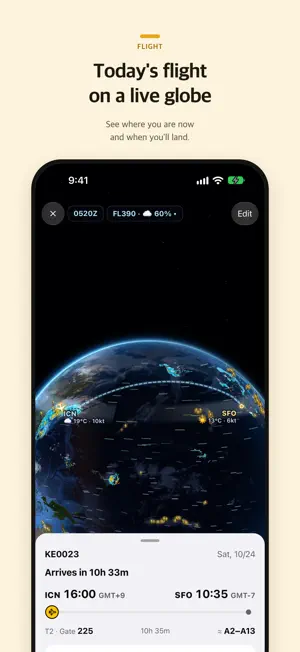
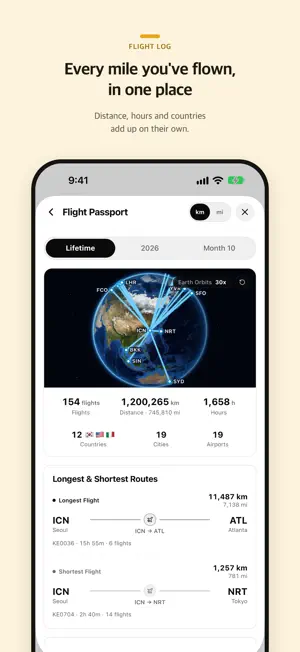
Whatever is happening in the neighborhood you're in right now, it's all here. Turn on location and nearbees opens on the neighborhood you're standing in. Seoul, Tokyo or Paris — whether you just moved or you're passing through, the screen always shows "right here." The neighborhood is for everyone. Office workers lean on the anonymous company lounges; cabin crew and pilots lean on schedules and making plans. [FOR EVERYONE — YOUR NEIGHBORHOOD] ■ Neighborhood feed Read the posts, photos and videos going up around you right now. What you write stays tied to that neighborhood, waiting for whoever comes next. ■ Shops and prices Browse local shops by category and check prices from photos of the actual price list. Know what it costs before you walk in. ■ This week's events Festivals, exhibitions, concerts and talks nearby, gathered in one place. Save the ones you want to attend to your calendar so they don't slip past. ■ Explore the map Pan around and see what's near you. In Seoul you can also see where it's busy right now. ■ Is it crowded right now? For places you linger — cafés, restaurants — the people already there tell you how busy it is. Check before you make the trip, then tap once yourself for the next person. ■ Records and polls Photos and videos build up over time, and likes and reposts carry the good ones further. Not sure which is better? Attach a poll and ask the neighborhood. [IF YOU WORK — ANONYMOUS COMPANY LOUNGES] Talk anonymously with people wrestling with the same things. ■ Industry lounges Pick the industries you care about and you can post there. ■ Company lounge Verify only where you work with your work email — we never ask your job title — and a lounge opens with people from your company. A worker badge and long posts (2,000 characters) open with it. Reading and commenting stay open without verification. Only posting needs it. Posts are anonymous, so never include an employee number or a name. [IF YOU FLY — SCHEDULES AND PLANS] Opens after a one-time check with your airline email. ■ Flight schedule One photo of your roster becomes a calendar. See duty, layovers and time zones together. ■ Overlay Lay a colleague's schedule over yours and see the free days at a glance. ■ Making plans The app finds the days you're both in the same city, and you propose a meetup on that date. Colleagues you could never sync with, found by overlaying schedules. ■ Airline lounge Talk anonymously with crew from your own airline. Overlay and planning work between cabin crew and pilots who are friends. [SO YOU CAN RELAX] You decide who can see your location and your flight schedule. Hide it from colleagues but show it to family — set it per person. Everything is encrypted in transit and at rest, and every post and message can be reported, blocked or hidden. [GETTING STARTED] 1. Sign in with Apple, Google or Kakao and pick a name 2. Turn on location and your neighborhood opens (or choose one yourself) 3. Browse posts, shops and this week's events, and save what you like to your calendar If you fly or work an office job, just add the work-email check in Settings.
What’s new
Version 1.0.14 · Updated October 24, 2026
• The Home Screen roster widget now matches the Calendar: multi-day leave shows as one band, and when a day is too narrow the flight number sits inside the bar. • In Dark Mode, your flights on the widget wear a gold card so they stand out. • Lock Screen clock widget: when you're abroad, the left column shows UTC instead of local time. The big clock above already shows local time.
App privacy
The developer, Future Labs Co., Ltd., reported these privacy practices to Apple.
Data Linked to You
The following data, which may be collected and linked to your identity, may be used for the following purposes:
- Identifiers: User ID, Device ID
- Usage Data: Product Interaction
- Location: Coarse Location
- Contact Info: Email Address, Name
- Contacts: Contacts
- User Content: Emails or Text Messages, Photos or Videos, Other User Content
- Search History: Search History
- Diagnostics: Crash Data, Performance Data
Used for: Analytics, App Functionality
Alternatives to nearbees
Looking for apps like nearbees? Here are 6 similar apps on the App Store. The highest rated is Layover - Crew Only (5.0/5), and all 6 are free to download.


| App | Rating | Price | Last updated | Compare |
|---|---|---|---|---|
| nearbees | – | Free | October 24, 2026 | |
| CrewCrew | – | Free | Apr 3, 2026 | Compare |
| 헤이처치 - Heychurch | – | Free | Oct 25, 2026 | Compare |
| 페퍼톡 | – | Free | Oct 22, 2026 | Compare |
| TiumTalk | – | Free | Jul 16, 2026 | Compare |
| 코플리 | – | Free | Sep 29, 2026 | Compare |
| Layover - Crew Only | 5.0 / 5 (2) | Free | Oct 10, 2026 | Compare |
Compare nearbees with the top alternatives: ratings, updates, ASO score and keyword gaps →