

Universal TV Remote Control ・
Ivik llc Utilities iPhoneiPadiPod touch
Universal TV Remote Control ・ is a free Utilities app for iPhone and iPad by Ivik llc. Rated 5.0/5 from 1 ratings. Requires iOS 15.0.
- Rating
- 5.0
- 1 ratings
- Price
- Free
- on the App Store
- Size
- 87 MB
- Age 4+
- Updated
- Sep 30
- 2026 · v1.0.1
Screenshots



About Universal TV Remote Control ・
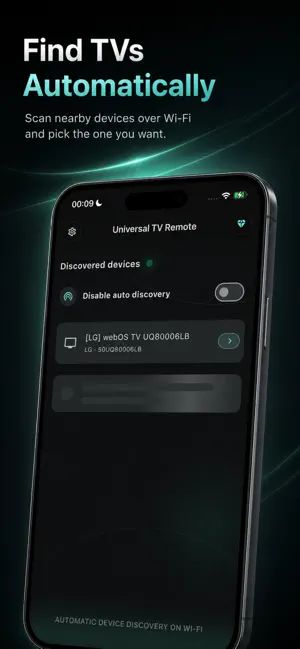
Turn your iPhone or iPad into a convenient TV remote control for compatible Smart TVs. Universal TV Remote Control helps you discover TVs on your local Wi-Fi network, pair with them, and control them directly from your phone or tablet. Use familiar remote buttons, navigate menus, adjust volume, change channels, control playback, and quickly reconnect to saved TVs. FAST WI-FI CONNECTION Getting started takes only a few steps: 1. Turn on your TV. 2. Connect your iPhone or iPad to the same Wi-Fi network. 3. Allow access to the local network. 4. Select a discovered TV. 5. Confirm the connection on your TV or enter the pairing code shown on screen. 6. Start using your phone as a remote. KEY FEATURES • Automatic TV discovery on your local Wi-Fi network • Remote control for compatible Samsung Tizen, LG webOS, and Android TV devices • D-pad navigation for menus and apps • Volume and channel controls • Play, pause, rewind, fast-forward, and other media controls • Numeric keypad for quick channel entry • Save multiple TVs for faster reconnection • Rename saved devices for easier access • Trackpad and cursor control on compatible TVs • Launch apps and enter text on supported Android TV devices • Voice commands on compatible Android TV devices • Adaptive interface for iPhone and iPad • Portrait support on iPhone and portrait or landscape support on iPad ONE REMOTE FOR MULTIPLE TVS Lost your physical remote? Battery dead? Have several TVs at home? Keep compatible TVs saved in one app and quickly switch between devices in different rooms. Universal TV Remote Control can be useful when you want to: • control your TV from your iPhone or iPad; • replace a missing or unavailable remote; • change volume or channels without searching for the physical remote; • type text using your phone keyboard on supported Android TV devices; • navigate compatible TVs with a convenient trackpad; • manage Samsung TV, LG TV, and Android TV devices from one app. COMPATIBILITY The app is designed for compatible: • Samsung Smart TVs running Tizen • LG Smart TVs running webOS • TVs and media devices running Android TV Android TV is available on selected models from manufacturers such as Sony, Philips, TCL, Xiaomi, Hisense, Sharp, and others. Compatibility depends on the TV model, operating system, firmware version, and supported network-control features. Some buttons and features may not be available on every TV. IMPORTANT Your iPhone or iPad and TV must be connected to the same local Wi-Fi network for network remote control. Some TVs require you to approve the connection on the TV screen or enter a pairing code. FREE & PREMIUM The free version includes core TV remote features and may contain advertising. Premium provides: • an ad-free experience; • expanded support for working with multiple saved TVs; • access to Premium features available in the app. Premium is offered as an auto-renewable subscription. Pricing, subscription duration, and any available trial terms are shown in the app before purchase and may vary by App Store storefront. You can manage or cancel your subscription in your Apple ID settings. Restore Purchases is available in the app. Universal TV Remote Control is an independent application and is not affiliated with or endorsed by Samsung, LG, Google, or other TV manufacturers. All product names, trademarks, and registered trademarks are the property of their respective owners. - Terms of Use (EULA): https://www.apple.com/legal/internet-services/itunes/dev/stdeula/ - Privacy Policy: https://universaltvrc.com/privacy.html
What’s new
Version 1.0.1 · Updated September 30, 2026
We have fixed some errors and improved the stability of the application.
App privacy
The developer, Ivik llc, reported these privacy practices to Apple.
Data Used to Track You
The following data may be used to track you across apps and websites owned by other companies:
- Identifiers: Device ID
- Usage Data: Product Interaction, Advertising Data
- Diagnostics: Performance Data
- Other Data: Other Data Types
Data Linked to You
The following data, which may be collected and linked to your identity, may be used for the following purposes:
- Identifiers: Device ID
- Other Data: Other Data Types
Used for: Third-Party Advertising, Analytics, App Functionality
Data Not Linked to You
The following data, which may be collected but is not linked to your identity, may be used for the following purposes:
- Usage Data: Product Interaction, Advertising Data
- Diagnostics: Performance Data, Other Diagnostic Data, Crash Data
- Purchases: Purchase History
- Location: Coarse Location
Used for: Third-Party Advertising, Analytics, App Functionality
Alternatives to Universal TV Remote Control ・
Looking for apps like Universal TV Remote Control ・? Here are 6 similar apps on the App Store. The highest rated is Universal TV Remote: All TVs (4.5/5), and all 6 are free to download.
-
 Tv remote Universal - All Tvs
-
 ADB Remote: TV Touchscreen
-
 Universal TV Remote: All TVs
4.5
Universal TV Remote: All TVs
4.5
-
 Remoto - TV Remote
-
 TV Remote・Universal
-
 Mac Tools – SmartEAR 1
2.3
Mac Tools – SmartEAR 1
2.3
| App | Rating | Price | Last updated | Compare |
|---|---|---|---|---|
| Universal TV Remote Control ・ | 5.0 / 5 (1 rating) | Free | September 30, 2026 | |
| Tv remote Universal - All Tvs | – | Free | Sep 7, 2026 | Compare |
| ADB Remote: TV Touchscreen | – | Free | Sep 29, 2026 | Compare |
| Universal TV Remote: All TVs | 4.5 / 5 (2) | Free | Oct 16, 2026 | Compare |
| Remoto - TV Remote | – | Free | Aug 12, 2026 | Compare |
| TV Remote・Universal | – | Free | Oct 30, 2026 | Compare |
| Mac Tools – SmartEAR 1 | 2.3 / 5 (3) | Free | Sep 24, 2025 | Compare |