

Scanner Image to PDF Converter
Phi Nguyen Utilities iPhoneiPadiPod touch
Scanner Image to PDF Converter is a free Utilities app for iPhone and iPad by Phi Nguyen. Requires iOS 13.0. Updated July 16, 2026.
- Price
- Free
- on the App Store
- Size
- 63 MB
- Age 4+
- Updated
- Jul 16
- 2026 · v1.0.0
Screenshots



About Scanner Image to PDF Converter
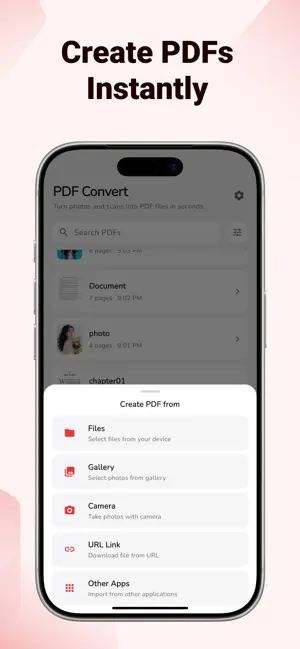
Convert Photos, Images & Documents to PDF Instantly Image to PDF Converter is a fast, secure, and easy-to-use PDF Converter that helps you turn photos, images, scans, and documents into professional PDF files directly on your iPhone. Convert JPG to PDF, PNG to PDF, HEIC to PDF, Word to PDF, Excel to PDF, and more in seconds without needing an internet connection. Unlike many PDF converter apps, all processing happens completely offline on your device. No uploads, no accounts, no cloud storage, and no waiting for remote servers. Your files stay private and secure at all times. IMAGE TO PDF CONVERTER Convert photos and documents into high-quality PDF files with just a few taps. Supported formats include: • JPG to PDF • JPEG to PDF • PNG to PDF • HEIC to PDF • TIFF to PDF • TXT to PDF • DOCX to PDF • XLS to PDF • XLSX to PDF Import files from your device, choose images from your photo library, or scan paper documents directly with your camera. Every file is converted into a clean, professional PDF ready to share, print, save, or archive. PDF SCANNER & DOCUMENT SCANNER Turn your iPhone into a powerful PDF Scanner and Document Scanner. Scan receipts, invoices, contracts, forms, notes, reports, IDs, business documents, and handwritten pages. Automatic edge detection, perspective correction, and image enhancement help create clear and readable PDF documents every time. Whether you need a document scanner for work, school, business, or personal use, Image to PDF makes scanning fast and effortless. PHOTO TO PDF & JPG TO PDF Need to convert multiple photos into a single PDF? Select images from your gallery and create PDF documents instantly. Perfect for assignments, reports, receipts, contracts, travel documents, tax forms, and business paperwork. Merge multiple photos into one PDF or create separate PDF files for each image. Convert JPG to PDF, JPEG to PDF, PNG to PDF, and HEIC to PDF in seconds. MERGE, ORGANIZE & MANAGE PDF FILES Create PDFs exactly the way you want. • Merge multiple images into one PDF • Rearrange page order • Remove unwanted pages • Rename files before saving • Generate multiple PDFs in one conversion Create professional PDF documents without complicated editing tools. FAST PDF CREATOR Open the app, select your files, and tap Convert. Our optimized PDF Creator engine generates PDF documents in seconds while preserving image quality and document clarity. Create PDF files from photos, screenshots, scans, and documents quickly and reliably. No unnecessary steps. No complicated setup. Just fast and reliable PDF conversion whenever you need it. PRIVATE & OFFLINE PDF CONVERTER Privacy comes first. Most PDF converter apps send files to online servers for processing. Image to PDF performs every conversion locally on your device. • Fully offline • No account required • No file uploads • No cloud processing • No tracking of your documents Your photos, scans, documents, and PDFs remain completely under your control. PDF HISTORY & FILE MANAGEMENT Every PDF you create is automatically saved with: • Preview thumbnail • Page count • File size • Creation date Quickly find, share, export, or delete PDFs whenever needed. Share through AirDrop, Mail, Messages, Files, or any app that supports PDF documents. PERFECT FOR • Students submitting assignments and homework. • Professionals sharing reports and presentations. • Freelancers sending contracts and invoices. • Small business owners managing paperwork. • Travelers digitizing important documents. PREMIUM Upgrade to Premium for unlimited PDF conversions and unrestricted access to all features. Try the free version first — fast, secure, offline PDF conversion on iPhone. Terms of Use: https://mushyp.app/terms/ Privacy Policy: https://mushyp.app/privacy/
App privacy
The developer, Phi Nguyen, reported these privacy practices to Apple.
Data Used to Track You
The following data may be used to track you across apps and websites owned by other companies:
- Diagnostics: Crash Data, Performance Data
Data Not Linked to You
The following data, which may be collected but is not linked to your identity, may be used for the following purposes:
- Diagnostics: Crash Data, Performance Data
Used for: Analytics, App Functionality
Alternatives to Scanner Image to PDF Converter
Looking for apps like Scanner Image to PDF Converter? Here are 6 similar apps on the App Store. The highest rated is Scanner to PDF: Convert to PDF (5.0/5), and all 6 are free to download.
-
 PDF Converter-File conversion
-
 FlutterCodeX
-
 Voco: AI Note Taker, Recorder
4.5
-
 Image to PDF Converter Easy
-
 电子收据宝
-
 Scanner to PDF: Convert to PDF
5.0
| App | Rating | Price | Last updated | Compare |
|---|---|---|---|---|
| Scanner Image to PDF Converter | – | Free | July 16, 2026 | |
| PDF Converter-File conversion | – | Free | Oct 15, 2025 | Compare |
| FlutterCodeX | – | Free | Nov 6, 2025 | Compare |
| Voco: AI Note Taker, Recorder | 4.5 / 5 (8) | Free | Jun 24, 2025 | Compare |
| Image to PDF Converter Easy | – | Free | Oct 28, 2025 | Compare |
| 电子收据宝 | – | Free | Jan 29, 2026 | Compare |
| Scanner to PDF: Convert to PDF | 5.0 / 5 (2) | Free | Apr 27, 2026 | Compare |