

My Whiskies: Collection
Helder Marques Lifestyle iPhoneiPadiPod touchApple Watch
My Whiskies: Collection is a free Lifestyle app for iPhone and iPad by Helder Marques. Requires iOS 26.0. Updated October 23, 2026.
- Price
- Free
- on the App Store
- Size
- 16 MB
- Age 17+
- Updated
- Oct 23
- 2026 · v1.14
Screenshots


About My Whiskies: Collection
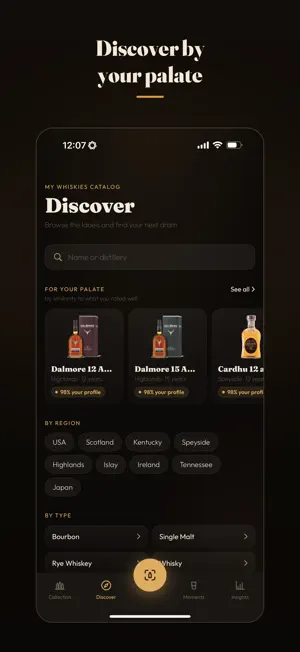
My Whiskies is the app to organize your personal whisky collection, discover your next one and show off your cellar to people who care about whisky. Turn your shelf into a digital cellar: keep bottles, tasting notes, ratings, price, drinking status and purchase history all in one place. And when you’re facing an unfamiliar label, just point your camera: the app identifies the whisky for you. Added a bottle? Three taps complete the entry: how much is left, what you’d rate it, and whether you’ve had the first dram. All optional, all editable later. On Apple Watch, your collection rides on your wrist: log a dram glass in hand, without reaching for your phone. More than a catalog, My Whiskies helps you understand your own palate. See which styles show up most in your collection, which bottles you repurchase the most, how much you’ve invested month by month — and explore a curated catalog with suggestions matched to your profile. And when you feel like showing it, share it: your whole collection becomes images ready for social media, with your bottles in a grid, each with photo, name and rating. Your palate profile and your Top 3 favorites too, with a preview and three backgrounds to choose from. With My Whiskies, you can: • Organize your whisky collection • Scan a bottle’s label and identify the whisky on the spot • Complete the entry as you add a bottle: fill level, rating and first dram, one tap each • Explore new whiskies by region, type, flavor profile and distillery — with a palate-match score • Record ratings, price, purchase date and personal notes • Capture right as you add it whether you bought or were gifted the bottle, when, and its price range • Track each bottle’s status: full, half, running low or empty • Log drams — including yesterday’s, by adjusting the day and time • Log a dram straight from Apple Watch, with a watch-face complication and a Smart Stack widget • Mark bottles as finished, log refills — and the ones you got as a gift • See where to find a bottle: the observed price, which store, and when it was seen (currently covering Brazil and the United States) • Keep the ones you covet on a wishlist, with photos, notes and sorting • Capture moments: that special dram at a bar or a friend’s place • Share your whole collection as social-ready images, on a dark, amber or light background • Share a whisky with friends via link • Discover your palate profile across sweetness, fruitiness, spice, peat and body — and share the result • Find your true favorite: the one you keep buying again • Follow total investment, average rating and cost per dram • Get, if you want, one reminder a week on the day you usually drink, alternating between your collection and a catalog pick • Use the app in English or Portuguese, in your preferred currency • Keep everything saved and synced in your personal iCloud — no account needed My Whiskies is not a store or a marketplace. When we show a price, it’s an observed reference — with its source and date — and the purchase happens on the store’s site, not here. It’s a personal space for those who enjoy whisky with curiosity, memory and mindfulness. Your cellar knows more about you than you’d think.
What’s new
Version 1.14 · Updated October 23, 2026
Ready for iPhone Duo. With the device open, your Collection fills both halves of the screen: the bottle list on one side, the full bottle profile on the other. Tap a bottle and its details appear right away, without leaving the list. Folded, unfolded or rotated? The bottle you had open stays open, it just moves. With the device closed, the app is exactly what it's always been. On any iPhone in landscape, the whisky profile now sits in a centered column that's easier to read. Cheers!
App privacy
The developer, Helder Marques, reported these privacy practices to Apple.
Data Not Linked to You
The following data, which may be collected but is not linked to your identity, may be used for the following purposes:
- Location: Coarse Location
- Identifiers: Device ID
- Usage Data: Product Interaction
- Diagnostics: Crash Data, Other Diagnostic Data
Used for: Analytics, App Functionality