

Petya — Network Check
Matrixxx VPN Utilities iPhoneiPadiPod touch
Petya — Network Check is a free Utilities app for iPhone and iPad by Matrixxx VPN. Requires iOS 16.0. Updated October 19, 2026.
- Price
- Free
- on the App Store
- Size
- 36 MB
- Age 4+
- Updated
- Oct 19
- 2026 · v1.5.4
Screenshots


About Petya — Network Check
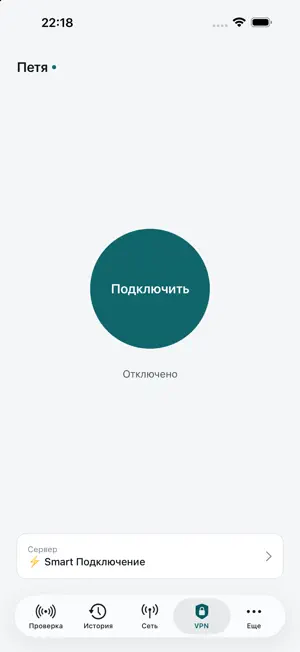
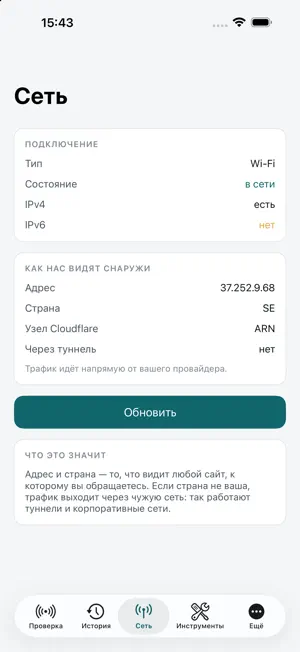
Petya connects your phone to the internet through a secure tunnel — with your own key or configuration link. One button, the server is picked for you, the connection keeps itself up. And when something will not open, Petya shows exactly where it breaks. SECURE CONNECTION • Paste the link your provider gave you, or open it from a messenger — the app reads the server list and connects. • vless keys and subscriptions with Xray servers: Reality, Hysteria. • All phone traffic travels encrypted through the server you chose — on home Wi-Fi, in a café, on mobile data. • The connection looks after itself: the app checks the link, restarts and moves to another server from the list when needed. • The server list refreshes itself as often as your provider asks. Remove the link with one button, and the system connection profile goes with it. • DNS is set separately: your carrier's or the configuration's, direct or through the tunnel. • Petya has no servers and no account of its own. The connection log can be sent to support as a file. NETWORK CHECK One button shows which services answer from your device right now, which stay silent, and what exactly is wrong. Eight outcomes, not two: "no answer", "connection dropped", "name did not resolve", "certificate error", "address substituted" are different failures in different places. HISTORY Every check is stored on the device: each service gets its share of successful checks, median response time, spread and a chart of recent runs. Export it as a table. NETWORK AND TOOLS Connection type, IPv4 and IPv6, public address and country — what any website sees. System resolver compared with Cloudflare and Google, TCP port check, your own addresses in the same list. BACKGROUND, SIRI AND SHORTCUTS A notification when a service stops or starts answering again — changes only. "Check the network" by voice, checks in Shortcuts automations. HONEST Traffic goes through a server only while you turned the tunnel on, and the same button turns it off. Measurements stay on the device until you send them yourself. No accounts, no ads. Terms of use (EULA): https://www.apple.com/legal/internet-services/itunes/dev/stdeula/
What’s new
Version 1.5.4 · Updated October 19, 2026
Improved stability and reliability, updated components.
App privacy
The developer, Matrixxx VPN, reported these privacy practices to Apple.
Data Not Linked to You
The following data, which may be collected but is not linked to your identity, may be used for the following purposes:
- Identifiers: Device ID
- Usage Data: Product Interaction, Advertising Data
- Location: Coarse Location
- Diagnostics: Crash Data
Used for: Developer’s Advertising or Marketing, Analytics, App Functionality
Alternatives to Petya — Network Check
Looking for apps like Petya — Network Check? Here are 6 similar apps on the App Store. The highest rated is MafiaOFFV (1.0/5), and all 6 are free to download.


| App | Rating | Price | Last updated | Compare |
|---|---|---|---|---|
| Petya — Network Check | – | Free | October 19, 2026 | |
| MafiaOFFV | 1.0 / 5 (1) | Free | Oct 14, 2026 | Compare |
| PageX Connect | – | Free | Jun 10, 2026 | Compare |
| Lockb | – | Free | May 20, 2025 | Compare |
| Kuala Proxy: Fast & Secure | – | Free | Aug 24, 2026 | Compare |
| Arava VPN | – | Free | Oct 15, 2026 | Compare |
| Sloop VPN | – | Free | Aug 31, 2026 | Compare |