

CreamAudio Analyzer
Siarhei Hladkou Utilities iPhoneiPadiPod touchMac
CreamAudio Analyzer is a free Utilities app for iPhone and iPad by Siarhei Hladkou. Requires iOS 18.0. Updated September 3, 2026.
- Price
- Free
- on the App Store
- Size
- 7 MB
- Age 12+
- Updated
- Sep 3
- 2026 · v1.1
Screenshots

About CreamAudio Analyzer
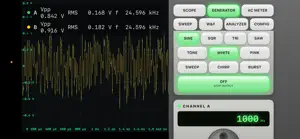
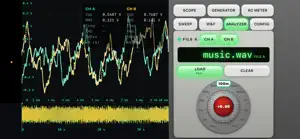
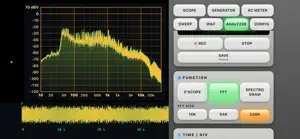
CreamAudio turns your Mac, iPad, or iPhone plus a class-compliant USB or Thunderbolt audio interface (such as a Focusrite Scarlett 2i2) into a complete professional audio measurement bench. The interface's analog inputs become the front end; its outputs drive the built-in signal generator. Multiple precision instruments share one calibrated signal path: OSCILLOSCOPE • Live two-channel display in normal (Y-t) and XY (Lissajous) modes • Adjustable volts/division and time/division with pinch and scroll zoom • Edge triggering with Auto / Normal / Single modes and single-shot capture • Graticule with division labels and live Vpp, RMS, frequency readouts • Per-channel DC/AC coupling and vertical offset FUNCTION GENERATOR • Sine, square, triangle, sawtooth, white and pink noise • Per-channel frequency, amplitude, offset, phase, and duty cycle • Sweep, chirp, and burst programs • Test Tape: an automated alignment-tape sequence (reference tones 400 Hz to 12.5 kHz, sweep, chirp, burst, flutter tone) to record onto a deck and measure back • Route to the same interface (loopback) or a separate output device SPECTRUM & SPECTROGRAM • Real-time FFT spectrum with selectable size and windowing, log/linear axes • Spectrogram heatmap across the recorded timeline FREQUENCY RESPONSE • Measure response with white / pink / swept stimulus that drives the generator automatically; curves accumulate for easy comparison DISTORTION & LEVEL • Automatic THD, THD+N, and SNR measurement • Vpp, Vrms, mean, frequency, period, and duty-cycle readouts • Built-in analog-style AC millivoltmeter (1 mV to 30 V, dual volt/dB scales) WOW & FLUTTER METER • Speed-stability analysis for turntables, cassette, and reel-to-reel tape • DIN / IEC 386 (3150 Hz) and JIS (3000 Hz) reference tones with auto-detect • WRMS, DIN 2-sigma quasi-peak, and unweighted readings; deviation waveform RECORD, SCRUB & EXPORT • Record the raw two-channel stream and scrub the timeline to find transients • Re-run any analysis offline on a selected window • Save recordings to WAV (lossless) or AAC (.m4a) CALIBRATION • Map normalized samples to real volts with manual entry or a guided reference solve, so every reading is in true voltage units; profiles persist per device Sample rates up to 192 kHz where the interface supports them. Everything runs locally on your device — no account, no network, no data collection. Requires a Metal-capable device. An external audio interface is recommended for real measurement work; the built-in microphone can be used for casual signals. Requires a subscription or one-time purchase. Start with a 3-day free trial, after which a monthly subscription begins automatically and renews each month unless cancelled at least 24 hours before the period ends. Prefer to pay once? Unlock everything with a one-time lifetime purchase — no trial, no subscription. The free trial is available to new subscribers. Subscription and lifetime prices are shown in the app and on this product page. All features described below are included once unlocked; there is no separately-priced content. Terms of Use (EULA): https://www.apple.com/legal/internet-services/itunes/dev/stdeula/
What’s new
Version 1.1 · Updated September 3, 2026
New Pro mode exposes the full signal path — channel mapping for multichannel interfaces (pick which device channels feed scope A/B and which the generator drives, by driver channel name), and per-channel output calibration. Level units are now honest: dBFS, dBu, dBV or Vrms, with every dBFS readout labelled by its full-scale convention. The generator's level is a jog control at 0.01 dB resolution, with per-channel mute and polarity invert. Bench profiles save an entire rig — interface, channel mapping, calibration, units, and all scope and generator settings — under a name, and recall it in one key. Fixes scope tearing, a wedge that stopped reconnection after an interface was unplugged, and an iOS restart loop. The Mac app is now Apple Silicon only.
App privacy
The developer, Siarhei Hladkou, reported these privacy practices to Apple.
Data Not Collected
The developer does not collect any data from this app.
Alternatives to CreamAudio Analyzer
Looking for apps like CreamAudio Analyzer? Here are 6 similar apps on the App Store. The highest rated is radioCREEP (5.0/5), and all 6 are free to download.
-
 Biquadia: Audio & DSP Lab
-
 radioCREEP
5.0
radioCREEP
5.0
-
 Survey Rush
-
 AuraField: Sensor & Mood Log
-
 ToneAtlas
-
 Thermal Sniffer
| App | Rating | Price | Last updated | Compare |
|---|---|---|---|---|
| CreamAudio Analyzer | – | Free | September 3, 2026 | |
| Biquadia: Audio & DSP Lab | – | Free | Aug 15, 2026 | Compare |
| radioCREEP | 5.0 / 5 (1) | Free | Jun 29, 2026 | Compare |
| Survey Rush | – | Free | Apr 18, 2026 | Compare |
| AuraField: Sensor & Mood Log | – | Free | Jun 12, 2026 | Compare |
| ToneAtlas | – | Free | Oct 21, 2026 | Compare |
| Thermal Sniffer | – | Free | Jan 22, 2024 | Compare |