

ART Coach: Calibration Planner
JOSE RAMON VELEZ Music iPhoneiPadiPod touchMac
ART Coach: Calibration Planner is a free Music app for iPhone and iPad by JOSE RAMON VELEZ. Rated 5.0/5 from 4 ratings. Requires iOS 18.0.
- Rating
- 5.0
- 4 ratings
- Price
- Free
- on the App Store
- Size
- 11 MB
- Age 4+
- Updated
- Oct 5
- 2026 · v1.0.8
Screenshots


About ART Coach: Calibration Planner
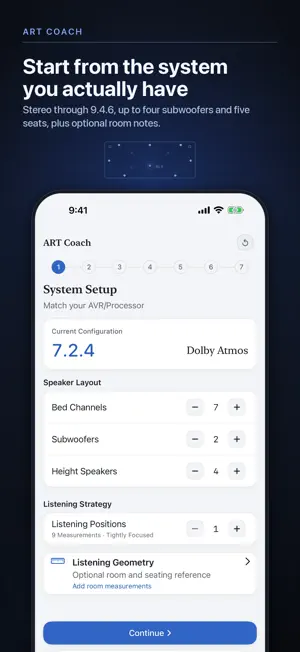
ART Coach is an independent planning app for Dirac Live® Active Room Treatment (ART). Describe your speaker system once, and the seven-step Planner turns it into a plan you take into calibration: speaker groups, support relationships, per-group starting values, and a target curve file. ART Coach plans; it does not calibrate. It doesn't play test signals, measure your room's acoustic response, or create correction filters, and it doesn't connect to or control Dirac software. You review the plan, enter the values yourself, then measure and correct in Dirac Live. FREE: THE COMPLETE PLANNING WORKFLOW • Set up any layout from stereo through 9.4.6, with up to four subwoofers and one to five seats • Enter each speaker's -3 dB low-frequency limit and placement, including exact values • Compare three Sound Strategies by their effect, tradeoff, and any constraint found in your layout • Choose a listening intent from seven Movie and Music presets, or build a Custom intent • Review speaker groups, support relationships, Fsiso, Support Level, and F-support ranges for every group • Choose one ART Coach House Curve for every target-bearing group, or Keep Speaker Voicing with a bass-only curve for systems with subwoofers, then adjust it with Curve Shape controls • Export a Setup Sheet and Technical Reference as TXT, PDF, or clipboard text, plus a .targetcurve file to import into Dirac Live • Record room dimensions, seating positions, and speaker distances in the Listening Geometry notebook, and add it to your Technical Reference • Check background noise before you measure with Room Noise Check and Background Noise Monitor. Readings are relative microphone input levels, not calibrated SPL. Audio is analyzed in real time and never recorded or stored • Learn the workflow with the built-in Guide ART COACH PRO (ONE-TIME UNLOCK, NOT A SUBSCRIPTION) • Save configurations in the ART Library, with folders and templates • Sync your library across your devices with iCloud • Review version history and compare configurations side by side • Fine-tune bass with Pro Bass Shaping and the Target Curve Editor • Add notes and custom group names; import and export .artcoach files • Use Home Screen and Lock Screen widgets, Spotlight Search, and Siri Shortcuts Fsiso, Support Level, and the other values are planning suggestions and starting points, not final acoustic results. Compare them with Dirac Live's defaults and your measurements. Final settings depend on your room, speakers, equipment capability, placement, listening level, and measurement quality. Always respect equipment limits and safe listening levels. ART Coach is an independent application and is not affiliated with, endorsed by, or sponsored by Dirac Research AB. Dirac® and Dirac Live® are registered trademarks of Dirac Research AB. Dirac Live and Active Room Treatment licenses and compatible hardware are sold separately.
What’s new
Version 1.0.8 · Updated October 5, 2026
• Wizard is now called Planner to better reflect how you build and refine your calibration plan. The same seven-step setup flow remains. • Added Listening Geometry, a notebook for room dimensions, seating positions, speaker distances and notes. • Added the option to include your room notebook in Technical Reference reports. • Enter exact speaker frequency values and mark specifications as reviewed. • Cleaner layouts and easier-to-read controls, including improvements for larger text. • Updated the in-app Guide with clearer instructions. • Fixed microphone calibration in Room Noise Check for more accurate band levels, especially at low and high frequencies. • Improved recovery options for saved plans that cannot be opened. • Preserve speaker settings when changing your layout, with confirmation before removing speakers. • Fix Music emphasis changing after reopening a plan and protect the current plan while browsing saved configurations. • Seven clearer Movie and Music presets, plus Custom. Older preset selections move to the closest retained option with an explanation; your Curve Shape and Pro adjustments are kept. • Saved Natural emphasis remains active as Natural (legacy), including when switching Music presets. It is hidden from new choices. • Preset cards show the bass contribution and calculated Fsiso range for your system. Emphasis labels now describe their bass and support adjustments. • Saved plans are recalculated with the updated planning engine. Some F-support Low values increase, some support relationships disappear, and Bass Profile numbers change (Theater Reference: +1.0 to +4.8 dB). If you entered 1.0.7 values in Dirac, reopen your plan and re-check its settings in Dirac. • Align bass summaries with exported curves, repair preset curve dips, and preserve group names across grouping changes. • For Keep Speaker Voicing without subs, enter bass points manually in Dirac; importing a bass-only file can replace the upper target. • Fsiso and Support Level remain optional ART Coach planning suggestions. Compare them with Dirac defaults and your measured results.
App privacy
The developer, JOSE RAMON VELEZ, reported these privacy practices to Apple.
Data Not Collected
The developer does not collect any data from this app.
Alternatives to ART Coach: Calibration Planner
Looking for apps like ART Coach: Calibration Planner? Here are 6 similar apps on the App Store.
-
 PA Check – Tone & Analyser
-
 Musical Demon's Impulse
-
 ShowTap – Live Soundboard
-
 DFTM Audio Tools
-
 SoundCoach
-
 EQ Ear: Mix Frequency Training
| App | Rating | Price | Last updated | Compare |
|---|---|---|---|---|
| ART Coach: Calibration Planner | 5.0 / 5 (4 ratings) | Free | October 5, 2026 | |
| PA Check – Tone & Analyser | – | Free | Oct 20, 2026 | Compare |
| Musical Demon's Impulse | – | Free | Aug 31, 2026 | Compare |
| ShowTap – Live Soundboard | – | Free | Oct 4, 2026 | Compare |
| DFTM Audio Tools | – | Free | Jun 16, 2026 | Compare |
| SoundCoach | – | Free | Jun 20, 2026 | Compare |
| EQ Ear: Mix Frequency Training | – | Free | Sep 9, 2026 | Compare |