

Wireless Presenter
Wajih JBARA Productivity iPhoneiPadiPod touch
Wireless Presenter is a free Productivity app for iPhone and iPad by Wajih JBARA. Requires iOS 15.1. Updated July 26, 2026.
- Price
- Free
- on the App Store
- Size
- 40 MB
- Age 4+
- Updated
- Jul 26
- 2026 · v1.0.1
Screenshots


About Wireless Presenter
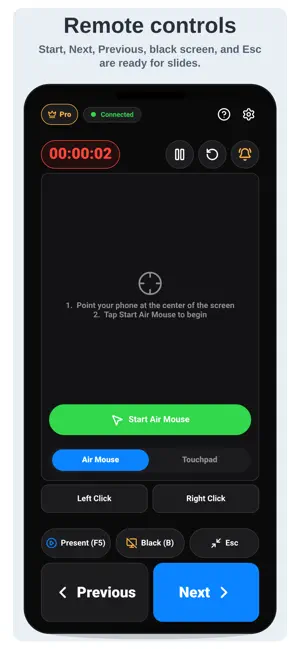
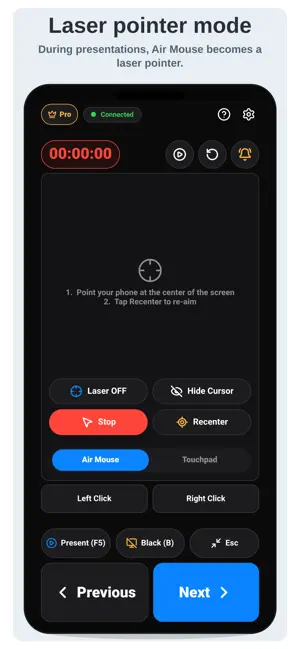
**Wireless Presenter turns your phone into a simple and powerful presentation remote for your PC.** Control your slides, move the cursor with Touchpad mode, control the mouse with **Gyroscopic Mouse** mode, and highlight key points with a virtual laser pointer. The app is ideal for PowerPoint presentations (online or local), PDF slideshows, conferences, classrooms, meetings, training sessions, and live demonstrations. ### How it works 1. Install the Wireless Presenter PC app for the OS you have. It works in macos/windows/linux (download link available in the mobile app). 2. Open the mobile app. 3. Scan the QR code displayed on your computer. 4. Start presenting. Your phone and PC simply need to be connected to the same Wi-Fi network. **No Wi-Fi available?** Use your phone’s mobile hotspot and connect your PC to it. ### Main Features • Fast QR code pairing with the PC app • Presentation controls: start slideshow, next slide, previous slide, black screen, and exit slideshow • Touchpad mode for cursor control • Gyroscopic Mouse mode using your phone’s motion sensors • Virtual laser pointer during presentations (Pro feature) • Built-in presentation timer • Vibration timer alerts (Pro feature) • Multiple Pro options to fit different needs • Remove ads with Pro Lifetime • Try Pro for 15 minutes by watching a rewarded video ### Pro Options **Pro Lifetime** is a one-time purchase with no subscription. The **3-Day Pass** is optional and useful for short events, classes, meetings, or occasional presentations. You can also try Pro features for **15 minutes** after watching a rewarded video. ### Who is it for? Wireless Presenter is designed for teachers, students, trainers, speakers, presenters, and anyone who wants to control a presentation remotely without standing next to their computer. **The mobile app requires the Wireless Presenter PC app. The download link for the PC app is available directly within the mobile app.**
What’s new
Version 1.0.1 · Updated July 26, 2026
Add Developer Website (URL marketing)
App privacy
The developer, Wajih JBARA, reported these privacy practices to Apple.
Data Used to Track You
The following data may be used to track you across apps and websites owned by other companies:
- Identifiers: Device ID
- Usage Data: Advertising Data
Data Linked to You
The following data, which may be collected and linked to your identity, may be used for the following purposes:
- Identifiers: Device ID
- Usage Data: Advertising Data, Product Interaction
- Purchases: Purchase History
Used for: Third-Party Advertising, Analytics, App Functionality
Data Not Linked to You
The following data, which may be collected but is not linked to your identity, may be used for the following purposes:
- Diagnostics: Crash Data, Performance Data
- Identifiers: User ID
Used for: Analytics, App Functionality
Alternatives to Wireless Presenter
Looking for apps like Wireless Presenter? Here are 6 similar apps on the App Store. The highest rated is PalmCards: Speech Cue Cards (5.0/5), and all 6 are free to download.
-
 DeckCue Remote
-
 JCue
JCue
-
 Presenter Remote: Slides & TV
-
 PalmCards: Speech Cue Cards
5.0
PalmCards: Speech Cue Cards
5.0
-
 My Technical Assistance
5.0
My Technical Assistance
5.0
-
 Teleprompter Easy
| App | Rating | Price | Last updated | Compare |
|---|---|---|---|---|
| Wireless Presenter | – | Free | July 26, 2026 | |
| DeckCue Remote | – | Free | Aug 11, 2026 | Compare |
| JCue | – | Free | Jun 10, 2026 | Compare |
| Presenter Remote: Slides & TV | – | Free | Jul 13, 2026 | Compare |
| PalmCards: Speech Cue Cards | 5.0 / 5 (1) | Free | Oct 22, 2026 | Compare |
| My Technical Assistance | 5.0 / 5 (1) | Free | Mar 24, 2026 | Compare |
| Teleprompter Easy | – | Free | Jun 12, 2026 | Compare |
Compare Wireless Presenter with the top alternatives: ratings, updates, ASO score and keyword gaps →