

The Shift: Work Schedule
Jeeyun Lee Productivity iPhoneiPadiPod touch
The Shift: Work Schedule is a free Productivity app for iPhone and iPad by Jeeyun Lee. Rated 5.0/5 from 4 ratings. Requires iOS 17.0.
- Rating
- 5.0
- 4 ratings
- Price
- Free
- on the App Store
- Size
- 15 MB
- Age 4+
- Updated
- Nov 6
- 2026 · v2.0.1
Screenshots


About The Shift: Work Schedule
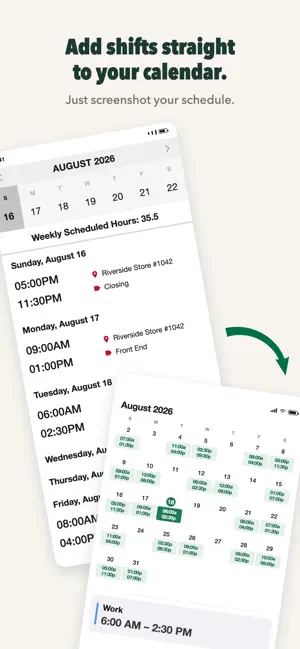
Stop logging in just to see your schedule. Screenshot it once. The Shift reads your schedule and pulls out the exact start and end times for each shift. Your next shift is right on your Lock Screen, and your whole schedule shows up in your calendar. No typing. No picking dates. No entering shifts one by one. A screenshot is all it takes. ―――――――――― SOUND FAMILIAR? It's 10 PM and you just want to know tomorrow's shift. So you unlock your phone, open your work app, wait for it to load, log in (again), find the schedule menu, scroll… Or the app is down. The night before a 5 AM opening. And even when it works, your shifts still live in your work app — not in your calendar, next to the rest of your life. That's why you already screenshot your schedule. The Shift does the rest. HOW IT WORKS 1. Screenshot your schedule from your scheduling app, or snap a photo of a posted schedule. 2. The Shift reads the dates and times for every shift. 3. Done. Your shifts are on your calendar, your Home Screen, and your Lock Screen. The Shift doesn't just find the dates — it captures each shift's exact times. That's the whole point. WHAT YOU GET - Your work schedule, added to your calendar from one screenshot — no manual entry, ever - Lock Screen widgets — your next shift and a live countdown, without unlocking your phone - Home Screen widgets — today, this week, or the next two weeks at a glance - Weekly hour totals — know your hours before payroll does - Days off clearly shown — plan your life, not just your work - Works offline — no Wi-Fi, no problem "AM I EVEN ALLOWED TO USE THIS?" Fair question. Here's what The Shift does — and doesn't do: - The Shift never connects to your employer's systems. It only reads a schedule screenshot you provide. - No account. No sign-up. No email. - Your schedule stays on your device. It isn't uploaded, shared, or sold. - Delete the app, and your local schedule data goes with it. Your schedule is yours. We built The Shift so it stays that way. BUILT BY A SHIFT WORKER The Shift was built by a barista who was tired of checking the work app just to see a schedule. Word spread among baristas, and The Shift reached 1,000+ downloads in its first month, mostly through coworkers sharing it. Now it works for shift workers everywhere: baristas, servers, nurses, retail and warehouse teams, grocery crews — anyone whose week never looks the same twice. If your schedule doesn't import correctly, let us know in the app — we usually add support within 24 hours. SCREENSHOT YOUR NEXT SCHEDULE Download The Shift, take one screenshot, and see your whole week — on your Lock Screen, Home Screen, and calendar. You'll never log in just to check a shift again.
What’s new
Version 2.0.1 · Updated November 6, 2026
## Bug Fixes • Stability improvements
App privacy
The developer, Jeeyun Lee, reported these privacy practices to Apple.
Data Used to Track You
The following data may be used to track you across apps and websites owned by other companies:
- Identifiers: Device ID
- Usage Data: Product Interaction, Advertising Data
Data Not Linked to You
The following data, which may be collected but is not linked to your identity, may be used for the following purposes:
- Identifiers: Device ID
- Usage Data: Product Interaction, Advertising Data
- Diagnostics: Crash Data, Performance Data
Used for: Third-Party Advertising, Analytics, App Functionality
Alternatives to The Shift: Work Schedule
Looking for apps like The Shift: Work Schedule? Here are 6 similar apps on the App Store. The highest rated is Pirates: Cat Pomodoro Timer (5.0/5), and all 6 are free to download.
-
 ScheduleWork – Shift Calendar
3.0
-
 SnapShift: Schedule Scanner
4.9
-
 Pirates: Cat Pomodoro Timer
5.0
-
 EasEvent: Calendar Assistant
5.0
-
 Minimo: Notes & Widgets
5.0
-
 ShiftStamp - 근무 일정 관리
| App | Rating | Price | Last updated | Compare |
|---|---|---|---|---|
| The Shift: Work Schedule | 5.0 / 5 (4 ratings) | Free | November 6, 2026 | |
| ScheduleWork – Shift Calendar | 3.0 / 5 (1) | Free | Aug 31, 2026 | Compare |
| SnapShift: Schedule Scanner | 4.9 / 5 (17) | Free | Jul 26, 2026 | Compare |
| Pirates: Cat Pomodoro Timer | 5.0 / 5 (12) | Free | Oct 23, 2026 | Compare |
| EasEvent: Calendar Assistant | 5.0 / 5 (11) | Free | Jun 24, 2026 | Compare |
| Minimo: Notes & Widgets | 5.0 / 5 (1) | Free | Sep 17, 2026 | Compare |
| ShiftStamp - 근무 일정 관리 | – | Free | Jan 8, 2026 | Compare |