

oixCloud
PENDLETON STREET HEALTH TECH LLC Utilities iPhoneiPadiPod touchApple Watch
oixCloud is a free Utilities app for iPhone and iPad by PENDLETON STREET HEALTH TECH LLC. Rated 4.5/5 from 4 ratings. Requires iOS 18.0.
- Rating
- 4.5
- 4 ratings
- Price
- Free
- on the App Store
- Size
- 52 MB
- Age 17+
- Updated
- Oct 24
- 2026 · v2.3
Screenshots

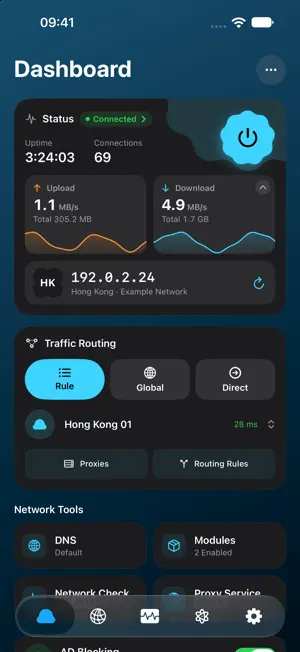


About oixCloud
oixCloud is a native proxy client for iPhone and iPad. Manage your servers and subscriptions, choose how traffic is routed, and connect from one place. CONNECTIONS AND SUBSCRIPTIONS Import supported configurations by link, file or QR code. Test server latency, switch nodes and organize subscriptions, proxy chains and policy groups. Supports protocols including Shadowsocks, VLESS, Trojan, Hysteria2, SOCKS5, Snell and AnyTLS. ROUTING AND NETWORK TOOLS Choose rule-based, global or direct routing. Configure rule sets, DNS, ad blocking and direct routing for selected regions. Always On uses the system's on-demand VPN connection. Connection events and diagnostics help investigate network problems. TAILSCALE Connect to your tailnet from the app, with support for MagicDNS, subnet routes, exit nodes and compatible self-hosted Headscale servers. RULES AND MODULES Import supported modules and manage their rules and scripts. Optional MITM features inspect and rewrite selected traffic on your device after you enable them and trust the required certificate. Only install scripts from sources you trust: scripts can make their own network requests. iCLOUD AND APPLE TV Choose which categories to sync between your iPhone and iPad: proxies, rules, modules, MITM, automation, settings and account. View sync status and use Sync Now; Recently Deleted can restore nodes and subscriptions deleted on this device within three days. Sync to Apple TV is a separate switch. Publish proxies, subscriptions, chains, policy groups, rule sets and your oixCloud sign-in to Apple TV using the same Apple Account. Apple TV keeps its own connection and routing settings and does not receive modules. For sync compatibility, update all participating devices to 1.34 or later; versions 1.33 and earlier use a different sync system. STRICT NO-LOGS POLICY The oixCloud service does not collect or record your traffic contents, visited websites or DNS queries. Local connection diagnostics help with troubleshooting; diagnostic packages you choose to export may contain anonymized connection metadata. Optional iCloud sync stores the configuration categories you enable. Your chosen server provider and third-party scripts may have their own data practices. Use your own compatible servers and subscriptions, or sign in to an existing oixCloud account to retrieve managed nodes. Server access and any related service charges depend on your provider.
What’s new
Version 2.3 · Updated October 24, 2026
Home and Interface: A redesigned status card combines connection controls, exit IP and network speed, with separate visibility settings. Charts collapse and animations follow Reduce Motion. Network Overview is now Dashboard; adjust Home Layout from the top-right button. Improved foldable layouts, larger text and scanning. The Proxies page remembers collapsed subscriptions. Folders and Watch: Organize servers and chains in folders, reorder and test groups, or test the current list or all entries. Routing, node selection and Apple Watch follow folders. Deleting folders keeps their nodes. Folders sync through iCloud; older versions prompt for an update when reading this data. Connections and Devices: Chains support URL Test or Fallback groups as their first hop, with fixed later hops. Policy groups can connect their members through an underlying proxy, each tested through the full route. Improved protocol implementations, dialing, cancellation, cleanup and network recovery. Fixed XHTTP uploads and response reads, IPv4 UDP fragmentation on smaller-MTU paths, and excessive memory use from misbehaving servers. Switching nodes preserves connections when routes stay unchanged. Tailscale uses device models as default names, preserves names after reinstalling and keeps device edits independent. DNS and Routing: Separate resolvers for nodes, subscription downloads, ECH and local requests, plus default forwarding servers. Matching queries share work with independent cancellation. Fixed suffix rules, module host entries and local IPv4 subnet detection. Rules switch together after background preparation. The IPv6 DNS setting syncs through iCloud, and DNS pages retain unsaved edits. Modules and Scripts: Import Anywhere .amod files and installation links, edit routing and MITM groups, and preserve valid choices on update. Improved module conversion, script concurrency, cancellation and memory management, with HTTP connection reuse. Native script top-level code runs separately per request, matching Anywhere and Surge; use oixCloud.store for cross-request data. Latency and Battery: Auto Select and policy groups share probes, with results dated by their actual round. Background Auto Select retests after proxied traffic and keeps results when settings stay unchanged. Reduced background polling, widget writes, timer wakeups and extra preconnections during probes. Usage combines same-name nodes within each subscription and retains history after refreshes. Local Control: Apple TV settings now include a local control panel with HTTPS addresses, access keys and QR codes. Use a browser on the same network to view status and logs or switch nodes. Import and Maintenance: Import add-proxy links by pasting, scanning or entering them on Apple TV, and share nodes from their menu. External Resources reports completion after saving. Improved local-control retries, settings sync, diagnostic redaction and translations. Logs hide duplicates and internal buffer-reclamation messages. Added Personal Hotspot IPv4 compatibility guidance.
App privacy
The developer, PENDLETON STREET HEALTH TECH LLC, reported these privacy practices to Apple.
Data Linked to You
The following data, which may be collected and linked to your identity, may be used for the following purposes:
- Identifiers: Device ID
Used for: App Functionality
Alternatives to oixCloud
Looking for apps like oixCloud? Here are 6 similar apps on the App Store. The highest rated is 塔台 (5.0/5), and 5 of the 6 are free to download.
-
 TiYi
2.2
-
 WiFi Health Check
4.8
-
 Crest Browser
4.2
-
 塔台
5.0
-
 Balance Browser
5.0
-
 FortiGate NOC Monitor
5.0
| App | Rating | Price | Last updated | Compare |
|---|---|---|---|---|
| oixCloud | 4.5 / 5 (4 ratings) | Free | October 24, 2026 | |
| TiYi | 2.2 / 5 (6) | Free | Oct 17, 2026 | Compare |
| WiFi Health Check | 4.8 / 5 (4) | Free | Oct 22, 2026 | Compare |
| Crest Browser | 4.2 / 5 (10) | Free | Oct 13, 2026 | Compare |
| 塔台 | 5.0 / 5 (8) | 1.99 USD | Oct 23, 2026 | Compare |
| Balance Browser | 5.0 / 5 (1) | Free | Oct 24, 2026 | Compare |
| FortiGate NOC Monitor | 5.0 / 5 (1) | Free | Oct 13, 2026 | Compare |
Compare oixCloud with the top alternatives: ratings, updates, ASO score and keyword gaps →