

PhotoGO AI – Photo Cleaner
Emil Airapetian Photo & Video iPhoneiPadiPod touch
PhotoGO AI – Photo Cleaner is a free Photo & Video app for iPhone and iPad by Emil Airapetian. Rated 5.0/5 from 1 ratings. Requires iOS 17.0.
- Rating
- 5.0
- 1 ratings
- Price
- Free
- on the App Store
- Size
- 33 MB
- Age 4+
- Updated
- Oct 14
- 2026 · v1.2.4
Screenshots



About PhotoGO AI – Photo Cleaner
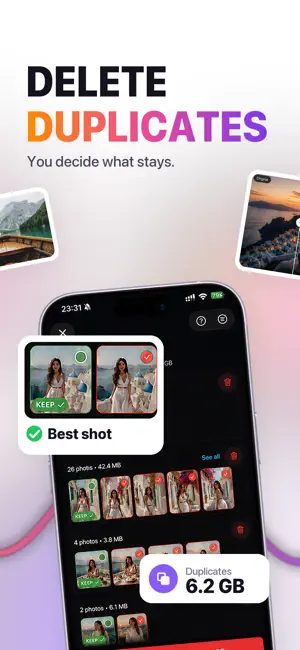
Your iPhone says "Storage Almost Full" again. PhotoGO AI goes through your photo library and finds the gigabytes hiding in plain sight: duplicate shots, near-identical burst frames, blurry misses, forgotten screenshots and oversized videos. WHAT IT DOES - Duplicates and similar shots, grouped side by side so you decide what stays - Best shot suggestion: inside each group of near-identical frames, the app points to the sharpest, best-lit one - Video compression with quality you control; the original stays until you say otherwise - Screenshots and blurry photos collected in one place instead of scattered across years - Month by month view: walk your library through time, swipe to keep or clear HOW IT WORKS Similar shots are found with Apple's Vision framework. Every photo gets a numeric feature print, and the app compares those prints to one another. A burst sequence, or two takes of the same scene, land in the same group even when the crop or the light differs slightly. Blurry frames are caught by measuring edge contrast through Apple's Accelerate library. A sharp photo has crisp edges; a shaken or out-of-focus one has soft ones. The calculation runs on your iPhone's own processor. EVERYTHING STAYS ON YOUR IPHONE Every operation on your photos and videos happens on the iPhone itself. Neither the original files nor their thumbnails are uploaded to a server or sent to a cloud. There is no setting to find and nothing to switch on. It is how the app is built. NOTHING DISAPPEARS WITHOUT YOU Every deletion is your call. Selected photos move to Recently Deleted, where iOS keeps them for 30 days before they are gone for good. Free to download. PhotoGO Pro unlocks unlimited cleanups. Terms of Use (EULA): https://www.apple.com/legal/internet-services/itunes/dev/stdeula/ Privacy Policy: https://photogoai.app/en/privacy
What’s new
Version 1.2.4 · Updated October 14, 2026
A new Sort tab, guided tips and a better duplicates screen. - Sort opens on your year at a glance: a bar for each month, as tall as the space its unsorted photos take, the heaviest month in orange. Tap a bar to sort that month. - Short guides on your first visits: each category opens with a card on what it holds and what to do, and a gesture demo shows the swipes. Swipe hints stay until you turn them off in Settings. - Duplicates start with a try-it example, and every group shows its best shot first. - Compression is explained right on its own screens, one element at a time. - New photos appear in PhotoGO without relaunching the app. - Fits iPhone Duo: onboarding, tips and the compression screen are laid out for both of its displays. - Fixes: the Sort tab no longer shows 0 bytes while the library is still being read, Home no longer slides sideways, and the two unused threshold sliders are gone from Settings.
App privacy
The developer, Emil Airapetian, reported these privacy practices to Apple.
Data Not Linked to You
The following data, which may be collected but is not linked to your identity, may be used for the following purposes:
- Location: Coarse Location
- Identifiers: Device ID, User ID
- Usage Data: Product Interaction, Other Usage Data
- Diagnostics: Performance Data, Other Diagnostic Data, Crash Data
- Contact Info: Email Address
Used for: Analytics, App Functionality
Alternatives to PhotoGO AI – Photo Cleaner
Looking for apps like PhotoGO AI – Photo Cleaner? Here are 6 similar apps on the App Store.
-
 PhotoTrim: Camera Roll Cleaner
-
 RePhoto – Clean Up Your Album
-
 Oushi
Oushi
-
 PhotoBye - Swipe. Keep. Bye.
-
 Toned: Halation & Darkroom
-
 Lecto: Photo Mosaic Collage
| App | Rating | Price | Last updated | Compare |
|---|---|---|---|---|
| PhotoGO AI – Photo Cleaner | 5.0 / 5 (1 rating) | Free | October 14, 2026 | |
| PhotoTrim: Camera Roll Cleaner | – | Free | Sep 29, 2026 | Compare |
| RePhoto – Clean Up Your Album | – | Free | Aug 24, 2026 | Compare |
| Oushi | – | Free | Oct 20, 2026 | Compare |
| PhotoBye - Swipe. Keep. Bye. | – | Free | Jul 20, 2026 | Compare |
| Toned: Halation & Darkroom | – | Free | Oct 22, 2026 | Compare |
| Lecto: Photo Mosaic Collage | – | Free | Sep 25, 2026 | Compare |