

Rulely: Parental Screen Time
LLM vertex LLC Education iPhoneiPadiPod touch
Rulely: Parental Screen Time is a free Education app for iPhone and iPad by LLM vertex LLC. Rated 3.0/5 from 1 ratings. Requires iOS 17.0.
- Rating
- 3.0
- 1 ratings
- Price
- Free
- on the App Store
- Size
- 21 MB
- Age 4+
- Updated
- Oct 15
- 2026 · v3.2.1
Screenshots



About Rulely: Parental Screen Time
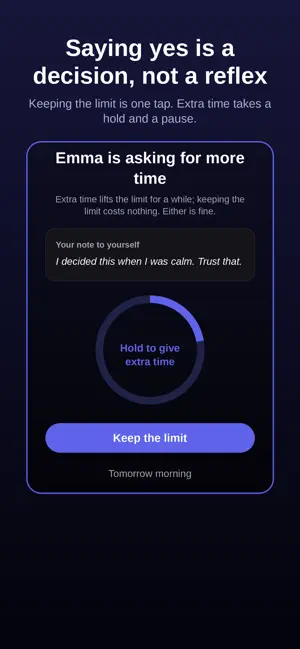
The "five more minutes" fight. Every night. Rulely ends it — not by watching your kid, but by holding the limit so you don't have to be the bad guy. You already know the rules you want. The hard part is enforcing them at the end of a long day, when you're tired and they're persistent. Rulely takes that job off your plate. HOW IT WORKS Set your rules once, in a calm moment — screen time limits and bedtime, with separate school-day and weekend schedules Your child's phone follows the rules automatically. The limit holds without you saying a word. Need an exception? Real life happens. Overrides exist — they just take a deliberate moment instead of a worn-down "fine." Your child can request extra time through the app instead of negotiating with you at bedtime. DECIDE ONCE, NOT EVERY NIGHT Before the first hard evening, you decide how you want to handle requests for more time — and write yourself a line to read in the moment. When the moment comes, Rulely shows you your own words. Granting extra time takes a deliberate hold and a short pause, so it stays a choice instead of a reflex. WHAT RULELY IS NOT Rulely is not a monitoring app. No message reading, no location tracking, no activity reports on your child. Other apps give you surveillance over your kid. Rulely gives you consistency — the rules you already decided on, enforced calmly, every night. BUILT ON APPLE'S SCREEN TIME Rulely uses Apple's Family Controls framework, so enforcement happens at the system level — not an app your child can swipe away. Works with a child Apple ID in Family Sharing for full protection, or in standard mode on the child's device without one. Designed for parents of kids 10–14. Questions? Reach us anytime through the app or at the support link below.
What’s new
Version 3.2.1 · Updated October 15, 2026
• A clearer start: choose “I’m the parent,” “A child’s phone,” or “Limiting myself.” • Connecting your child’s phone is easier, even if you don’t have the code yet. • Sign in with Apple, everywhere you sign in. • Step away during setup and pick up right where you left off. Your rules are saved. • See what actually happened in your family’s week, night by night. • Self mode: change your managed apps without signing in again. • More reliable Screen Time status, with no false “Rulely is off” alerts. • Nights, reminders and your weekly summary now follow your real time zone. • Smaller fixes and improvements.
App privacy
The developer, LLM vertex LLC, reported these privacy practices to Apple.
Data Linked to You
The following data, which may be collected and linked to your identity, may be used for the following purposes:
- Purchases: Purchase History
- Contact Info: Email Address, Name
- Identifiers: User ID, Device ID
- Usage Data: Product Interaction
- User Content: Other User Content
Used for: Analytics, App Functionality
Data Not Linked to You
The following data, which may be collected but is not linked to your identity, may be used for the following purposes:
- Diagnostics: Crash Data, Performance Data
Used for: Analytics
Alternatives to Rulely: Parental Screen Time
Looking for apps like Rulely: Parental Screen Time? Here are 6 similar apps on the App Store. The highest rated is SkillSpree (5.0/5), and 5 of the 6 are free to download.
-
 Continuum Speech Therapy
-
 DOI Finder: Paper Search
-
 SkillSpree
5.0
SkillSpree
5.0
-
 BrainTokens: Earn Screen Time
5.0
BrainTokens: Earn Screen Time
5.0
-
 Vline Videos
5.0
Vline Videos
5.0
-
 Phono - Improve your speech
| App | Rating | Price | Last updated | Compare |
|---|---|---|---|---|
| Rulely: Parental Screen Time | 3.0 / 5 (1 rating) | Free | October 15, 2026 | |
| Continuum Speech Therapy | – | Free | Jul 30, 2026 | Compare |
| DOI Finder: Paper Search | – | 1.49 USD | Feb 3, 2026 | Compare |
| SkillSpree | 5.0 / 5 (9) | Free | Aug 25, 2026 | Compare |
| BrainTokens: Earn Screen Time | 5.0 / 5 (6) | Free | Oct 12, 2026 | Compare |
| Vline Videos | 5.0 / 5 (2) | Free | Nov 7, 2025 | Compare |
| Phono - Improve your speech | – | Free | Mar 2, 2026 | Compare |