

M3U TV
Shaun Parkison Entertainment iPhoneiPadiPod touchMac
M3U TV is a free Entertainment app for iPhone and iPad by Shaun Parkison. Requires iOS 15.0. Updated November 18, 2026.
- Price
- Free
- on the App Store
- Size
- 75 MB
- Age 4+
- Updated
- Nov 18
- 2026 · v1.3.1
Screenshots


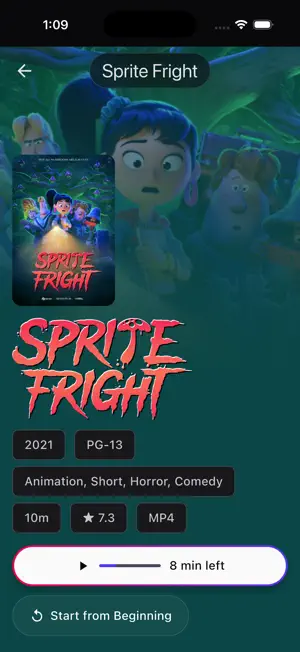
About M3U TV
M3U TV is the iPhone and iPad app for M3U Editor, the open-source, self-hosted platform for managing your IPTV playlists, guides and media. Connect it to your own M3U Editor server and your live channels, movies and series come together in one fast, touch-friendly app. It's also available on Apple TV, built around the Siri Remote. M3U TV does not include any channels, playlists or content. You need your own M3U Editor server and your own lawful sources. HOME • Continue Watching with Up Next episodes, so you can pick up right where you left off. • Optional Spotlight home: a full-screen hero with artwork and title logos above your rows. • Favorites and quick rows for Live TV, movies and series. Choose which screen the app opens on. • Reorder the nav and Home rows, and hide the sections you don't use. LIVE TV AND GUIDE • A multi-day timeline guide with an optional live preview player. • On Now and Upcoming views with station logos. • Guide previews carry into full screen without restarting the stream. • Catchup playback with seeking on channels that support it. • Multiview: watch several channels at once. • Pause live TV, and pick back up at the live point after a longer break. • Custom channel sorting, favorites-first ordering and grid or list layouts. SPORTS • See each day's games with live scores, for the leagues your server is set up for. • Find which of your own channels is showing a game, and start it in one tap. • Game details with the score by period, key moments and team stats. • Follow your teams, with My Teams and a Sports row on Home. • Needs M3U Editor 0.14.1 or later with Sports turned on. DVR • Record a single airing or a whole series straight from the guide or search. • Watch, cancel and delete recordings, and see storage usage at a glance. • Your whole recordings library, with status filters and sorting. • Automatic commercial skipping on recordings that support it. MOVIES AND SERIES • Detail pages with cast, filmographies, trailers, ratings and related titles. • A season and episode browser with Up Next, plus an episode picker right in the player. • Artwork while movies and episodes load. • Skip Intro and Skip Credits prompts powered by TheIntroDB (optional). • Sort by recently added, recently updated, title and more. • Request new movies and shows through your server, and pick which service handles it when there's more than one. SEARCH • One search across channels, guide listings, movies, series and recordings. PLAYBACK • Native mpv playback with an automatic AVKit fallback. • Audio and subtitle track selection, plus multichannel audio on iPhone and iPad. • Picture in Picture, and background audio: keep listening after leaving the app or locking your device, with playback controls on the Lock Screen and in Control Center. • Audio and subtitle sync, saved for each channel, movie or series. • Search for subtitles online for movies and episodes. • A built-in Logs and Diagnostics screen for troubleshooting. CARPLAY • Listen to your favorite channels and Live TV categories from your car's screen. • Pick a channel in the car with your iPhone locked, then open the app and it carries on playing there. • Now Playing shows the channel's logo and what's on, with next and previous channel. MADE FOR YOUR HOUSEHOLD • Multiple viewers, each with their own history and favorites. • Keep several playlists on one device, from one server or more, each with its own favorites and guide. • Trakt, SIMKL and MDBList watch history sync, from the device or from your server. • Settings and Home layouts your server can set up for every device, as defaults or locked. • A notification center for alerts from your server, with per-channel subscriptions. • Adjustable display scale. OPEN SOURCE M3U TV and M3U Editor are open source. Bring your own server, your own playlists and your own sources.
What’s new
Version 1.3.1 · Updated November 18, 2026
• MDBList watch history sync. Connect it in Settings, or let it work alongside an MDBList account connected on your server (M3U Editor 0.14.4 or later). • Manage DVR recordings from movie and episode pages: see when and on which channel each one was recorded, and delete it. Needs M3U Editor 0.14.3 or later. • Search now includes your DVR recordings, in a cleaner layout that matches the rest of the app. • New Playback setting to open streams with the player overlay hidden. • View all on a Home row set up by your server now opens that category directly, and Home's shortcut tiles preview what's inside. • Fixes focus jumping between Home rows, scrolling on screens with a search bar, and more.
App privacy
The developer, Shaun Parkison, reported these privacy practices to Apple.
Data Not Collected
The developer does not collect any data from this app.
Alternatives to M3U TV
Looking for apps like M3U TV? Here are 6 similar apps on the App Store. The highest rated is Plozz Player (5.0/5), and all 6 are free to download.
-
 Plozz Player
5.0
-
 Zaply: IPTV Player & Live TV
4.6
-
 NowSeen - IPTV & Media Player
4.8
-
 Lume: IPTV Player, Xtream, M3U
4.7
-
 SWIPTV - IPTV Player
4.3
-
 Streamyfin
4.2
| App | Rating | Price | Last updated | Compare |
|---|---|---|---|---|
| M3U TV | – | Free | November 18, 2026 | |
| Plozz Player | 5.0 / 5 (7) | Free | Nov 7, 2026 | Compare |
| Zaply: IPTV Player & Live TV | 4.6 / 5 (26) | Free | Nov 11, 2026 | Compare |
| NowSeen - IPTV & Media Player | 4.8 / 5 (36) | Free | Nov 19, 2026 | Compare |
| Lume: IPTV Player, Xtream, M3U | 4.7 / 5 (57) | Free | Nov 20, 2026 | Compare |
| SWIPTV - IPTV Player | 4.3 / 5 (135) | Free | Nov 19, 2026 | Compare |
| Streamyfin | 4.2 / 5 (160) | Free | Oct 9, 2026 | Compare |
Compare M3U TV with the top alternatives: ratings, updates, ASO score and keyword gaps →