

InvoiceFlow – Invoice Maker
Rahul Jalavadiya Business iPhoneiPadiPod touch
InvoiceFlow – Invoice Maker is a free Business app for iPhone and iPad by Rahul Jalavadiya. Requires iOS 16.0. Updated September 23, 2026.
- Price
- Free
- on the App Store
- Size
- 55 MB
- Age 4+
- Updated
- Sep 23
- 2026 · v3.0
Screenshots


About InvoiceFlow – Invoice Maker
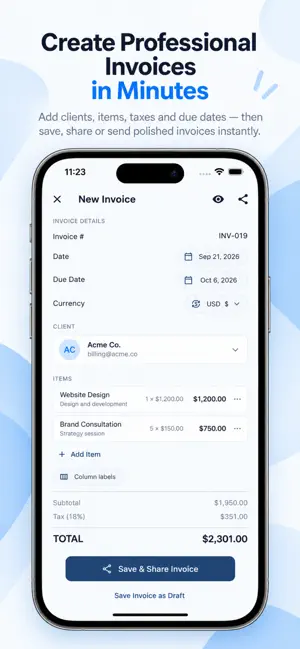
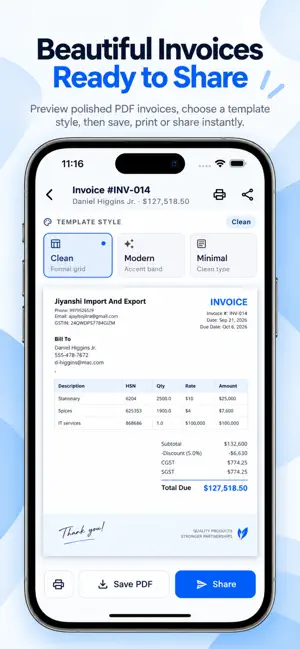
InvoiceFlow is a modern invoice maker and business billing app built for freelancers, contractors, consultants, agencies, service providers, and small businesses. Create professional invoices and estimates, generate polished PDFs, track payments and expenses, automate recurring invoices, log billable time, manage clients, and keep your business records organized from one place. CREATE PROFESSIONAL INVOICES Build invoices quickly with your business details, client information, items, quantities, rates, taxes, discounts, payment terms, and custom invoice numbering. Preview your invoice before sharing, then save, print, or send the PDF to your client. ESTIMATES & PROPOSALS Create estimates and proposals for upcoming work, track their status, and keep quotes organized alongside your invoices and clients. PAYMENT & RECEIVABLE TRACKING See Sent, Paid, and Overdue invoices at a glance. Track collected and outstanding amounts, view receivables aging, review recent invoices, and understand which clients contribute most to your revenue. EXPENSE TRACKING Record business expenses by category, including materials, rent, salaries, travel, utilities, marketing, installments, and other costs. Your dashboard combines invoiced revenue, collections, outstanding balances, expenses, and net results for a clearer business overview. RECURRING INVOICES Set invoices to repeat weekly or monthly for retainers, subscriptions, maintenance work, and recurring clients. Pause, edit, or manage recurring billing whenever needed. TIME TRACKING Track time spent on client work and billable tasks. Set an hourly rate, start and pause a timer, and review recent time entries with calculated amounts. CLIENT MANAGEMENT Keep client names, phone numbers, email addresses, locations, and billing history organized. Search clients quickly and create new invoices or estimates without re-entering information. GST & TAX TOOLS Configure default tax rates and business tax details. For supported workflows, review GST summaries, tax by rate, B2B/B2C supply splits, HSN-wise summaries, and GSTR-1 export information. PDF, PRINT & SHARE Choose from Clean, Modern, and Minimal invoice styles. Preview documents, save PDFs, print invoices, and share them through the apps available on your device. BUSINESS CUSTOMIZATION Add your business name, logo, contact details, GSTIN, payment information, currency, tax defaults, payment terms, invoice numbering, and estimate numbering. Customize branding with the Brand Kit and available appearance options. REPORTS, EXPORTS & BACKUP Review dashboard trends, recent invoices, top clients, payment status, and receivables aging. Export invoices, clients, and expenses as CSV files. Back up your data and restore it when needed. PAYMENT REMINDERS Set a daily reminder for invoices that are overdue or approaching their due date, with a reminder window and time that works for you. InvoiceFlow keeps invoicing, estimates, expenses, clients, payments, recurring billing, time tracking, and business reports together in one streamlined app. INVOICEFLOW PRO InvoiceFlow Pro is optional. Core app functionality does not require a subscription. Pro plans may remove ads and unlock additional customization features. Auto-renewable subscriptions are available monthly, quarterly, and yearly. Payment is charged to your Apple ID at confirmation of purchase. Subscriptions renew automatically unless cancelled at least 24 hours before the end of the current period. You can manage or cancel your subscription in your Apple account settings. Terms of Use (EULA): https://www.apple.com/legal/internet-services/itunes/dev/stdeula/ Website: https://sarvadhidigital.com/
What’s new
Version 3.0 · Updated September 23, 2026
InvoiceFlow has been completely redesigned with a faster, cleaner experience. This update brings a refreshed business dashboard and new or improved tools for expenses, estimates and proposals, recurring invoices, time tracking, payment reminders, GST reporting, CSV exports, backup and restore, invoice templates, client management, and branding customization.
App privacy
The developer, Rahul Jalavadiya, reported these privacy practices to Apple.
Data Used to Track You
The following data may be used to track you across apps and websites owned by other companies:
- Identifiers: Device ID
Data Not Linked to You
The following data, which may be collected but is not linked to your identity, may be used for the following purposes:
- Location: Coarse Location
- Usage Data: Advertising Data
- Identifiers: Device ID
- Diagnostics: Crash Data, Performance Data
- Contact Info: Email Address, Physical Address, Name, Phone Number, Other User Contact Info
- Contacts: Contacts
Used for: Third-Party Advertising, Analytics, Product Personalization, App Functionality
Alternatives to InvoiceFlow – Invoice Maker
Looking for apps like InvoiceFlow – Invoice Maker? Here are 6 similar apps on the App Store. The highest rated is Invoice Maker ⁃ Bill Generator (5.0/5), and all 6 are free to download.
-
 Invoice Maker ⁃ Bill Generator
5.0
Invoice Maker ⁃ Bill Generator
5.0
-
 InvoiceFlow: Invoice Maker
-
 Invoice Flow: Bill & Receipt
-
 InvoiceFlow: Estimate Maker
5.0
InvoiceFlow: Estimate Maker
5.0
-
 DocuFlow: AI Document Manager
-
 Invoice Maker - Invoice Flow
2.0
Invoice Maker - Invoice Flow
2.0
| App | Rating | Price | Last updated | Compare |
|---|---|---|---|---|
| InvoiceFlow – Invoice Maker | – | Free | September 23, 2026 | |
| Invoice Maker ⁃ Bill Generator | 5.0 / 5 (1) | Free | Oct 20, 2026 | Compare |
| InvoiceFlow: Invoice Maker | – | Free | Apr 28, 2026 | Compare |
| Invoice Flow: Bill & Receipt | – | Free | Feb 9, 2026 | Compare |
| InvoiceFlow: Estimate Maker | 5.0 / 5 (3) | Free | Jul 21, 2026 | Compare |
| DocuFlow: AI Document Manager | – | Free | Oct 10, 2026 | Compare |
| Invoice Maker - Invoice Flow | 2.0 / 5 (1) | Free | May 20, 2026 | Compare |