

ExamScan: Answer Sheet Grader
Tien Nguyen Education iPhoneiPadiPod touch
ExamScan: Answer Sheet Grader is a free Education app for iPhone and iPad by Tien Nguyen. Requires iOS 17.0. Updated October 17, 2026.
- Price
- Free
- on the App Store
- Size
- 34 MB
- Age 4+
- Updated
- Oct 17
- 2026 · v1.0.39
Screenshots
About ExamScan: Answer Sheet Grader
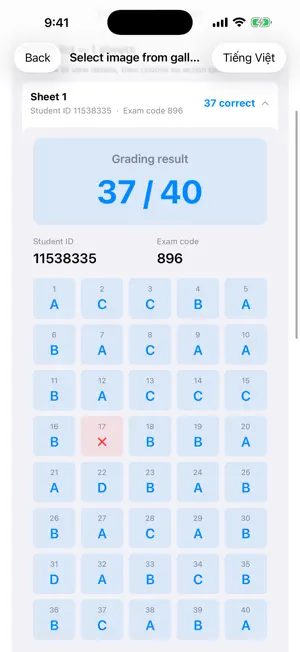
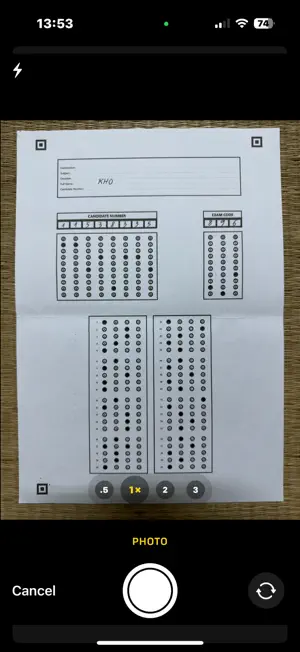
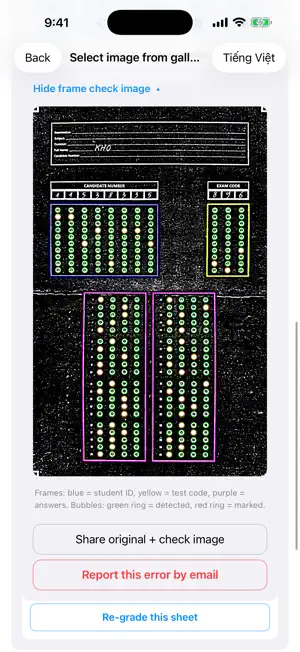
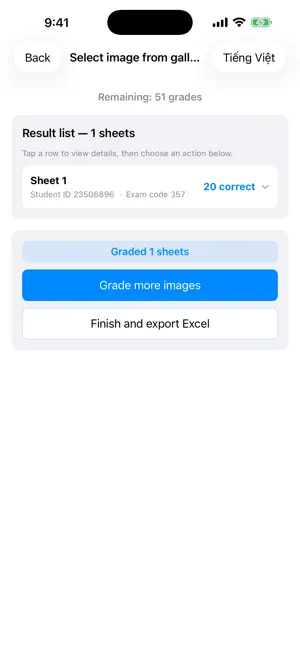
ExamScan helps teachers grade paper multiple-choice tests just by photographing the answer sheet — fast, accurate, and processed entirely on your device. DEAD SIMPLE — ONLY 2 STEPS • No templates to build, no setup, no special app forms to print. • Use the standard answer sheets you already have: (1) load the answer key, (2) snap a photo — done. • A sheet came out skewed or mismarked? Fix it right on the sheet — no need to reconfigure anything. GRADE IN SECONDS • Snap a photo or pick from your library — the app detects filled bubbles and scores the sheet. • Automatically reads the student ID and exam code. • Supports sheets with 3, 4, 5, or 6 options (A–F). BATCH GRADING • Pick many photos from the gallery to grade a whole class at once. • Review the result list — error sheets are clearly highlighted in red. • Re-grade any single sheet if a photo wasn't good enough. EXPORT TO EXCEL • Create an .xlsx file with each student's score, named the way you like. • Share it or save it to Files in one tap. PRIVATE — GRADE RIGHT ON YOUR DEVICE • All recognition and scoring happen right on your device — grading works even offline. • No accounts, no login; your answer sheet images and results are never sent to a server. • The app uses Firebase for anonymous analytics and crash reporting to improve the app (never your answer sheets or results). See our Privacy Policy. CONVENIENT • Built-in "Grade with sample sheets" demo to try instantly — no setup needed. • 5-language interface: English, Vietnamese, Indonesian, Portuguese, Spanish — auto-selected from your device language, switch anytime. • Works on iPhone and iPad. • A "frame check" image shows you why a sheet failed. • Report a problem sheet by email with attached images for support. ANSWER SHEET REQUIREMENTS • Standard A4 sheet with 3 orientation marks at the corners. • Fill solidly with a 2B pencil or pen, one bubble per question. • Download free sample sheets right from the About screen in the app. ExamScan is free with a starter batch of grading credits; earn more through daily login, sharing the app, or watching ads. The app shows advertisements (filtered to general-audience content). Feedback is welcome at: [email protected]
What’s new
Version 1.0.39 · Updated October 17, 2026
• Sheets are read correctly even when photographed at a slight angle: the right-hand answer box (questions 41–60) is no longer cut off. • Supports new ExamSheet sheets with a small square in the bottom-right corner, for more accurate auto-scan. • Auto-scan asks you to hold the phone parallel when the sheet is tilted too much. • New auto-scan tips in About. • Minor fixes and stability improvements.
App privacy
The developer, Tien Nguyen, reported these privacy practices to Apple.
Data Not Linked to You
The following data, which may be collected but is not linked to your identity, may be used for the following purposes:
- Location: Coarse Location
- Identifiers: Device ID
- Usage Data: Product Interaction, Advertising Data
- Diagnostics: Crash Data, Performance Data, Other Diagnostic Data
Used for: Third-Party Advertising, Analytics, App Functionality
Alternatives to ExamScan: Answer Sheet Grader
Looking for apps like ExamScan: Answer Sheet Grader? Here are 6 similar apps on the App Store. The highest rated is MarkSheet: answer sheet (4.8/5), and all 6 are free to download.
-
 OMR Sheet Scanner
-
 Super Gabari: Exam Grader
-
 MarkSheet: answer sheet
4.8
MarkSheet: answer sheet
4.8
-
 ScanGrader
-
 Examica for Teachers
4.5
Examica for Teachers
4.5
-
 Test Plus: Scan & Grade
| App | Rating | Price | Last updated | Compare |
|---|---|---|---|---|
| ExamScan: Answer Sheet Grader | – | Free | October 17, 2026 | |
| OMR Sheet Scanner | – | Free | Oct 4, 2026 | Compare |
| Super Gabari: Exam Grader | – | Free | Aug 18, 2026 | Compare |
| MarkSheet: answer sheet | 4.8 / 5 (24) | Free | Aug 20, 2026 | Compare |
| ScanGrader | – | Free | May 6, 2025 | Compare |
| Examica for Teachers | 4.5 / 5 (13) | Free | Mar 25, 2026 | Compare |
| Test Plus: Scan & Grade | – | Free | Oct 14, 2026 | Compare |