

iRead: Translate & Learn
Mykhailo Tykhonov Education iPhoneiPadiPod touch
iRead: Translate & Learn is a free Education app for iPhone and iPad by Mykhailo Tykhonov. Requires iOS 18.0. Updated October 19, 2026.
- Price
- Free
- on the App Store
- Size
- 6 MB
- Age 4+
- Updated
- Oct 19
- 2026 · v1.12.1
Screenshots


About iRead: Translate & Learn
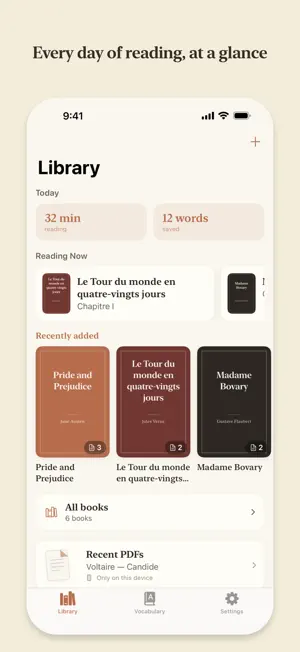
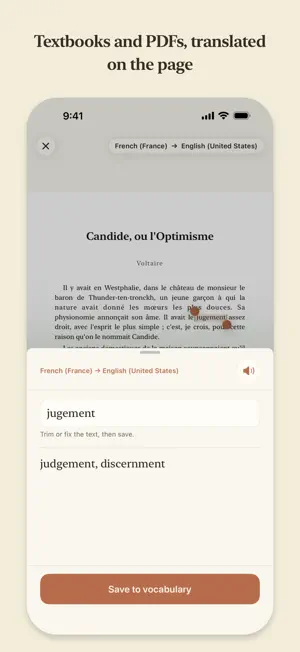
iRead is a calm reader for people learning a language through real texts. Bring in a book, an article or a PDF in the language you're learning, read at your own pace, translate unfamiliar words with a tap, and keep them in a personal vocabulary. READ ANYTHING - Books in FB2 (including fb2.zip), EPUB and TXT — with the author, italics and bold preserved - Articles and notes in Markdown - PDFs: select text right on the page and translate it. Each PDF remembers its language pair, the page and the zoom you left it at - Pages of paper books: take a photo and the text is recognized automatically - Pasted text and anything shared from other apps TRANSLATION WITHOUT THE INTERNET - Translation runs on your device — fast and private - Any pair of system-supported languages: you choose what you read and what you translate into - Language packs download once; after that everything works offline YOUR READING DAY - The Library opens with your day: how long you read and how many words you saved - A reading diary: each day shows the time you spent, the books you read and the words you kept A PERSONAL VOCABULARY, WITH REVIEW - Save words and phrases together with the sentence you found them in - Categories, favorites and search - Review that goes through your whole vocabulary: every word comes up in turn, and the ones you missed come back a little sooner - Short sessions of up to ten words for each language — you only ever answer "I know it" or "I don't" - Fresh words: what you saved in the last few days gets its own short session, all your languages together - An optional reminder the morning after you save words, at a time you choose - Hard words show how many times you didn't remember each one - Quiet statistics, no streaks - Saved words are gently underlined as you read, so what you've learned shows up in the text itself COMFORTABLE READING - Book-style typesetting: justified text, hyphenation, chapter headings - Four warm paper themes and a dark mode - Seven text sizes on top of the system setting - Tapping a book picks up right where you left off — straight to your last chapter, with the contents one swipe back - Reading Now keeps started books close at hand - In the PDF reader the page lies on paper, and one tap hides the panels ON IPAD - Translation appears in a small popover right next to the word, so the page stays readable around it - Your library, vocabulary and settings sit in a comfortable reading column on a large screen - PDFs in landscape fill the width of the screen and stay sharp; turning the iPad keeps your place SYNC AND PRIVACY - Your library and vocabulary sync across your devices through iCloud - Data lives in your private iCloud database; translation never leaves the device - No accounts, no ads, no tracking
What’s new
Version 1.12.1 · Updated October 19, 2026
- On iPad, the chapter bar now always sits at the bottom of the screen — it no longer jumps up over the text in short chapters. - The review reminder now arrives as planned even if you save new words in the morning before it. - Bug fixes and improvements.
App privacy
The developer, Mykhailo Tykhonov, reported these privacy practices to Apple.
Data Not Collected
The developer does not collect any data from this app.
Alternatives to iRead: Translate & Learn
Looking for apps like iRead: Translate & Learn? Here are 6 similar apps on the App Store. The highest rated is EPUB Reader: Duotext (5.0/5), and all 6 are free to download.
-
 WordVia: Learn by Reading
-
 EPUB Reader: Duotext
5.0
-
 Ember: Read & Learn Languages
-
 TeaderBook
-
 Bulb: Read to Learn Languages
-
 Kalima - Read, Learn Languages
| App | Rating | Price | Last updated | Compare |
|---|---|---|---|---|
| iRead: Translate & Learn | – | Free | October 19, 2026 | |
| WordVia: Learn by Reading | – | Free | Oct 16, 2026 | Compare |
| EPUB Reader: Duotext | 5.0 / 5 (1) | Free | Oct 18, 2026 | Compare |
| Ember: Read & Learn Languages | – | Free | Apr 15, 2026 | Compare |
| TeaderBook | – | Free | Sep 25, 2026 | Compare |
| Bulb: Read to Learn Languages | – | Free | May 21, 2026 | Compare |
| Kalima - Read, Learn Languages | – | Free | Oct 12, 2026 | Compare |